
You have a business to run. Emails need to be sent, leads need to be tracked, invoices need to be created, and data needs to move from one app to another – every single day. Doing all of this manually is not just tiring, it is a complete waste of your time and talent.
That is exactly why workflow automation software exists. And right now, three tools are leading that space – Zapier, Make, and n8n. If you have been trying to figure out the Zapier vs Make vs n8n debate, you are not alone. Thousands of freelancers, agencies, and startup founders search for this comparison every month because picking the wrong tool can cost you real money and real time.
In this guide, we break down all three tools honestly – what they do, how they work, how much they cost, and who should use which one. By the time you finish reading, you will know exactly which no-code automation tool is right for your situation.
What Are Zapier, Make, and n8n? (And Why Does the Choice Matter?)
Before jumping into comparisons, it helps to understand what these three platforms actually are and why the decision between them is more important than it looks on the surface.
All three are workflow automation platforms. Their job is simple – they sit between your apps and make them talk to each other automatically. Instead of copying data from one tool to another by hand, these platforms handle it for you. A new lead comes in on your website and it automatically gets added to your CRM, a Slack message gets sent to your team, and a welcome email goes out – all without you lifting a finger.
That is the promise. But how each platform delivers that promise is very different.
What Is Zapier and Who Is It For?
Zapier launched back in 2011 and is the platform that practically invented the idea of no-code automation tools for everyday users. The whole idea was simple – if you can use Google and click buttons, you can automate tasks.

Zapier works on a “Trigger → Action” model. Something happens (a trigger), and then something else happens automatically (an action). You create these flows inside Zapier, and they are called “Zaps.” The interface walks you through every step, and you do not need to know a single line of code to get started.
Zapier has over 8,000+ app integrations today, which means it connects to more tools than almost anything else on the market. If you use popular apps like Gmail, Slack, HubSpot, Shopify, Notion, or Airtable, Zapier definitely supports all of them.
The trade-off is that Zapier keeps things simple – which is great for beginners but can feel limiting once your workflows get complex.
What Is Make (Formerly Integromat) and How Does It Work?
Make (which was called Integromat before 2022) is a European-built automation platform that sits right in the middle of the pack – more powerful than Zapier, but not as technically intense as n8n.
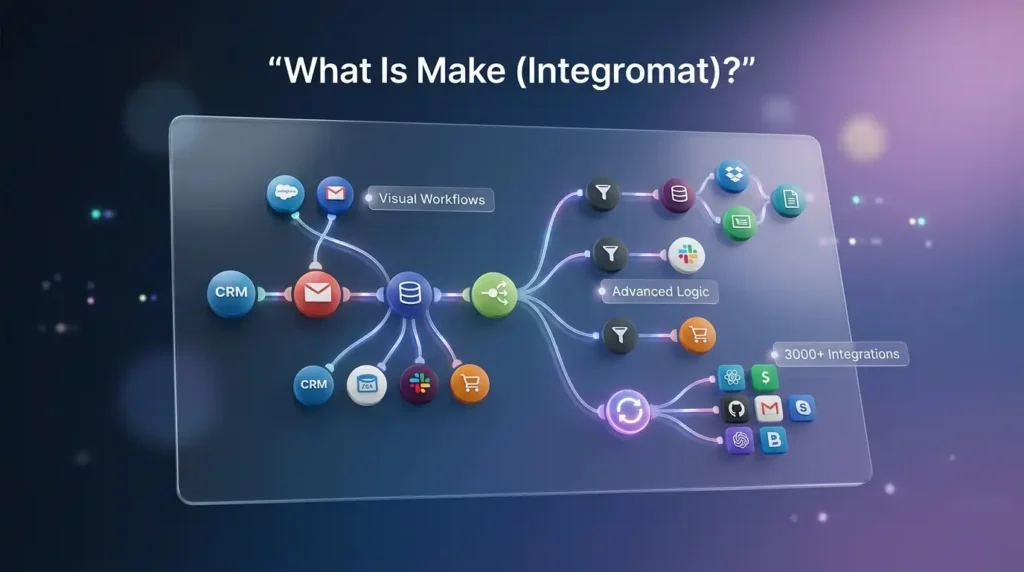
The biggest difference you notice immediately with Make is its visual workflow builder. Instead of a step-by-step wizard like Zapier, Make gives you a canvas where you can see your entire automation laid out like a flowchart. You can add branching paths, loops, filters, and parallel actions – things that Zapier’s linear approach just cannot handle as cleanly.
Make supports over 3,000 app modules, and each integration tends to go deeper than Zapier’s. You get more control over what fields to use and how data moves.
The make vs zapier debate really comes down to this – Zapier is faster to set up, but Make gives you more power for the same or less money.
What Is n8n and Is It Really Free to Use?
n8n is the wild card in this comparison and the one most people are least familiar with. It is an open source automation tool that works completely differently from Zapier and Make.
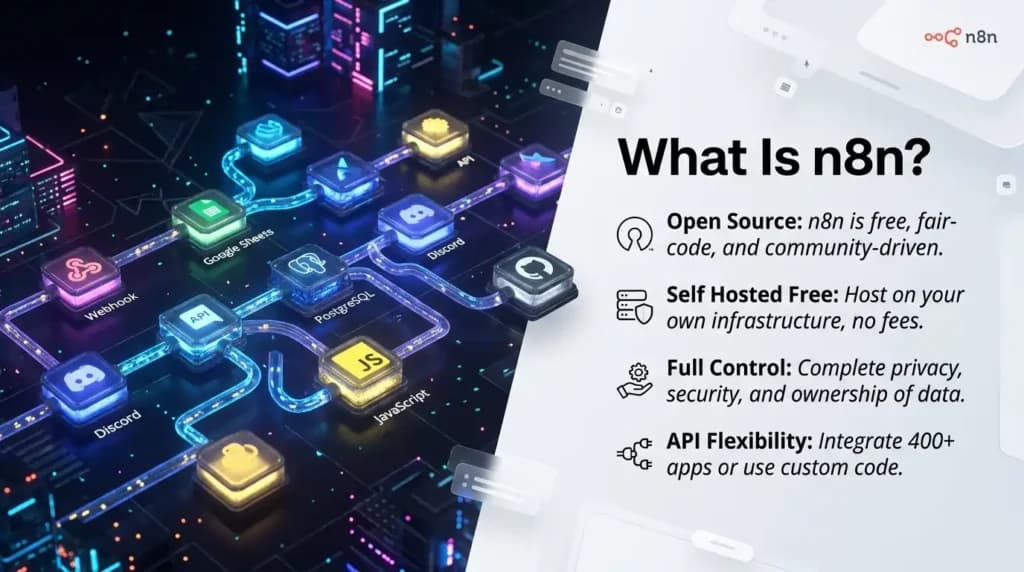
n8n was built for technical users – developers, engineers, and teams that need full control over their data and workflows. It uses a node-based automation approach where each step is a “node” you connect together. You can write custom JavaScript directly inside your workflows, connect to any API using HTTP requests, and – most importantly – host the entire platform on your own server.
That last point is huge. Because n8n is open source, you can self-host it for free. Your data never leaves your infrastructure. No monthly fees for the platform itself (you only pay for the server). For businesses with high workflow volumes or strict data privacy requirements, this changes everything.
n8n has around 1,500+ native integrations, which is fewer than Zapier or Make. But because you can connect to any service via HTTP, that limitation almost disappears if you have even basic technical knowledge on your team.
Also Read – Apollo.io vs PhantomBuster vs Leads.cm: Which B2B Lead Generation Tool Is Actually Worth It in 2026?
🔥 LinkedIn Premium Business Plan 12 Months
Original Price ₹23,000 • Get it ₹8XXX
🤖 Gemini AI Advanced Pro Plan
Original Price ₹19,500 • Get it ₹8XXX
💼 LinkedIn Sales Navigator Core
Original Price ₹80,000 • Get it ₹2XXXX
🎨 Canva Pro Lifetime Access
Original Price ₹3,999 • Get it ₹4XX
📚 Coursera Plus Annual Plan
Original Price ₹33,000 • Get it ₹2XXX
✨ Adobe Creative Cloud All Apps
Original Price ₹59,000 • Get it ₹4XXX
How Do These No-Code Automation Tools Actually Work? (Features Compared)
Now let us get into the features side by side. This is where the automation tools comparison gets really useful.
How Easy Is Zapier to Set Up for Beginners?
Zapier is genuinely the easiest automation tool to start with – no debate there. You can go from zero to your first working automation in under 15 minutes. The interface is clean, the prompts are friendly, and there are thousands of templates you can use right out of the box.
The AI assistant (Zapier Copilot) that was introduced recently makes it even easier – you can describe what you want to automate in plain English and it builds the Zap for you.
Where Zapier struggles is when things get complicated. If you need your workflow to branch in different directions based on a condition, or if you need to loop through a list of items, Zapier gets messy fast. The linear trigger-action structure just was not built for that kind of logic.
For a solo freelancer, a small business owner, or a marketing team with straightforward tasks, Zapier is an excellent starting point with very little learning involved.
How Does Make Handle Complex Workflow Logic?
Make’s canvas-based visual interface is genuinely impressive once you spend time with it. You can see exactly how data flows through your entire automation – every branch, every filter, every loop is visible on screen at once.
This makes make vs zapier a very different conversation when complexity comes into the picture. Make can handle conditional branching (if this condition is true, do this; if not, do that), data transformation, parallel processing, and error handling in a way that Zapier simply cannot match.
The trade-off is a steeper learning curve. You will need a few hours or a weekend to really get comfortable with Make. But once you do, the things you can build are significantly more sophisticated.
Make also recently introduced AI Agents (October 2025) and improved its HTTP capabilities for custom API connections – making it a strong choice for teams that need visual power without going full developer mode.
How Does n8n Give Developers Full Control?
n8n is in a completely different category when it comes to technical capability. This is not a tool you pick up in an afternoon – but the investment pays off massively if you have the right team.
With n8n, you can write JavaScript directly inside any workflow node. You can process complex data structures, call external APIs with full control over headers and payloads, connect AI models into your workflows, and build automation systems that would be impossible or ridiculously expensive in Zapier or Make.
The self-hosted automation capability is what truly sets n8n apart. You install it on your own server (a basic VPS works fine), and from that point on, you have unlimited workflows with no task limits and zero ongoing platform cost.
For agencies that build automation systems for clients, technical teams at startups, or any business handling sensitive customer data, n8n is not just an option – it is often the only tool that makes financial and practical sense at scale.
Here is a quick feature comparison to make the differences clear:
| Feature | Zapier | Make | n8n |
| Interface style | Linear step-by-step | Visual canvas builder | Node-based editor |
| Learning curve | Very easy | Moderate | Steep (for non-devs) |
| App integrations | 8,000+ | 3,000+ | 1,500+ native |
| Custom code support | Limited | Limited | Full JavaScript / Python |
| Self-hosting option | No | No | Yes (free) |
| AI features | Zapier Copilot, AI Agents | AI Agents (Oct 2025) | AI model integrations |
| Best for | Beginners, solo users | Agencies, power users | Developers, technical teams |
| Data privacy control | Low | Medium | Very High |
Also Read – LinkedIn Premium Pricing Guide 2026: Cost, Plans, India Price & Is It Worth It?
Zapier vs Make vs n8n Pricing: Which Automation Tool Is Cheapest at Scale?
This is where the automation software pricing conversation gets really interesting – and where a lot of people get surprised after their first month.
All three platforms measure usage differently, which makes a direct automation tools comparison on price tricky. Let us break it down clearly.
Why Is Zapier So Expensive When You Scale?
Zapier charges per “Task.” A Task is any successful action your workflow completes. Here is the problem – every single step in a Zap counts as a separate task.
So if you have a workflow with 5 steps and it runs 1,000 times in a month, that is 5,000 tasks used. Build a more complex workflow with 15 steps and those same 1,000 runs now consume 15,000 tasks. This model actively punishes complexity, which is the exact opposite of what growing businesses need.
Zapier’s free plan gives you 100 tasks per month and only 5 basic Zaps – enough to test the tool, not enough to run a real business. Once you need more, the cost climbs quickly, and at high volumes, Zapier can become one of the most expensive tools in your stack.
Is Make Cheaper Than Zapier for High-Volume Workflows?
Yes – significantly. Make charges per “Operation,” and its pricing per operation is much lower than Zapier’s per-task cost for comparable work.
Make’s free tier is also much more generous – you get 1,000 operations per month and two active scenarios (workflows). That is enough to actually test real automations before you commit to a paid plan.
For teams comparing make vs n8n pricing, Make sits comfortably in the middle – more affordable than Zapier, especially for complex workflows, but it does still have a monthly cost that grows with volume.
The key advantage of Make’s pricing model is predictability. Because it charges for operations rather than individual steps, complex multi-step workflows do not cost dramatically more than simple ones when compared to Zapier.
| Pricing Factor | Zapier | Make | n8n Cloud | n8n Self-Hosted |
| Free tier | 100 tasks / 5 Zaps | 1,000 ops / 2 scenarios | Limited trial | Completely free |
| Pricing model | Per task (per step) | Per operation | Per execution | Free (server cost only) |
| Complex workflow cost | Increases per step | More predictable | Flat per run | No platform fee |
| Best for budget | Simple, low-volume | Mid-volume teams | Moderate volume | High volume, technical |
Note: For exact current pricing on each platform, visit their official websites. Our focus here is on the pricing model differences.
When Should You Self-Host n8n for Free?
The open source automation tool argument for n8n really hits home when you start running serious volumes. The self-hosted Community Edition of n8n is completely free – no task limits, no workflow limits, no expiry.
You can run n8n on a basic VPS server (a cheap cloud server from any hosting provider) and have the full product available to you at essentially zero ongoing platform cost.
This makes n8n the clear financial winner for high-volume use cases. If your team runs tens of thousands of operations per month, the cost difference between Zapier and self-hosted n8n is enormous – we are talking about hundreds of dollars saved every month.
The catch is that you need someone technically capable of setting up and maintaining a server. If your team has that capability, self-hosting n8n is one of the smartest financial decisions you can make. If not, n8n Cloud (the hosted version) is still competitive, especially once you factor in make vs n8n pricing at scale.
Also Read – Best Graphic Design Tools in 2026: The Complete Guide for Every Designer
🔥 LinkedIn Premium Business Plan 12 Months
Original Price ₹23,000 • Get it ₹8XXX
🤖 Gemini AI Advanced Pro Plan
Original Price ₹19,500 • Get it ₹8XXX
💼 LinkedIn Sales Navigator Core
Original Price ₹80,000 • Get it ₹2XXXX
🎨 Canva Pro Lifetime Access
Original Price ₹3,999 • Get it ₹4XX
📚 Coursera Plus Annual Plan
Original Price ₹33,000 • Get it ₹2XXX
✨ Adobe Creative Cloud All Apps
Original Price ₹59,000 • Get it ₹4XXX
Who Should Use Which Tool? – Zapier vs Make vs n8n by Use Case
The Zapier vs Make vs n8n decision is not really about which tool is “better.” It is about which tool matches your team, your technical comfort level, and your long-term goals.
Which Is the Best Automation Tool for Agencies?
If you run a marketing, design, or operations agency and you manage multiple clients, Make is almost always the sweet spot. Here is why:
- Make’s visual canvas makes it easy to document and hand off workflows to clients because everything is visible at a glance
- The pricing model is significantly cheaper than Zapier at the kind of volume agencies typically run
- Conditional logic and branching means you can build proper business rules, not just simple “if this then that” flows
- The deeper integrations give you access to fields and actions that Zapier’s simpler connectors miss
That said, many agencies that offer automation as a service are now graduating to n8n for client work, especially when those clients have data sensitivity requirements. The ability to self-host n8n for a client on their own server is a serious value-add that neither Zapier nor Make can offer.
The best automation tool for agencies is ultimately Make if your team has moderate technical skill, or n8n if you have developers who can manage the infrastructure.
Which Workflow Tool Works Best for Startups and Small Teams?
For workflow tools for startups, the answer depends on where you are in your journey.
If you are early-stage with a non-technical founding team, start with Zapier. The speed to first automation is unmatched. You can connect your tools, stop doing repetitive manual work, and validate your automation needs – all without a developer.
The things worth considering before you commit to Zapier long-term:
- As your team grows and workflows get more complex, Zapier’s task-based pricing starts to feel like a penalty for success
- Make is often worth the switch once you outgrow basic automations – the learning curve is real but manageable
- If your startup handles sensitive customer data (fintech, healthtech, legal) and you have even one developer on the team, look seriously at n8n from the start to avoid a painful migration later
Many workflow tools for startups blogs skip this migration cost entirely – but it is real. Building 40+ Zaps in Zapier and then moving them to n8n 18 months later is a painful project. If you know you will need scale and control, plan for it early.
When Should Developers Choose n8n Over Zapier or Make?
If you are a developer or work with a development team, n8n is almost always the better long-term choice. The zapier alternatives comparison argument almost ends here.
Developers choose n8n because:
- Writing custom JavaScript inside workflows means you can solve problems that Zapier and Make simply cannot handle without multiple workarounds
- The HTTP node lets you connect to any service with an API – which in practice means n8n can do almost anything
- Self-hosting gives complete data privacy automation – your customer data never passes through a third-party platform’s servers
- The open source nature means you can extend n8n with custom nodes that your entire team can reuse
- For AI-powered workflows – connecting language models, vector databases, and custom ML endpoints – n8n’s flexibility is unmatched
The only reason a developer would not choose n8n is if they need access to a very specific, niche app integration that n8n does not have natively and they do not want to build it via HTTP. In that case, Zapier’s 8,000+ integrations become the deciding factor.
Also Read – What Is ChatGPT? The AI Tool That’s Changing How We Work
Where Do These Tools Connect? – Integrations, APIs, and Data Privacy
One area the automation tools comparison often glosses over is where your data actually goes when you use these platforms. For businesses that care about compliance, security, or customer trust, this matters a lot.
Zapier and Make are both cloud-only SaaS platforms. When your automation runs, your data passes through their servers. For most business use cases, this is completely fine. Both platforms have solid security practices. But if you are in a regulated industry – healthcare, legal, finance, education – you need to think carefully about what data your automations are processing and where it goes.
n8n, when self-hosted, keeps your data entirely on your own infrastructure. Nothing passes through a third-party server. This is why industries with strict data governance are increasingly choosing n8n as their workflow automation software of choice, despite the higher technical setup cost.
On the integrations side:
- Zapier’s 8,000+ integrations are the widest coverage available. If an app exists, Zapier almost certainly connects to it. This is Zapier’s single strongest argument.
- Make’s 3,000+ integrations cover all the major platforms and go deeper per integration – you typically have access to more fields and actions within each connected app.
- n8n’s 1,500 native nodes cover the core tools most businesses use. For anything else, the HTTP Request node and Webhook node let you connect to essentially any service that has a public API. For technical teams, this is not a limitation at all.
The integration count only really matters when you need a very niche or industry-specific tool that is not widely supported. For most businesses using Google Workspace, Slack, HubSpot, Notion, Airtable, Stripe, or Shopify – all three platforms have you well covered.
Also Read – How to Use Perplexity AI for Research (Complete Practical Guide)
🔥 LinkedIn Premium Business Plan 12 Months
Original Price ₹23,000 • Get it ₹8XXX
🤖 Gemini AI Advanced Pro Plan
Original Price ₹19,500 • Get it ₹8XXX
💼 LinkedIn Sales Navigator Core
Original Price ₹80,000 • Get it ₹2XXXX
🎨 Canva Pro Lifetime Access
Original Price ₹3,999 • Get it ₹4XX
📚 Coursera Plus Annual Plan
Original Price ₹33,000 • Get it ₹2XXX
✨ Adobe Creative Cloud All Apps
Original Price ₹59,000 • Get it ₹4XXX
Zapier vs Make vs n8n: Honest Head-to-Head Verdict (2026)
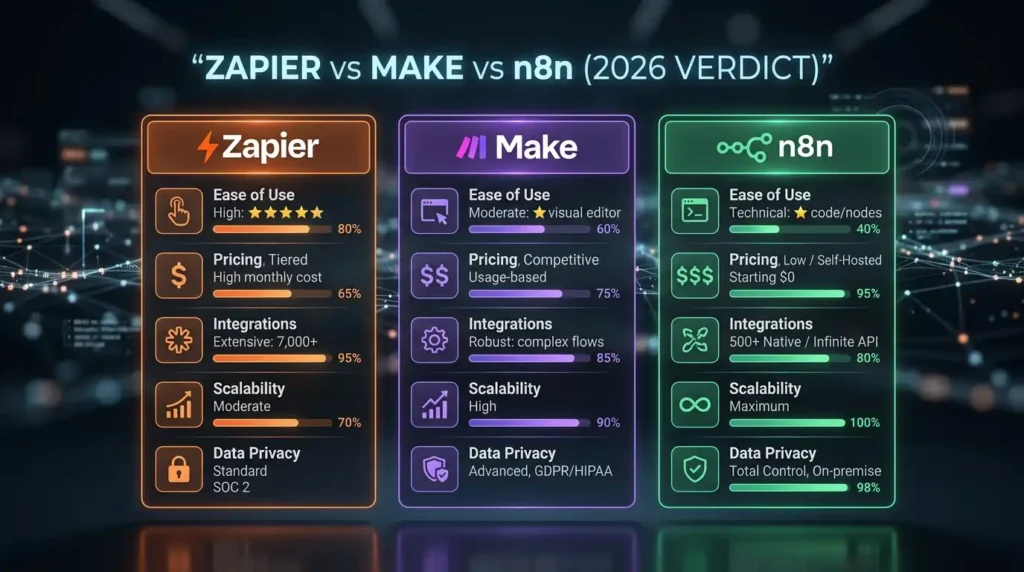
Let us put all the pieces together. Here is the honest verdict on the Zapier vs Make vs n8n debate in 2026:
| Comparison Area | Zapier | Make | n8n |
| Ease of use | Best | Good | Technical |
| Pricing at scale | Expensive | Affordable | Cheapest |
| Integration count | 8,000+ | 3,000+ | 1,500+ |
| Complex workflows | Limited | Strong | Best |
| Data privacy | Cloud only | Cloud only | Self-hosted |
| Scalability | Cost barrier | Good | Unlimited |
| AI features (2026) | Copilot + Agents | AI Agents | Full AI flexibility |
The one-line verdict for each:
- Zapier = Use it if you need automation running today with zero technical skill and you are okay with paying more for that convenience
- Make = Use it if you want visual power, better pricing, and more complex logic without needing a developer
- n8n = Use it if you have technical resources, care about data ownership, and need the most cost-effective solution at scale
The quote that best sums up this automation tools comparison comes from the community: “Zapier is about ease. Make is about structure. n8n is about power.”
Also Read – Gemini Advanced vs ChatGPT Plus – Which Is Worth It?
Frequently Asked Questions About Zapier, Make, and n8n
Is n8n better than Zapier for developers?
Yes, for most developers, n8n is the better long-term choice. The ability to write custom code directly in workflows, connect to any API, and self-host for free makes n8n vs Zapier a clear win for technical users. Zapier’s advantage is its massive integration library and zero learning curve – but those matter less to developers who can build connections themselves.
Is Make cheaper than Zapier in 2026?
Yes – significantly. Make’s operation-based pricing model is more affordable than Zapier’s task-based model, especially for complex, multi-step workflows. When comparing make vs n8n pricing, Make is more affordable than Zapier but more expensive than self-hosted n8n. For cloud-hosted plans at mid-range volumes, Make typically offers more value per dollar than Zapier.
Which automation tool is best for beginners?
Zapier is the easiest starting point for beginners with no technical background. The guided setup, 8,000+ pre-built integrations, and AI assistant (Zapier Copilot) mean you can build your first workflow automation software experience in under 20 minutes. Make is a solid second choice for beginners who are willing to spend a bit more time learning in exchange for more power.
Can n8n replace Zapier completely?
For most technical teams, yes. n8n can replace Zapier completely – and often at a fraction of the cost. The main reason you might not switch is if you rely on a very specific app integration that n8n does not support natively and you cannot build it via HTTP. But for the vast majority of no-code automation tools use cases, n8n handles everything Zapier does and more.
What happens when Zapier runs out of tasks?
When you hit your Zapier task limit, your Zaps stop running until your plan renews or you upgrade. This can cause missed leads, broken workflows, and hours of cleanup work. This is one of the biggest frustrations with Zapier’s pricing model – and a primary reason businesses explore zapier alternatives comparison content and end up switching to Make or n8n.
Final Thoughts – Which Tool Should You Start With Today?
The Zapier vs Make vs n8n decision does not have to be permanent. Many businesses start with Zapier, graduate to Make, and eventually adopt n8n as they scale. There is no shame in that path.
But if you want to make the right call from the start:
- Start with Zapier if you are a solo professional, marketer, or small business owner who needs quick wins without any technical friction
- Start with Make if you run an agency, manage complex workflows, or want better pricing for real business automation
- Start with n8n if you have a developer on your team, handle sensitive data, or know you will need high-volume automation at the lowest possible cost
All three are genuinely good platforms. The best workflow automation software is the one that actually fits your team’s skill level, your business needs, and your budget – not just the one with the most features on paper.
Whatever tool you pick, one thing is certain: automating your workflows is no longer optional. It is how smart teams work, and the Zapier vs Make vs n8n comparison exists precisely because you are ready to join them.
Want n8n, Zapier, or Make at a Fraction of the Official Price?
Here is something most automation guides will not tell you – the biggest barrier to getting started with these tools is not the learning curve. It is the monthly cost.
Full-price subscriptions for n8n Cloud, Zapier Professional, or Make’s paid tiers add up fast, especially when you are a freelancer, a startup, or an agency managing multiple client workflows. That budget pressure is real, and it stops a lot of people from getting started at all.
PremiumToolsHub.in is built exactly for this situation. It gives you access to premium automation tools – including n8n and a wide range of other business software – at heavily discounted prices, without cutting corners on what matters most.
What makes PremiumToolsHub different from just finding a cheap deal online:
- Every purchase comes with a proper payment invoice – so you have clear billing proof for your accounts or for client reimbursements
- Full customer support is available via WhatsApp from 9 AM to 12 AM IST – not a chatbot, actual people who help you get access set up
- Access is provided through legitimate licensing – family plans, team licenses, and authorized reseller arrangements – not cracked accounts or anything that puts your data at risk
- Beyond automation tools, PremiumToolsHub covers AI tools like ChatGPT Plus and Gemini Advanced, creative tools like Adobe Creative Cloud and Canva Pro, LinkedIn Premium plans for career and sales growth, and even OTT and learning platforms like Coursera Plus and Netflix
If you have been holding back on trying n8n, exploring Make, or upgrading your full digital toolkit because of the cost – this is worth a look. Over 650 professionals and businesses already use PremiumToolsHub to access the tools they need at a price that actually makes sense.