Every week, thousands of job seekers across Mumbai, Delhi, and Bengaluru search for ways to speed up their LinkedIn job search. The question that comes up again and again is: can I use LinkedIn automation tools to save time, send more connection requests, or apply to more jobs faster – and is it actually safe to do so in India?
The honest answer is: it depends entirely on what you use and how you use it. Some LinkedIn automation tools India safe options genuinely help you work smarter – built within LinkedIn’s own ecosystem, fully permitted, and completely risk-free. Others are third-party bots and scrapers that can get your account restricted or permanently banned – sometimes within days of use.
This guide gives Indian job seekers the complete, honest picture. You will learn exactly how LinkedIn’s detection system works, which LinkedIn tools are safe to use in 2026, which ones to stay far away from, and how professionals in Mumbai’s BFSI sector, Delhi’s corporate world, and Bengaluru’s tech ecosystem are using smart automation job search tools without putting their accounts at risk.
No fluff. No generic tool lists. Just practical, accurate information that helps you make smart decisions about LinkedIn automation tools India safe usage – starting today.
What Are LinkedIn Automation Tools and Why Do Indian Job Seekers Use Them?
Before getting into what is safe and what is not, it is important to understand what LinkedIn automation tools actually are. Broadly, these fall into two categories:
- LinkedIn-native tools – features and tools built directly into LinkedIn’s platform. These are fully sanctioned, completely safe, and often underused by Indian job seekers. Examples include LinkedIn Job Alerts, Easy Apply, Open to Work, LinkedIn Learning, and LinkedIn’s own analytics dashboard.
- Third-party automation tools – external software, browser extensions, or cloud-based tools that interact with your LinkedIn account from outside the platform. These range from fully safe Chrome extensions to high-risk bots that violate LinkedIn’s User Agreement.
The reason Indian job seekers in Mumbai, Delhi, and Bengaluru turn to automation job search tools is simple: LinkedIn’s job market is intensely competitive and time-consuming. Sending personalised connection requests to 50 recruiters manually, following up on 30 applications, and tracking responses across multiple companies can take hours every day. The appeal of tools that automate these repetitive tasks is completely understandable.
The problem is that the line between helpful safe LinkedIn tools and account-threatening LinkedIn bots India is not always obvious – and getting it wrong can cost you your entire LinkedIn presence right in the middle of an active job search.
| Tool Category | Examples | Safety Level | LinkedIn’s Position |
| LinkedIn-native features | Job Alerts, Easy Apply, Open to Work | 100% Safe | Fully permitted – built by LinkedIn |
| Official LinkedIn partner tools | LinkedIn Learning, LinkedIn Recruiter | 100% Safe | Officially endorsed integrations |
| Safe Chrome extensions | LinkedIn profile viewers, post schedulers | Generally Safe | Permitted if they don’t simulate actions |
| Grey area automation tools | Connection request automators with limits | Medium Risk | Technically violates ToS, rarely actioned |
| High-risk bots and scrapers | Auto-connect bots, mass message senders | Very High Risk | Clear ToS violation, accounts get banned |
Did You Know? LinkedIn uses a sophisticated AI-powered detection system that monitors unusual activity patterns on every account. In India, where automation tool usage spiked significantly between 2022 and 2025, LinkedIn has increased enforcement actions. Accounts that trigger these detectors receive warnings, temporary restrictions, or permanent bans – with no appeals process for the most severe violations.
🔥 LinkedIn Premium Business Plan 12 Months
Original Price ₹23,000 • Get it ₹8XXX
🤖 Gemini AI Advanced Pro Plan
Original Price ₹19,500 • Get it ₹8XXX
💼 LinkedIn Sales Navigator Core
Original Price ₹80,000 • Get it ₹2XXXX
🎨 Canva Pro Lifetime Access
Original Price ₹3,999 • Get it ₹4XX
📚 Coursera Plus Annual Plan
Original Price ₹33,000 • Get it ₹2XXX
✨ Adobe Creative Cloud All Apps
Original Price ₹59,000 • Get it ₹4XXX
Is LinkedIn Automation Legal in India – What Does LinkedIn’s Policy Actually Say?
This is one of the most searched questions by Indian professionals: is LinkedIn automation legal in India? The answer requires separating two different questions: is it legal under Indian law, and does it violate LinkedIn’s User Agreement?
Under Indian Law
Using most LinkedIn tools – including third-party automation tools – is not illegal under Indian law as of 2026. The Information Technology Act and related regulations do not specifically prohibit the use of browser automation or job search tools. So from a purely legal standpoint, the answer is: using automation tools is not a criminal activity in India.
Under LinkedIn’s User Agreement
This is where it gets important. LinkedIn’s User Agreement explicitly prohibits:
- Using bots, scrapers, or automated tools to interact with the platform
- Sending automated connection requests or messages
- Scraping LinkedIn profiles or data without explicit permission
- Using any tool that simulates human activity on the platform
This means that while using LinkedIn bots India-style automation tools is not a crime, it is a violation of the contract you agreed to when creating your LinkedIn account. LinkedIn can – and does – restrict or ban accounts that violate these terms, regardless of the user’s location in India, the US, or anywhere else.
The practical consequence for Indian job seekers is clear: LinkedIn automation tools India safe usage means staying within LinkedIn’s own ecosystem and using only third-party tools that genuinely do not simulate automated human behaviour on the platform. Everything else carries real account risk.
How Does LinkedIn Detect Automation and Bot Activity in India?
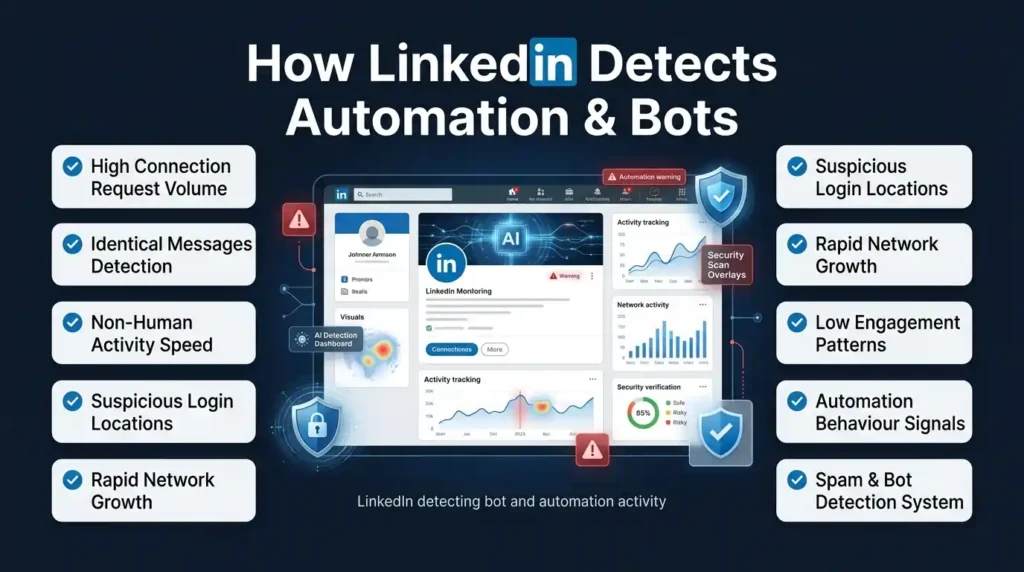
Understanding how LinkedIn detects LinkedIn bots India and automation activity helps you understand exactly why certain tools are risky and others are not. LinkedIn’s detection system looks for several specific patterns:
Behavioural Pattern Analysis
- Unusually high connection request volume – sending 50+ connection requests in a single day, especially to people outside your network, triggers LinkedIn’s automated detection system
- Identical messages sent to multiple recipients – copy-pasted InMails or connection notes sent to many people in a short window are flagged as bot behaviour
- Non-human interaction speeds – clicking through profiles, sending messages, or performing actions faster than a human naturally would is a clear automation signal
- Off-hours activity – accounts that are active at 2 AM sending 40 connection requests suggest automated tools, not human job seekers
- IP address and device anomalies – using a tool that logs into your LinkedIn account from a different IP than your usual device triggers security flags
Content and Account Signals
- Profile completeness mismatch – a heavily automated account often has high activity but low profile quality, which creates a pattern LinkedIn recognises
- Engagement mismatch – accounts that send hundreds of connection requests but have zero post engagement look like bots
- Rapid network growth – growing from 200 to 2,000 connections in two weeks is a pattern LinkedIn flags for review
For Indian job seekers using LinkedIn automation tools India safe practices, the key is keeping all activity within human-normal ranges. Even manually – 20 connection requests per day, personalised messages, regular post engagement – is a sustainable approach that never triggers these detection systems.
Did You Know? LinkedIn’s Trust and Safety team specifically monitors account behaviour in high-activity markets like India, where automation tool usage is among the highest globally. In 2024 and 2025, LinkedIn increased enforcement actions in the Indian market significantly – meaning the risk of using unsanctioned automation tools is higher for Indian professionals today than it has ever been.
Also Read – The Ultimate LinkedIn Job Application Checklist for Delhi Professionals
🔥 LinkedIn Premium Business Plan 12 Months
Original Price ₹23,000 • Get it ₹8XXX
🤖 Gemini AI Advanced Pro Plan
Original Price ₹19,500 • Get it ₹8XXX
💼 LinkedIn Sales Navigator Core
Original Price ₹80,000 • Get it ₹2XXXX
🎨 Canva Pro Lifetime Access
Original Price ₹3,999 • Get it ₹4XX
📚 Coursera Plus Annual Plan
Original Price ₹33,000 • Get it ₹2XXX
✨ Adobe Creative Cloud All Apps
Original Price ₹59,000 • Get it ₹4XXX
Which LinkedIn Automation Tools Are Safe for Indian Job Seekers in 2026?
Now for the practical answer. Which LinkedIn automation tools are safe for Indian job seekers? Here is a clear, honest breakdown organised by tool type:
Category 1: LinkedIn’s Own Built-In Tools – 100% Safe
These are the most powerful and most underused safe LinkedIn tools available to Indian job seekers in Mumbai, Delhi, and Bengaluru:
| LinkedIn Native Tool | What It Does | How Indian Job Seekers Use It |
| Job Alerts | Notifies you of new jobs matching your criteria instantly | Set alerts for target roles in Mumbai, Delhi, Bengaluru – apply within first 24 hours |
| Easy Apply | One-click job application using saved profile data | Apply to high-volume targets quickly; use regular apply for top choices |
| Open to Work | Signals availability to recruiters with location and role preferences | Set to Recruiter Only for discreet search; All Members for faster response |
| LinkedIn Learning | Courses that link directly to your profile as certifications | Complete skill-related courses before applying – badges improve profile visibility |
| LinkedIn Analytics | Shows who viewed your profile, post performance, search appearances | Identify which companies are viewing your profile – follow up strategically |
| Saved Job Applications | Tracks all jobs you have applied for within LinkedIn | Use as a basic application tracker alongside your own spreadsheet |
| Job Collections | Save and organise jobs you are considering | Build a pipeline of target roles; revisit and apply strategically |
| Company Follow + Alerts | Get notified of new job posts from followed companies | Follow all target companies in your city – never miss a relevant posting |
Category 2: Safe Third-Party Chrome Extensions
These LinkedIn third-party tools work alongside LinkedIn without violating its User Agreement – they assist your workflow without simulating automated actions:
- LinkedIn Profile Viewer extensions – tools that help you view and save profile information you are already accessing manually. These do not automate any actions – they just organise what you are already doing
- Post scheduling tools (Buffer, Hootsuite for LinkedIn) – these are officially integrated LinkedIn partners. Scheduling posts in advance is fully permitted and does not violate any LinkedIn policy
- Job application trackers (Huntr, Teal, Notion templates) – these work outside LinkedIn entirely, tracking your applications in an external system. Completely safe and extremely useful for Indian job seekers managing high-volume applications
- Resume optimisers (Jobscan, Resume Worded) – these tools analyse your resume against job descriptions to identify keyword gaps. They work on your resume file, not on LinkedIn directly – fully safe
- LinkedIn analytics viewers – tools that help visualise your LinkedIn performance data in richer formats than LinkedIn’s default dashboard. Safe as long as they use official LinkedIn API access
Which LinkedIn Tools and Bots Are Dangerous – What Indian Job Seekers Must Avoid
This section is just as important as knowing the safe tools. Here is what Indian professionals in Mumbai, Delhi, and Bengaluru must avoid when thinking about LinkedIn automation tools India safe usage. If you are searching for LinkedIn automation tools that won’t get you banned India – the honest answer is that the tools in the table below are the ones that will get you banned, so read this carefully before installing anything:
| Dangerous Tool Type | What It Does | Risk Level | What Happens If Caught |
| Auto-connect bots | Sends connection requests automatically to large lists | Very High | Account restricted, then banned on repeat |
| Mass message senders | Sends identical InMails or messages to hundreds at once | Very High | Immediate account restriction, spam flag |
| LinkedIn scrapers (unauthorised) | Extracts profile data in bulk without permission | Very High | IP ban, account termination, potential legal action |
| Auto-endorsement tools | Automatically endorses skills of connections | High | Profile flagged, endorsements removed |
| Fake profile view generators | Artificially inflates your profile view count | High | Account flagged for inauthentic behaviour |
| Auto-follow bots | Follows hundreds of accounts automatically | Medium-High | Activity restriction, temporary account lock |
| Browser automation scripts (Selenium) | Simulates human clicking and form-filling via code | Very High | LinkedIn detects non-human patterns, immediate ban risk |
The most commonly used dangerous tools among Indian job seekers are auto-connect bots. These tools promise to send 500 connection requests per week on your behalf – and they do deliver on that promise, for a while. But LinkedIn’s detection rate for these tools has improved dramatically, and Indian accounts using them face restrictions within days to weeks of starting. The short-term gain of a larger connection count is not worth the risk of losing your entire LinkedIn account during an active job search in Mumbai, Delhi, or Bengaluru.
Did You Know? LinkedIn permanently bans approximately 3 million fake or bot-driven accounts every month globally. India is among the top markets for automated account activity, which means Indian job seekers using LinkedIn bots face heightened scrutiny compared to users in smaller markets. The risk is not hypothetical – it is actively enforced.
Also Read – LinkedIn Premium Plans – Complete Introduction & Foundation
🔥 LinkedIn Premium Business Plan 12 Months
Original Price ₹23,000 • Get it ₹8XXX
🤖 Gemini AI Advanced Pro Plan
Original Price ₹19,500 • Get it ₹8XXX
💼 LinkedIn Sales Navigator Core
Original Price ₹80,000 • Get it ₹2XXXX
🎨 Canva Pro Lifetime Access
Original Price ₹3,999 • Get it ₹4XX
📚 Coursera Plus Annual Plan
Original Price ₹33,000 • Get it ₹2XXX
✨ Adobe Creative Cloud All Apps
Original Price ₹59,000 • Get it ₹4XXX
Best LinkedIn Tools for Job Search in India 2026 – City-Wise Guide
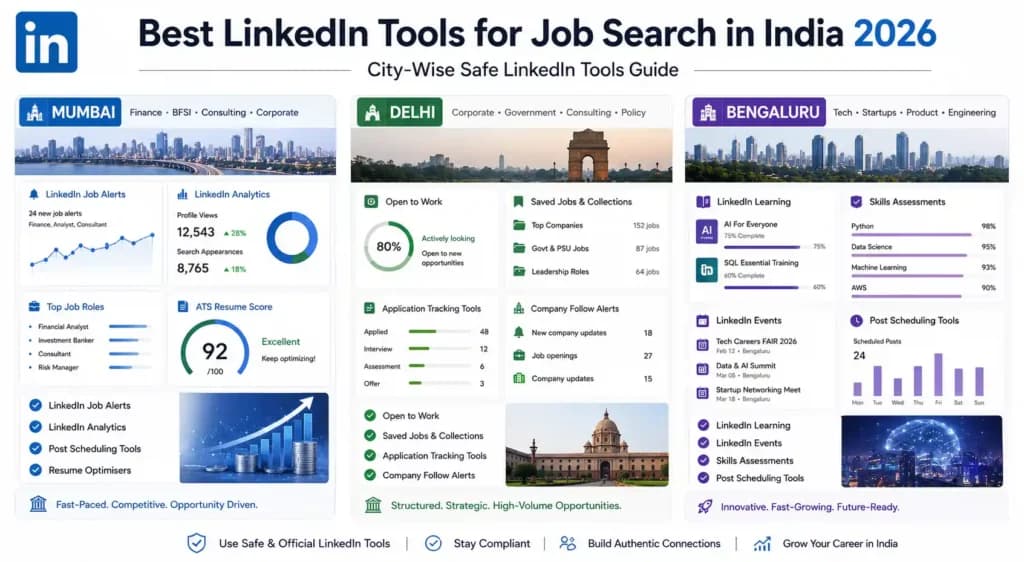
Here is a city-specific breakdown of best LinkedIn tools for job search in India 2026 – what professionals in Mumbai, Delhi, and Bengaluru should prioritise based on how each city’s job market actually works:
Best LinkedIn Tools for Job Seekers in Mumbai
Mumbai’s job market is dominated by BFSI, media, consulting, and e-commerce. Here is the safe LinkedIn tools stack that works best:
- LinkedIn Job Alerts – set alerts for finance, banking, and consulting roles specifically in Mumbai and Mumbai Metropolitan Region. The speed advantage of Day 1 applications is critical in Mumbai’s competitive market
- LinkedIn Analytics – Mumbai finance and media companies actively view profiles before reaching out. Monitor your ‘Who Viewed My Profile’ section and follow up with companies that appear
- Post scheduling tools – Mumbai professionals with demanding schedules benefit most from batching and scheduling LinkedIn content in advance. Buffer and Hootsuite both have official LinkedIn integrations
- Resume optimisers like Jobscan – Mumbai’s MNCs and large Indian corporations use ATS systems with keyword filtering. Matching your resume to job descriptions before applying directly improves shortlisting rates
Best LinkedIn Tools for Job Seekers in Delhi
Delhi’s job market spans IT, government-adjacent consulting, e-commerce, and media. Automation job search tools that work well here:
- LinkedIn Open to Work (Recruiters Only) – Delhi’s recruiter community is large and active. Setting Open to Work correctly ensures you appear in the right searches without broadcasting your search to your current employer
- LinkedIn Saved Jobs and Job Collections – Delhi’s job market has high volume but also high noise. Organising target roles into collections helps you apply strategically rather than reactively
- Application tracking tools (Teal or Notion) – Delhi professionals applying to 10 to 15 roles per week need external tracking systems. These tools work completely outside LinkedIn and carry zero account risk
- Company follow alerts – following target Delhi companies on LinkedIn and enabling notifications means you always apply to fresh postings before the competition builds up
Best LinkedIn Tools for Job Seekers in Bengaluru
Bengaluru’s tech-heavy market means professionals here are most likely to encounter LinkedIn bots India-type tools being discussed in developer communities. Here is the safe approach:
- LinkedIn Learning certifications – Bengaluru’s tech recruiters actively filter for verified skills. Completing LinkedIn Learning courses in your target tech stack and earning badges directly on your profile is a safe, high-ROI tool
- LinkedIn Events – Bengaluru has the most active LinkedIn event community in India. Attending and engaging with tech and startup events through LinkedIn’s built-in events feature builds network without any automation risk
- LinkedIn Skills Assessments – Bengaluru IT and product companies filter by verified skills in LinkedIn Recruiter. Passing assessments is completely free, fully safe, and directly improves your search visibility
- Post scheduling tools – Bengaluru’s startup and tech community is one of India’s most active LinkedIn content audiences. Consistent posting with scheduled tools builds visibility with exactly the right audience
Free LinkedIn Tools for Job Seekers in Mumbai, Delhi, and Bengaluru
Cost is a real consideration for many Indian job seekers. Here is a complete list of free LinkedIn tools for job seekers Mumbai Delhi Bengaluru that are both safe and genuinely useful:
| Free Tool | What It Does | Best For | Safe? |
| LinkedIn Job Alerts (Free) | Email and app notifications for new matching jobs | All cities, all sectors | 100% Safe |
| LinkedIn Easy Apply (Free) | One-click applications to thousands of roles | High-volume active job seekers | 100% Safe |
| LinkedIn Skills Assessments (Free) | Earn verified badges in 40+ skills | Mumbai, Delhi, Bengaluru IT and finance | 100% Safe |
| LinkedIn Learning (Free trial + some free courses) | Skill-building courses linked to profile | All professionals upgrading skills | 100% Safe |
| Teal (Free tier) | Job application tracker and resume builder | Active job seekers managing volume | Works outside LinkedIn |
| Huntr (Free tier) | Kanban-style job application tracker | Organised job seekers in any city | Works outside LinkedIn |
| Jobscan (Free tier) | Resume keyword matching against job descriptions | Anyone applying to ATS-screened roles | Works outside LinkedIn |
| Buffer (Free tier) | Schedule up to 3 LinkedIn posts in advance | Content-active job seekers in Bengaluru, Mumbai | Official LinkedIn partner |
| LinkedIn Analytics (Free) | Profile views, search appearances, post reach | Anyone wanting to understand their LinkedIn visibility | 100% Safe |
| Resume Worded (Free tier) | LinkedIn profile and resume scoring + suggestions | Profile optimisation before job search | Works outside LinkedIn |
Every tool in this table is either built into LinkedIn itself or works completely outside the platform – meaning zero risk to your account. For Indian job seekers who want a LinkedIn automation tools India safe toolkit that costs nothing, this list covers everything you actually need.
Also Read – LinkedIn Premium Pricing Guide 2026: Cost, Plans, India Price & Is It Worth It?
What Happens When LinkedIn Bans Your Account – The Real Consequences for Indian Job Seekers
Most Indian professionals who consider using risky LinkedIn bots India tools underestimate the consequences of a ban. Here is the honest picture of what actually happens:
Level 1: Profile Restriction
LinkedIn first issues a temporary restriction – your ability to send connection requests or messages is limited for a period ranging from a few days to several weeks. You can still log in and browse, but your outreach capabilities are frozen at exactly the moment you need them most in an active job search.
Level 2: Account Warning and Review
If the behaviour continues or is severe, LinkedIn sends a formal warning and places your account under review. During this period, your profile may be invisible in search results – meaning recruiters in Mumbai, Delhi, or Bengaluru who search for your skills will not find you. All the work you put into building your safe LinkedIn tools profile and content presence becomes temporarily inaccessible.
Level 3: Permanent Account Ban
For serious or repeated violations, LinkedIn permanently bans the account. This means:
- All your connections – potentially hundreds or thousands of people you spent years building relationships with – are gone
- All your recommendations, endorsements, and skill badges – permanently deleted
- Your LinkedIn URL – no longer yours. Anyone searching for you by name finds nothing
- Your LinkedIn Premium subscription – cancelled with no refund
- Future accounts – LinkedIn attempts to ban new accounts created from the same device or IP
For Indian job seekers in the middle of an active search in any city – losing your LinkedIn account is a serious professional setback. This is why LinkedIn automation tools India safe awareness matters so much. The short-term convenience of automation bots is simply not worth this risk.
How to Speed Up Your LinkedIn Job Search Without Automation – Smart Manual Strategies
The good news is that you do not need risky LinkedIn third-party tools to dramatically speed up your job search. Here are smart manual strategies that match the speed advantages of automation without any of the risk – specifically for Indian job seekers in Mumbai, Delhi, and Bengaluru:
Strategy 1: The 30-Minute Daily LinkedIn Routine
Instead of occasional bursts of activity (which look suspicious to LinkedIn’s detection system), build a consistent 30-minute daily routine that keeps your account active and your applications moving:
- Minutes 1 to 10 – Job applications: Check Job Alerts, apply to 2 to 3 fresh postings with personalised notes
- Minutes 11 to 20 – Engagement: Comment thoughtfully on 3 to 5 posts from your target companies or connections
- Minutes 21 to 25 – Connections: Send 3 to 5 personalised connection requests to recruiters or professionals at target companies
- Minutes 26 to 30 – Follow-up: Check your application tracker and send one follow-up message to applications that are 5 to 7 days old
This 30-minute routine, done consistently Monday through Friday, produces better results than any automation job search tool – and carries zero risk to your account.
Strategy 2: Template-Assisted Manual Outreach
One of the main appeals of automation tools is saving time on writing messages. The solution is not a bot – it is a smart template system. Create 3 to 5 message templates for different scenarios:
- Template 1: Connection request to a recruiter at a target company
- Template 2: Follow-up message after submitting an application
- Template 3: Introduction message after attending a LinkedIn event
- Template 4: Warm outreach to a second-degree connection at a company you are targeting
- Template 5: Thank-you message after an informational conversation
Each template should have blank spaces for personalisation – the company name, a specific detail from their profile, or a reference to something recent. This approach gives you the speed of templates with the quality of personalisation – and it is 100% human, 100% LinkedIn automation tools India safe.
Strategy 3: Batch Your LinkedIn Activity Weekly
Rather than doing a little LinkedIn work every day, some Indian professionals prefer batching – spending 2 to 3 hours on one or two days per week doing all their connection requests, applications, and content in one focused session. This works well for employed professionals in Mumbai, Delhi, and Bengaluru who have limited time on weekdays.
Just keep the volume within human-normal ranges – no more than 20 connection requests per session, no more than 10 to 15 applications per day, and no identical messages sent to multiple people. These limits keep your account safe while still covering significant ground.
LinkedIn Automation Tools India Safe – The Final Verdict for 2026
Let us summarise the complete picture for Indian job seekers who want a clear, definitive answer about LinkedIn automation tools India safe usage in 2026:
| Tool Type | Safe to Use? | Risk of Ban? | Recommended for India? |
| LinkedIn’s own features (Job Alerts, Easy Apply, Open to Work) | Yes | Zero | Highly recommended |
| Official LinkedIn partner tools (Buffer, Hootsuite) | Yes | Zero | Recommended |
| Resume optimisers working on resume files (Jobscan) | Yes | Zero | Recommended |
| Application trackers outside LinkedIn (Teal, Huntr) | Yes | Zero | Recommended |
| Chrome extensions that only read/display data | Generally yes | Low | Use with caution |
| Connection request automation tools | No | High | Avoid completely |
| Mass message or InMail automation | No | Very High | Avoid completely |
| LinkedIn scrapers and data extraction bots | No | Very High | Avoid completely |
| Browser automation scripts (Selenium etc.) | No | Very High | Avoid completely |
The bottom line for Indian job seekers across Mumbai, Delhi, and Bengaluru: LinkedIn’s own tools are powerful enough. When used consistently and strategically – with a clear routine, smart templates, and a focused target list – they produce better results than any bot-driven approach, without any of the account risk. LinkedIn automation tools India safe usage means choosing tools that work with LinkedIn, not tools that try to trick it.
Also Read – Best Cheap SaaS Tools for Agencies in 2026 – Save Up to 85% Without Losing Performance
How to Spot a Fake ‘Safe’ LinkedIn Automation Tool – Red Flags Every Indian Job Seeker Must Know
One of the biggest gaps in every competitor guide on LinkedIn automation tools India safe usage is that none of them tell you how to identify a dangerous tool before you install it. Many tools marketed to Indian job seekers claim to be ‘safe’, ‘undetectable’, or ‘LinkedIn-approved’ – and almost none of those claims are true. Here is how to spot a dangerous tool before it costs you your account:
- Red Flag 1 – Claims to be ‘undetectable by LinkedIn’ – No legitimate tool makes this claim. If a tool markets itself as undetectable, it is explicitly designed to violate LinkedIn’s Terms of Service. That is the opposite of LinkedIn automation tools that won’t get you banned India-style safe usage
- Red Flag 2 – Requires your LinkedIn username and password – Any tool that asks for your LinkedIn login credentials to operate is logging into your account from a different device or IP address. This is exactly the kind of behaviour LinkedIn’s detection system flags immediately. Never give your LinkedIn password to a third-party tool
- Red Flag 3 – Promises to send hundreds of connection requests per day – LinkedIn’s own internal safe limit for connection requests is around 20 per day for most accounts. Any tool promising 100, 200, or 500 daily requests is operating far outside safe behaviour ranges
- Red Flag 4 – Has no official LinkedIn API partnership – Safe LinkedIn third-party tools that integrate with LinkedIn do so through LinkedIn’s official API. If a tool’s website does not mention LinkedIn API access or partner status – it is scraping or simulating, not integrating
- Red Flag 5 – Sold in Telegram groups or WhatsApp forwards – Legitimate safe LinkedIn tools are distributed through app stores, official websites, and reputable marketplaces. If you found the tool through a Telegram group or WhatsApp forward promising ‘LinkedIn growth hacks’ – treat it with extreme caution
- Red Flag 6 – Offers a ‘Chrome extension’ that runs in the background – Browser extensions that run continuously in the background, monitoring your LinkedIn activity and taking automated actions, are bot-style tools even if they look like helpful extensions. Check the permissions an extension requests before installing
For Indian job seekers in Mumbai, Delhi, and Bengaluru, this red flag checklist is the most practical LinkedIn automation tools that won’t get you banned India guide available – because avoiding the wrong tool in the first place is always better than recovering from a ban.
What to Do If LinkedIn Has Already Restricted or Warned Your Account in India
No competitor guide covers this – but it is one of the most urgent questions Indian job seekers face. What do you actually do if LinkedIn has already flagged your account for automation activity? Here is the step-by-step recovery plan:
Step 1: Stop All Automation Immediately
The moment you receive a LinkedIn warning or restriction, stop using every third-party tool immediately. Uninstall any browser extensions related to LinkedIn automation. Log out of any tools that have access to your account. Do not try to appeal while the automated behaviour is still running – it makes things worse.
Step 2: Complete the LinkedIn Safety Verification
LinkedIn typically asks you to complete a CAPTCHA or phone verification when an account is restricted. Complete this immediately and honestly. This signals to LinkedIn’s system that a real human is now operating the account.
Step 3: Reduce All Activity for 2 to 3 Weeks
After a restriction is lifted, keep all your LinkedIn activity at minimum levels for 2 to 3 weeks. Do not send connection requests, do not use Easy Apply aggressively, and focus only on profile updates and gentle post engagement. Let the account return to normal behavioural patterns before resuming active job search activities.
Step 4: Submit an Appeal for Serious Restrictions
If your account is severely restricted or banned, LinkedIn does have an appeal process – though it is not widely known. Go to LinkedIn’s Help Centre, select ‘Account Restriction’ or ‘Suspended Account’, and submit an honest appeal explaining that you understand the violation and will not repeat it. Appeals are not guaranteed to succeed, but for first-time violations they do sometimes result in account restoration.
Step 5: Rebuild With Safe Tools Only
Once your account is restored or if you are starting fresh, rebuild your automation job search approach using only LinkedIn automation tools India safe options – LinkedIn’s native features, official partner tools, and manual outreach with smart templates. The recovery process is far more painful than simply doing it right from the start.
LinkedIn Automation vs LinkedIn Premium – Which One Should Indian Job Seekers Choose?
This is a comparison no competitor makes – but it is the most practically relevant question for Indian job seekers who are trying to decide between paying for automation tools versus paying for LinkedIn Premium. Here is the honest breakdown:
| Comparison Factor | LinkedIn Automation Tools (Third-Party) | LinkedIn Premium |
| Account safety | High risk – violates LinkedIn ToS | 100% safe – official LinkedIn product |
| What it actually does | Automates actions (connections, messages) | Gives you more data, InMails, and visibility |
| Recruiter visibility boost | None – automation does not improve recruiter search ranking | Yes – Open Profile + Premium badge visible to recruiters |
| InMail credits | Not provided | 5 to 50 InMail credits per month depending on plan |
| Who viewed your profile | Not provided | Full 90-day viewer list – invaluable for follow-up |
| Applicant insights | Not provided | See how you rank vs other applicants before applying |
| Risk of account loss | Very high | Zero |
| Cost | Free to paid (INR 500 to 5,000/month) | INR 1,500 to 8,000/month depending on plan |
| Long-term value | Negative if account gets banned | Compounds with consistent use over months |
The verdict for Indian job seekers: LinkedIn Premium is a safer, more effective, and more sustainable investment than any third-party automation tool. The safe LinkedIn tools advantage of Premium – InMails, applicant insights, full profile viewer data – delivers real job search results without any account risk. For professionals in Mumbai, Delhi, and Bengaluru who are serious about their search, LinkedIn Premium accessed through a legitimate, cost-effective provider is a smarter choice than any LinkedIn bots India tool that promises shortcuts.
Also Read – How to Build a Personal Brand on LinkedIn for Mumbai’s Finance Sector
Can LinkedIn Automation Tools Get You Blacklisted by Recruiters – Not Just Banned by LinkedIn?
This is a consequence almost no guide mentions – and it is just as damaging as an account ban. Using LinkedIn bots India-style automation tools does not just risk your account – it can get you blacklisted by individual recruiters and companies in Mumbai, Delhi, and Bengaluru.
Here is how it happens:
- Mass automated connection requests – When a bot sends connection requests to 200 recruiters with an identical note, experienced recruiters recognise the pattern immediately. Many Mumbai and Delhi-based recruitment professionals maintain informal blacklists of accounts that send automated or spammy outreach. Once you are on that list, your applications to roles they manage get ignored regardless of your qualifications
- Identical automated InMails – Recruiters at Bengaluru tech firms and Mumbai BFSI companies receive dozens of automated InMails every week. They recognise the language patterns, the timing, and the generic personalisation. Sending an automated InMail to a recruiter who receives 50 of them per week does not just fail – it actively signals that you are not worth engaging with
- LinkedIn’s spam reporting by recruiters – When recruiters mark your automated messages as spam, LinkedIn’s system learns from those signals. Multiple spam reports from recruiters can accelerate account restriction and also reduce your profile’s visibility in their searches going forward
The damage from recruiter blacklisting is harder to recover from than a LinkedIn restriction – because it is invisible and persistent. There is no appeal process, no notification that it happened, and no recovery path. The only LinkedIn automation tools India safe approach that protects you from both platform bans and recruiter blacklisting is genuine, personalised, human outreach – every single time.
Ready to Use the Right LinkedIn Tools and Supercharge Your Indian Job Search?
You have done the hard thinking.
You now know exactly which LinkedIn automation tools India safe options exist, which ones to avoid, how LinkedIn’s detection system works, and how to use smart safe LinkedIn tools to speed up your job search in Mumbai, Delhi, or Bengaluru – without risking your account. The only question left is: do you have the right premium tools to back up your job search strategy?
At PremiumToolsHub, we have helped 650+ professionals, freelancers, and agencies across 15+ countries access the exact same premium tools they were already using – just at prices that finally make sense. Here is what you get when you work with us:
- Proper billing invoice with every purchase – every transaction is clean, documented, and professional. You get a proper invoice with each purchase so your records are always in order.
- Real human support on WhatsApp, 9 AM to 12 AM IST – no bots, no ticket queues, no waiting three days for a reply. A real person answers your message – usually within a few hours, sometimes within minutes.
- 100% legitimate access through proper licensing – all tool access is provisioned through official family plans, team workspaces, and authorized reseller programs. No cracked software. No stolen accounts.
- Way more than just LinkedIn tools – PremiumToolsHub gives you access to AI tools, design tools, productivity suites, and more – all in one place, all backed by the same warranty and support.
Visit premiumtoolshub.in or send a message on WhatsApp to see exactly how much you could be saving – starting from your very next billing cycle.
FAQ – People Also Ask
Can I use automation tools on LinkedIn?
You can use certain tools with LinkedIn – but the answer depends entirely on what type of tool you mean. LinkedIn’s own built-in features like Job Alerts, Easy Apply, Open to Work, and LinkedIn Learning are completely safe and highly recommended. Official partner tools like Buffer for post scheduling are also permitted. However, third-party bots that automate connection requests, send mass messages, or scrape data violate LinkedIn’s User Agreement – and using them puts your account at risk of restriction or permanent ban. For LinkedIn automation tools India safe usage, stick to tools that are either built by LinkedIn or officially integrated through LinkedIn’s API.
Will LinkedIn ban me for using automation?
Yes – LinkedIn actively detects and bans accounts that use unsanctioned automation tools. LinkedIn bots India users face the same enforcement as users anywhere globally, with Indian accounts under particularly active monitoring due to high automation tool usage in the market. The ban process starts with a temporary restriction, progresses to a formal warning, and can end in a permanent account termination for repeated or severe violations. All your connections, recommendations, and profile history are deleted in a permanent ban – making it one of the most damaging outcomes for an active job seeker in Mumbai, Delhi, or Bengaluru.
What are the best free LinkedIn tools for job search?
The best LinkedIn tools for job search in India 2026 that are completely free include: LinkedIn Job Alerts (instant notifications for new matching roles), LinkedIn Skills Assessments (free badges that improve recruiter search visibility), LinkedIn Easy Apply (fast applications to thousands of roles), LinkedIn Analytics (profile view and search data), Teal or Huntr for free application tracking, Jobscan’s free tier for resume keyword matching, and Buffer’s free tier for scheduling LinkedIn posts. All of these are free LinkedIn tools for job seekers Mumbai Delhi Bengaluru that carry zero account risk and deliver real, measurable job search value.
Are LinkedIn bots safe to use in India?
No – LinkedIn bots India are not safe to use, regardless of what the tool’s marketing claims. LinkedIn’s detection system monitors for bot behaviour patterns specifically, and Indian accounts using automation bots face real risks of account restriction and permanent banning. Beyond the account risk, bots that send generic automated connection requests or messages actually damage your professional reputation in India’s close-knit professional communities in Mumbai, Delhi, and Bengaluru – where personalised, genuine outreach is the norm and automated spam is immediately recognisable. The only LinkedIn automation tools India safe approach is to use LinkedIn’s own features and officially sanctioned partner tools exclusively.
Conclusion: Smart Beats Fast – What Indian Job Seekers Really Need to Know About LinkedIn Automation
The appeal of LinkedIn automation tools is completely understandable. You are a job seeker in Mumbai, Delhi, or Bengaluru – competing against hundreds of other qualified professionals for every decent role, managing a full workday while trying to run an active job search, and looking for any edge you can find. The idea of a tool that sends 200 connection requests while you sleep sounds like the answer.
But here is the reality: the professionals who consistently get the best results from LinkedIn in India’s most competitive cities are not the ones using bots. They are the ones who use LinkedIn automation tools India safe features – LinkedIn’s own powerful built-in tools – consistently and strategically, with smart templates, a clear daily routine, and a targeted approach that quality-filters every action.
You now know which LinkedIn automation tools are safe for Indian job seekers – the full spectrum from LinkedIn’s native features to safe third-party tools to dangerous bots to avoid. You understand is LinkedIn automation legal in India – and the distinction between legal and compliant with LinkedIn’s User Agreement. You have a city-specific tool guide for Mumbai, Delhi, and Bengaluru, and a complete list of free LinkedIn tools for job seekers Mumbai Delhi Bengaluru that cost nothing and carry zero risk.
And you have smart manual strategies that match the speed of automation without any of the danger – because a fast job search that gets your account banned is worse than a slightly slower job search that keeps your profile intact and visible.
Use the right tools. Stay safe. Get hired. That is the only strategy that works long-term in India’s LinkedIn job market.