Welcome to this LinkedIn Automation Tools Comparison guide – built for professionals who are tired of doing outreach the hard way. Think about your typical Monday morning on LinkedIn. You open the app, see 200+ profiles you want to connect with, and know you have to manually send each request, write personalised messages, and follow up with people who haven’t replied. By noon, you’ve barely made a dent – and this is just one part of your job.
That feeling of running out of hours is something every sales professional, recruiter, and agency owner knows deeply. And the painful reality? You’re not reaching enough people to move the needle on your pipeline.
LinkedIn is the undisputed #1 B2B lead generation platform right now. A 2026 study by Expandi found that LinkedIn messages get a 10.3% response rate – more than double the 5.1% average for cold emails. That gap is massive. But trying to tap into it manually is simply not possible at scale.
This is exactly where linkedin automation tools come in. These platforms automate the repetitive parts of LinkedIn outreach – connection requests, follow-up messages, profile visits, inbox management – so you can focus on what actually matters: having real conversations with real people who are genuinely interested.
In this detailed LinkedIn Automation Tools Comparison, we’ve broken down the top platforms available today – by use case, budget, and safety – so you can make a clear, confident decision. Whether you’re a freelancer looking for affordable linkedin automation software, a sales team wanting the best linkedin lead generation tools, or an agency searching for the best linkedin automation tool for agencies, this guide has everything you need.
What Are LinkedIn Automation Tools and How Do They Work?
Before diving into any LinkedIn Automation Tools Comparison, it helps to understand what these platforms actually do. They are software tools that handle the repetitive, time-consuming tasks on LinkedIn automatically – things that would otherwise eat up several hours of your day, every single day.
Here’s what these tools typically automate:
- Sending personalised connection requests to your ideal prospects – based on job title, company, industry, or geography
- Following up automatically after someone accepts your connection request – with a warm, conversational message that feels natural and timely
- Visiting profiles strategically to get on your prospect’s radar before you even send a request – a subtle but effective warm-up technique
- Managing replies in a unified inbox – so you never miss a conversation even when you’re running campaigns across hundreds of leads
- Tracking response rates, acceptance rates, and campaign performance – so you can see exactly what’s working and improve over time
Think of linkedin automation tools as your behind-the-scenes outreach assistant that never gets tired, never forgets to follow up, and never sends the wrong message to the wrong person – as long as you set it up right.
There are two main types of linkedin outreach software available today:
Browser Extension Tools – These run inside your browser (usually Chrome). They’re generally more affordable and easier to set up. However, because they operate through your actual browser session, LinkedIn’s systems can sometimes detect unusual patterns. They require your computer to be on and running, which limits how much automation you can run.
Cloud-Based Tools – These run on remote servers, completely independent of your computer. They work even when your laptop is off. More importantly, they mimic human-like behaviour on dedicated IP addresses, which makes them far safer and more reliable for long-term use. Most modern linkedin automation tools today are cloud-based for exactly this reason.
Cloud-Based vs Browser Extension: Which Is Safer?
The answer is clear: cloud-based linkedin automation tools are significantly safer. They operate on dedicated country-based IP addresses, include smart throttle controls that respect LinkedIn’s daily limits, and are built to mimic natural human activity. Research shows that desktop or browser-based linkedin bot tools carry a 23% account restriction rate within just 90 days of use. If your LinkedIn account is a business asset – and it almost certainly is – cloud-based is the only sensible choice for serious outreach.
Also Read – Best AI Tools for Lead Generation in 2026: Close More Deals Without the Grind
🔥 LinkedIn Premium Business Plan 12 Months
Original Price ₹23,000 • Get it ₹8XXX
🤖 Gemini AI Advanced Pro Plan
Original Price ₹19,500 • Get it ₹8XXX
💼 LinkedIn Sales Navigator Core
Original Price ₹80,000 • Get it ₹2XXXX
🎨 Canva Pro Lifetime Access
Original Price ₹3,999 • Get it ₹4XX
📚 Coursera Plus Annual Plan
Original Price ₹33,000 • Get it ₹2XXX
✨ Adobe Creative Cloud All Apps
Original Price ₹59,000 • Get it ₹4XXX
LinkedIn Automation vs Manual Outreach – When Should You Automate?
This is the question people are afraid to ask out loud. “Should I even be automating my LinkedIn?” And it’s a completely fair concern. Nobody wants to come across as robotic, spam-y, or like they’re just blasting messages into the void.
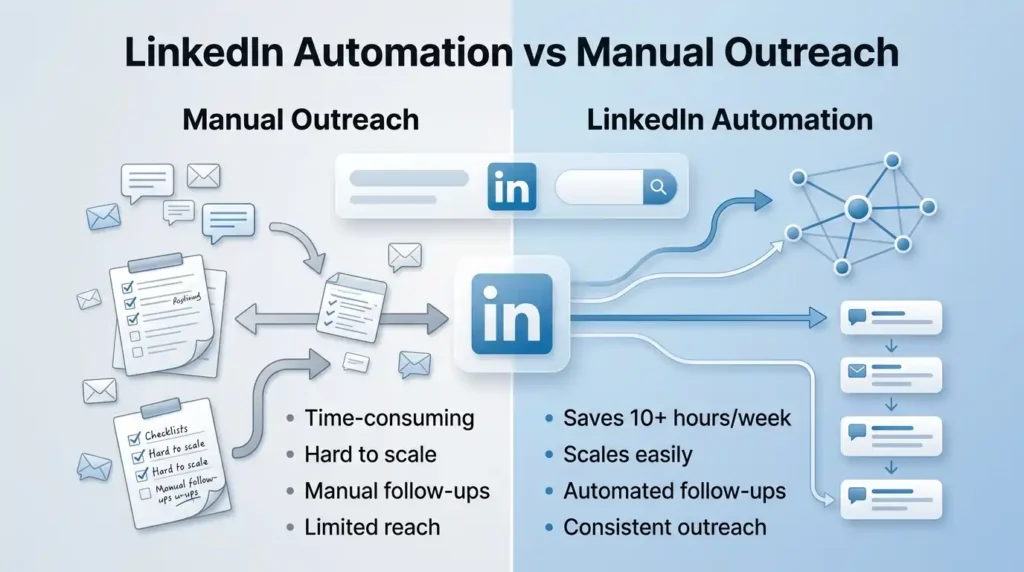
But here’s the honest truth: the problem is never automation itself. The problem is bad automation. When done thoughtfully, linkedin automation tools don’t replace the human element. They amplify it. They handle the logistics so you can focus on the conversations that actually convert.
Here’s a simple side-by-side that should help you decide:
| Situation | Manual Outreach | LinkedIn Automation |
| 10-20 highly targeted prospects | Better – personalised and careful | Overkill for this scale |
| 500+ prospects per month | Time-consuming and inconsistent | Essential – saves 10+ hours per week |
| Following up with non-responders | Easy to forget manually | Automated follow-ups handle this perfectly |
| Managing multiple client campaigns | Nearly impossible at scale | Built exactly for this use case |
| Nurturing warm leads over time | Manual check-ins work but don’t scale | Drip sequences keep leads warm automatically |
The bottom line is this: if you need to scale your linkedin lead generation tools beyond what one person can reasonably handle manually, automation is not just helpful – it’s necessary.
Is LinkedIn Automation Legal? What You Need to Know in 2026
This is one of the most Googled questions about linkedin automation tools, and it deserves a straight, honest answer.
LinkedIn’s Terms of Service does restrict certain kinds of automated behaviour – specifically mass data scraping and sending identical spam messages at high volume. However, reputable, cloud-based linkedin outreach software is specifically designed to operate within those boundaries. They include built-in daily limits, account warm-up features, random delay intervals, and human-behaviour mimicking to keep your account safe.
Using a responsible, cloud-based linkedin automation tool with personalised messages and safe volume limits is a fundamentally different thing from running a reckless bot that blasts 500 identical messages in an hour. Choose tools that are transparent about their safety architecture – and always stay within recommended activity limits. Your account health is too important to gamble with.
Also Read – Zapier vs Make vs n8n: Which Workflow Automation Software Is Best in 2026?
How to Evaluate LinkedIn Automation Tools – 6 Key Criteria
Any solid LinkedIn Automation Tools Comparison starts with a clear set of criteria, not just a list of names. Not all linkedin automation tools are built the same, and choosing the wrong one can cost you your account and months of pipeline opportunity. Here are the six criteria that matter most:
- Account Safety and Compliance – Does the tool use dedicated cloud infrastructure? Does it include smart throttling, daily limit controls, and account warm-up? This is your first filter, always. No feature is worth risking your LinkedIn account.
- Outreach Automation Features – Can the tool build multi-step sequences with conditional logic? Does it support A/B testing and reply detection? More intelligent sequences mean higher response rates and less wasted outreach.
- Personalisation Capabilities – Can you use custom variables, dynamic images, or GIFs in your messages? Mass outreach that feels personal is what separates a 5% response rate from a 25% one. This is where linkedin marketing tools that feel human beat generic blasts every time.
- CRM and Tool Integrations – Does it connect with your existing CRM – HubSpot, Salesforce, Pipedrive? Can it plug into your workflow via Zapier or webhooks? The best linkedin outreach software fits seamlessly into your existing sales stack.
- Multi-Channel Support – The strongest linkedin lead generation tools in 2026 don’t stop at LinkedIn. They combine LinkedIn outreach with email in a single campaign, doubling your touchpoints and dramatically increasing your chances of getting a response.
- Pricing and Scalability – Does the pricing model make sense for your current team size, and does it scale with you? The right affordable linkedin automation software shouldn’t lock you into paying for enterprise features you don’t yet need.
Which Features Matter Most for LinkedIn Lead Generation?
For pure linkedin lead gen automation, the non-negotiables are: a multi-step sequence builder with conditional branching, reply detection (so automation stops the moment someone responds), profile visit automation to warm up leads before messaging, and a unified inbox to manage all conversations in one place. Any linkedin lead generation tool that’s missing these four features will create more work than it saves.
🔥 LinkedIn Premium Business Plan 12 Months
Original Price ₹23,000 • Get it ₹8XXX
🤖 Gemini AI Advanced Pro Plan
Original Price ₹19,500 • Get it ₹8XXX
💼 LinkedIn Sales Navigator Core
Original Price ₹80,000 • Get it ₹2XXXX
🎨 Canva Pro Lifetime Access
Original Price ₹3,999 • Get it ₹4XX
📚 Coursera Plus Annual Plan
Original Price ₹33,000 • Get it ₹2XXX
✨ Adobe Creative Cloud All Apps
Original Price ₹59,000 • Get it ₹4XXX
LinkedIn Automation Tools Comparison: Features, Pricing & Safety (2026)
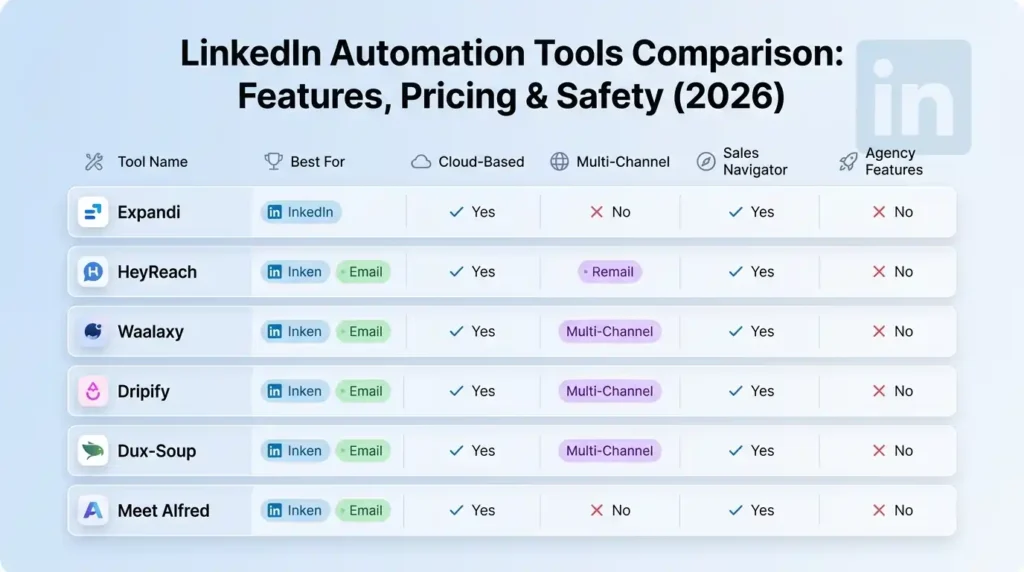
Now for the actual LinkedIn Automation Tools Comparison. We’ve analysed the most widely used platforms based on safety record, core features, ease of use, and the type of user each one truly serves best. Here’s the full picture:
| Tool | Best For | Cloud-Based | Multi-Channel | Sales Navigator | Agency Features |
| Expandi | Agencies, high-volume teams | Yes | LinkedIn + Email | Full support | Yes |
| HeyReach | Multi-account mgmt | Yes | LinkedIn + Email | Full support | Yes |
| Waalaxy | Beginners, budget users | Yes | LinkedIn + Email | Partial | Limited |
| Dripify | Sales teams | Yes | LinkedIn + Email | Yes (higher plan) | Yes |
| Dux-Soup | Solo users, freelancers | Hybrid | LinkedIn only | Limited | No |
| Meet Alfred | Teams, agencies | Yes | LinkedIn + Email + X | Yes | Yes |
Also Read – LinkedIn Premium vs Sales Navigator: Which LinkedIn Plan Is Best for You in 2026?
Expandi – Best for Agencies Needing High-Volume Safe Outreach
If account safety is your top concern and you’re running linkedin outreach software for a large sales team or multiple clients, Expandi has earned its reputation as the gold standard. It runs on dedicated country-based IP addresses, which means your outreach patterns look like natural human activity to LinkedIn’s detection systems – not a bot.
Its ‘Smart Sequences’ feature lets you build advanced conditional flows that respond to prospect behaviour. For example: if someone doesn’t accept your connection request within five days, the tool automatically switches to an email follow-up. This kind of intelligent branching is what sets serious linkedin automation tools apart from basic ones.
Expandi also supports hyper-personalisation through dynamic placeholders, custom images, and GIFs inside messages – a detail that consistently lifts reply rates. It’s one of the few linkedin automation tools that can safely push 300+ connection requests per week through its advanced ‘Mobile Connector’ technology.
HeyReach – Best LinkedIn Automation Tool for Multi-Account Management
HeyReach is built from the ground up for agencies and teams managing multiple LinkedIn profiles. Instead of logging in and out of different accounts, you get a single dashboard where every account runs campaigns simultaneously through account rotation – spreading outreach across multiple senders so no single account hits LinkedIn’s daily limits.
What makes HeyReach genuinely stand out among linkedin automation tools is its recent MCP (Model Context Protocol) support – the first linkedin outreach software to offer this. It means you can connect HeyReach to AI agents that manage campaigns, add leads, and pull analytics completely on autopilot, even while you sleep. For agencies doing high-volume outreach, this is a genuine game-changer.
Waalaxy – Best Affordable LinkedIn Automation Software for Beginners
If you’re just getting started with linkedin lead gen automation and don’t want to commit to a complex, expensive platform right away, Waalaxy is your smartest entry point. It’s cloud-based, genuinely beginner-friendly, and supports multi-channel sequences combining LinkedIn and email from a single interface.
Its built-in email enrichment through Dropcontact means you can find and verify professional email addresses without needing a separate tool. The UI is clean, campaign setup takes minutes, and you can launch your first outreach sequence without any technical knowledge. Among affordable linkedin automation software options that actually deliver results, Waalaxy consistently earns its spot at the top of the list.
Did You Know?
LinkedIn messages get a 10.3% response rate – more than double the 5.1% average response rate of cold emails (2026, Expandi). This means if your outreach strategy is email-only, you are leaving more than half your potential pipeline untouched. LinkedIn automation tools help you tap into that gap at scale – safely, consistently, and with personalisation built in.
Dripify – Best for Sales Teams Running Multichannel Sequences
Dripify is a cloud-based linkedin lead generation tool built for sales teams that need structured, multi-step outreach campaigns combining LinkedIn and email in one sequence. It includes a visual drip campaign builder, a team management console where managers can track performance and assign leads, and detailed analytics showing exactly where prospects are dropping off in your funnel.
It’s particularly strong for team collaboration – which is what makes it one of the more reliable linkedin marketing tools for B2B sales organisations running consistent monthly outreach to new prospect lists. If your team does outreach as a structured, repeatable process rather than ad hoc, Dripify fits that workflow well.
Dux-Soup – Most Affordable LinkedIn Automation Tool for Solo Users
Dux-Soup has been around since 2015, making it one of the original linkedin automation tools on the market. While it started as a Chrome extension, it now offers both a browser version and a cloud plan. Its ’12-action campaign builder’ automates everything from profile visits and skill endorsements to personalised InMails and follow-up sequences – a wider action variety than most tools at its price point.
For solo professionals, freelancers, and budget-conscious users, Dux-Soup offers the most affordable linkedin automation software entry point. It integrates natively with Salesforce, HubSpot, Pipedrive, Slack, and Microsoft Teams. Its main limitation is that the browser-based version requires your computer to stay on – a trade-off that most solo users find acceptable given how low the starting cost is.
Meet Alfred – Best All-in-One LinkedIn Outreach Software for Teams
Meet Alfred positions itself as a ‘virtual sales rep’ that handles LinkedIn, email, and X (Twitter) outreach from a single platform. For teams that want to run true multi-channel campaigns without stitching together multiple tools, it’s one of the most efficient solutions available. It includes a smart inbox for unified reply management, built-in CRM features, campaign analytics, and team collaboration tools – making it a solid all-in-one linkedin outreach software for small-to-medium sales teams and agencies.
Also Read – What Is LinkedIn Sales Navigator? The Ultimate Tool for B2B Leads
How to Use Sales Navigator Automation to Supercharge Lead Generation
Sales Navigator is LinkedIn’s own premium search and prospecting tool. On its own, it’s already powerful. But when you combine it with the right linkedin automation tools, the results are genuinely in a different league compared to using either one alone.
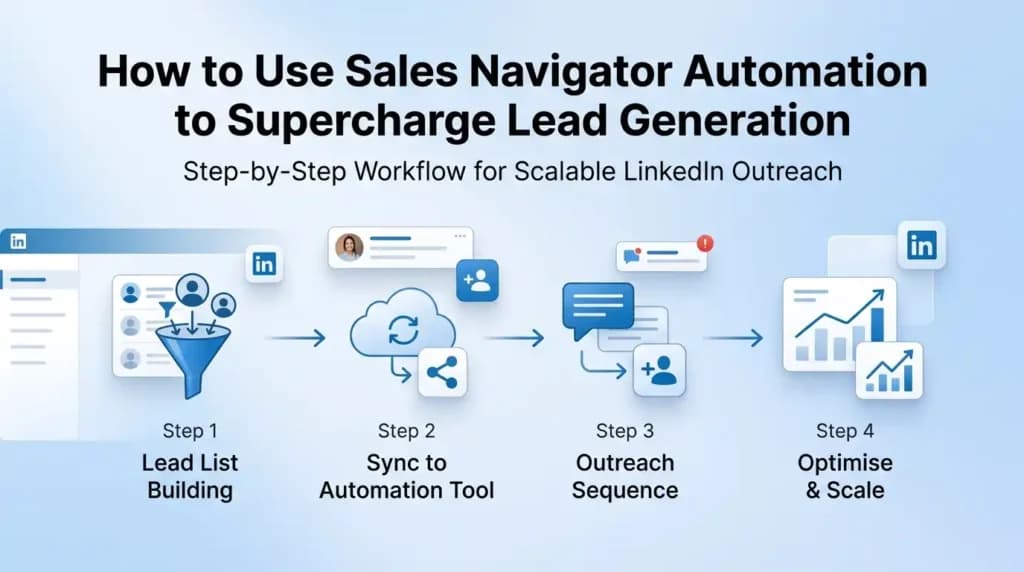
Here is how a well-designed sales navigator automation workflow actually looks in practice:
- Step 1: Build a precision lead list in Sales Navigator. Use advanced filters – job title, seniority level, company size, industry, geography, and even buying intent signals – to create a highly targeted prospect list. The quality of your filter setup at this stage determines the quality of your entire campaign downstream.
- Step 2: Sync leads directly to your automation tool. Most serious linkedin automation tools like Expandi, HeyReach, and Dripify have native Sales Navigator integration. You pull leads directly from a saved search or lead list – no manual CSV exports, no copy-pasting.
- Step 3: Build a smart outreach sequence. Set up a multi-step flow: profile view on Day 1 → connection request with a personalised note on Day 2 → follow-up message three days after acceptance → a second follow-up five days later if no reply. Each message should reference something specific about the prospect – their industry, a recent post, or a pain point relevant to their role.
- Step 4: Monitor, optimise, and scale. Once the sequence is live, track acceptance rates, reply rates, and meeting bookings. A/B test your connection request notes. Optimise the message that gets the highest positive response. Then scale what works.
This combination of linkedin lead generation tools and Sales Navigator is what separates pipelines that consistently produce qualified meetings from scattered outreach efforts that go nowhere.
Did You Know?
When you combine sales navigator automation with a cloud-based linkedin automation tool, sales teams have reported generating 3x more qualified leads compared to manual LinkedIn prospecting – without spending any additional time on outreach. Sales Navigator handles the targeting precision; the automation tool handles execution at scale.
Which LinkedIn Automation Tools Work Best with Sales Navigator?
Not all linkedin automation tools support Sales Navigator equally. Here is a quick breakdown based on integration depth:
- Expandi – Full Sales Navigator integration. Can pull leads directly from saved searches and lead lists. Strong personalisation features complement the high-quality targeting you get from Sales Navigator filters.
- HeyReach – Deep Sales Navigator support, ideal for agencies running multiple client campaigns. Account rotation across senders means you can hit higher total weekly volumes while staying safe.
- Dripify – Supports Sales Navigator on higher-tier plans. Best for structured team workflows where multiple salespeople share the same lead pipeline.
- Waalaxy – Partial integration. Works for basic lead imports but doesn’t have the same depth of native Sales Navigator sync as the tools above.
If sales navigator automation is central to your outreach strategy – and it should be – Expandi and HeyReach are your strongest options.
🔥 LinkedIn Premium Business Plan 12 Months
Original Price ₹23,000 • Get it ₹8XXX
🤖 Gemini AI Advanced Pro Plan
Original Price ₹19,500 • Get it ₹8XXX
💼 LinkedIn Sales Navigator Core
Original Price ₹80,000 • Get it ₹2XXXX
🎨 Canva Pro Lifetime Access
Original Price ₹3,999 • Get it ₹4XX
📚 Coursera Plus Annual Plan
Original Price ₹33,000 • Get it ₹2XXX
✨ Adobe Creative Cloud All Apps
Original Price ₹59,000 • Get it ₹4XXX
Who Should Use Which LinkedIn Automation Tool? A Buyer Persona Guide
One thing most LinkedIn Automation Tools Comparison guides get completely wrong is treating every reader the same. A solo freelancer trying to get three new clients and a 10-person agency managing campaigns for 20 clients have entirely different needs, budgets, and risk tolerances. Here’s a persona-based breakdown to help you cut through the noise.
Best LinkedIn Automation Tools for Agencies in 2026
If you’re an agency managing LinkedIn outreach for multiple clients, the single most important feature you need is proper multi-account management. You cannot afford to be logging in and out of different LinkedIn profiles manually – it defeats the entire purpose of automation and introduces account safety risks.
The best linkedin automation tool for agencies provides:
- A single dashboard where all client accounts run campaigns simultaneously – no manual switching, no chaos
- Account rotation across multiple senders so each account stays within LinkedIn’s daily limits while the campaign as a whole runs at scale
- White-label reporting features so you can share professional, branded performance reports directly with clients
- A unified inbox that separates replies by client account, so your team never accidentally sends a reply from the wrong profile
For pure multi-account management, HeyReach is currently the strongest option. For agencies that prioritise personalisation and per-client campaign customisation, Expandi delivers more depth. If you need a full multi-channel setup combining LinkedIn, email, and Twitter for clients, Meet Alfred rounds out the comparison.
Best Affordable LinkedIn Automation Software for Freelancers
If you’re a freelancer or solo professional building your network and generating inbound leads, you have completely different priorities – mainly simplicity, safety, and cost-effectiveness. You don’t need enterprise features. You need something that works, protects your account, and doesn’t require a technical background to set up.
The best affordable linkedin automation software for solo users right now is Waalaxy for anyone who wants a clean, cloud-based tool with LinkedIn and email in one place – or Dux-Soup for the absolute lowest entry point with surprisingly strong CRM integrations. Both let you run structured outreach without needing a dedicated sales operations person or a big monthly budget.
Also Read – LinkedIn Premium Plans – Complete Introduction & Foundation
How to Stay Safe – Avoiding LinkedIn Bans When Using Automation Tools
No LinkedIn Automation Tools Comparison is complete without a serious section on account safety. This is the section that most people skip – and the section they regret skipping later. Getting your LinkedIn account restricted is a real consequence of using linkedin automation tools carelessly. Your account represents your professional reputation, your network, and often a significant part of your business pipeline. Protecting it has to be non-negotiable.
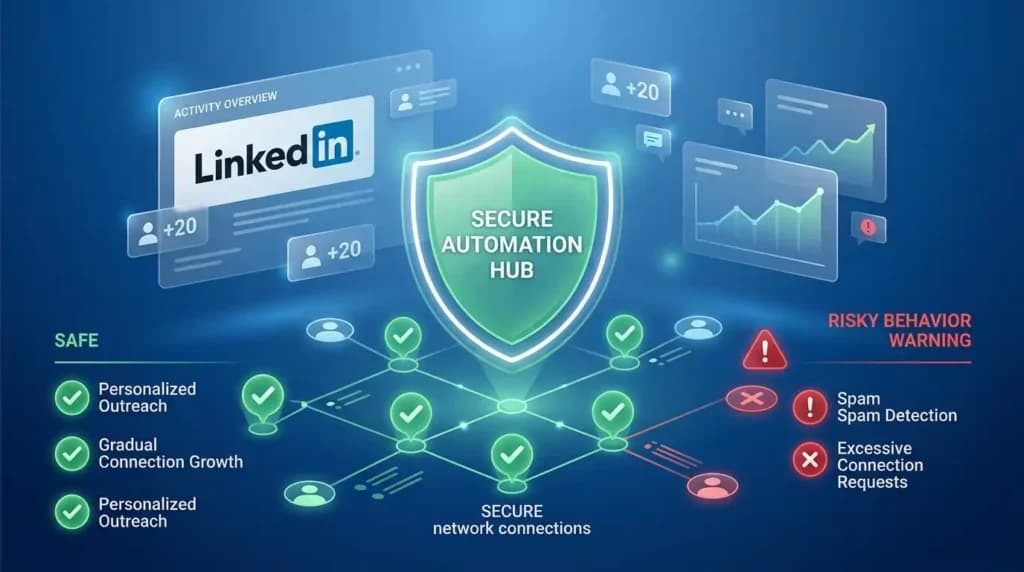
Here are the most important safety rules when running any linkedin outreach software:
- Always start with an account warm-up period. Don’t launch your first campaign sending 80 connection requests on day one. Start with 10-15 per day, increase gradually over two to three weeks. Most good linkedin automation tools include a built-in warm-up feature that handles this automatically, but it’s worth verifying this before you start.
- Respect LinkedIn’s daily and weekly sending limits. LinkedIn typically allows around 100-200 connection requests per week on standard accounts. Premium accounts with certain tools can go slightly higher, but caution is always the right approach. More volume is not automatically better – quality targeting with safe volume consistently outperforms aggressive volume with poor targeting.
- Personalise every message in your sequence. Generic messages like ‘Hi [First Name], I’d love to connect’ get rejected more often, which damages your account’s health score over time. Even basic personalisation – mentioning their industry, their recent post, or a specific pain point – makes a measurable difference in both acceptance rates and long-term account safety.
- Use cloud-based tools over browser extensions. As covered earlier, linkedin bot tools that run through your browser carry a 23% account restriction rate within 90 days. Cloud-based linkedin automation tools on dedicated IPs are inherently safer for sustained, long-term use.
- Make sure your tool has reply detection. Sending a follow-up to someone who has already responded is one of the fastest ways to damage trust and get flagged as spam. Every serious linkedin outreach software should automatically stop the sequence the moment a prospect replies.
- Do not scrape LinkedIn data at scale. Data scraping beyond what is permitted directly violates LinkedIn’s Terms of Service and is the fastest route to a permanent account ban. Stick to tools that work within LinkedIn’s sanctioned data access pathways.
When Is the Right Time to Start LinkedIn Automation?
You are genuinely ready for linkedin automation tools when you’re already sending 20+ connection requests per day manually and struggling to keep up with follow-ups – when you have a clearly defined Ideal Customer Profile and know exactly who you want to reach – when you’ve tested your messaging manually enough to know at least one sequence that gets a real response – and when you’re ready to invest in a cloud-based tool rather than a risky free extension. If you haven’t validated your outreach message manually yet, start there first. Linkedin automation tools scale what’s already working. They don’t fix messaging that isn’t landing.
Also Read – How to Use LinkedIn Sales Navigator: The Definitive Guide for 2026
How Much Do LinkedIn Automation Tools Cost? A Realistic Pricing Overview
Let’s talk about budgeting honestly. This section of our LinkedIn Automation Tools Comparison is one most other blogs skip or oversimplify. While specific prices change frequently and we always recommend checking official tool websites for current rates, here is a clear overview of what to expect across the market tiers:
| Tier | What You Get | Best For |
| Budget (entry) | Basic automation, limited sequences, single account, browser or cloud | Freelancers, solo professionals, first-time users testing the space |
| Mid-range | Cloud-based, multi-channel (LinkedIn + email), CRM integrations, team dashboard | Small sales teams, B2B founders, professionals running consistent monthly outreach |
| Premium | Multi-account management, AI personalisation, white-label reporting, priority support | Growth agencies, established sales organisations, high-volume outbound teams |
| Enterprise | Custom setup, dedicated account manager, full API access, custom integrations | Large enterprise sales teams, multi-regional B2B organisations |
There is one important cost that most LinkedIn Automation Tools Comparison blogs don’t mention clearly enough: to use these linkedin automation tools at their full potential, you need a LinkedIn Premium or Sales Navigator account behind them. Without it, your targeting depth and InMail capabilities are significantly limited.
This is exactly where PremiumToolsHub makes a real difference. If affordable linkedin automation software is what you’re looking for, you need the right LinkedIn account to pair it with – and that doesn’t have to cost you full retail price. PremiumToolsHub provides legitimate access to LinkedIn Premium plans including Career, Business, Sales Navigator, and Recruiter Lite, at prices built for freelancers, small teams, and agencies. Get the LinkedIn access you need to make your linkedin lead generation tools work the way they were designed to.
Chat with PremiumToolsHub on WhatsApp to find the right LinkedIn plan for your outreach goals.
Frequently Asked Questions About LinkedIn Automation Tools Comparison
Are linkedin automation tools safe to use in 2026?
Yes – when you choose reputable, cloud-based linkedin automation tools that include smart throttling, account warm-up sequences, and daily sending limits that respect LinkedIn’s guidelines. Browser-based linkedin bot tools carry significantly higher risk. For long-term use, always default to cloud-based linkedin outreach software with a proven safety record. Your account is a professional asset – treat it accordingly.
What is the best free LinkedIn automation tool?
Truly free linkedin automation tools that work at a practical scale are rare. Most serious platforms offer limited free trials or very restrictive free tiers that cap you at a level where automation barely makes a difference. Waalaxy has a limited free plan worth testing if you want to understand how linkedin lead gen automation works before committing to a paid plan. For anything beyond basic testing, an entry-level paid plan is the minimum viable setup for real results.
How many connection requests can I send per day with automation?
A safe starting point when using linkedin automation tools is 10-20 connection requests per day, gradually increasing over 2-3 weeks to a maximum of around 100-200 per week. Premium LinkedIn accounts and tools with specific ‘Mobile Connector’ technology (like Expandi) can sometimes safely push slightly higher. The rule of thumb: start conservative, warm up slowly, and always prioritise account health over volume. Getting banned sets your pipeline back by months.
What is the difference between Sales Navigator and linkedin automation tools?
Sales Navigator is LinkedIn’s own premium tool for finding and targeting prospects – it gives you advanced search filters, buyer intent signals, and lead recommendations. LinkedIn automation tools handle the execution – sending connection requests, messages, and follow-ups to those prospects automatically. They serve different purposes and work best together: Sales Navigator for high-quality targeting, automation tools for scalable, consistent outreach to those targets. Sales navigator automation is the combination of both.
Which linkedin automation tool is best for agencies?
The best linkedin automation tool for agencies depends on your specific setup. HeyReach is the top pick for agencies managing multiple client accounts from one dashboard, with its account rotation and unified inbox features. Expandi is better suited for agencies running high-volume, highly personalised campaigns for individual clients. Meet Alfred works well for smaller agencies that need true multi-channel outreach – LinkedIn, email, and Twitter – from a single platform.
How is linkedin lead gen automation different from linkedin marketing tools?
LinkedIn lead gen automation focuses on direct outreach – connection requests, personalised messages, and follow-up sequences designed to generate specific leads and book meetings. LinkedIn marketing tools cover a broader scope including content scheduling, post engagement automation, follower growth, and brand awareness tracking. Many modern platforms are combining both functions into a single tool, which is why the distinction is becoming less rigid over time.
Did You Know?
Professionals using linkedin automation tools report saving an average of 10+ hours per week on manual outreach tasks. That is more than a full working day every single week, handed back to you. Redirected toward real sales conversations, strategy, or client delivery, those hours compound into serious business growth over time.
Final Verdict – Which LinkedIn Automation Tool Should You Choose in 2026?
We’ve covered a lot of ground in this LinkedIn Automation Tools Comparison. There is no single best linkedin automation tool for everyone – and anyone who tells you otherwise is oversimplifying. The right choice depends entirely on who you are and what you’re trying to accomplish. Here is the clearest decision guide we can give you:
| Who You Are | Best Tool to Start With | Why This Fits |
| Freelancer / Solo Professional | Waalaxy or Dux-Soup | Affordable, beginner-friendly, cloud-based, no technical setup needed |
| Small Sales Team (2-10 people) | Dripify or Expandi | Team dashboard, multichannel sequences, reliable account safety at scale |
| Agency (multiple clients) | HeyReach or Expandi | Multi-account management, account rotation, white-label reporting, unified inbox |
| Recruiter | Meet Alfred or HeyReach | InMail automation, multi-account support, inbox management for high-volume hiring |
| Enterprise / Large Sales Org | Expandi or Meet Alfred Pro | High-volume campaigns, full CRM integrations, enterprise-grade support |
The one thing that applies to every single person reading this: any of these linkedin automation tools will perform significantly better when combined with a proper LinkedIn Premium or Sales Navigator account. Sales navigator automation gives your outreach the targeting precision that turns generic campaigns into qualified pipeline. Without it, you’re automating outreach to a broad audience instead of the specific decision-makers who are most likely to buy.
If getting LinkedIn Premium or Sales Navigator at an accessible price is what’s been holding you back, PremiumToolsHub is built for exactly that. We provide legitimate access to LinkedIn Premium plans – Career, Business, Sales Navigator, and Recruiter Lite – for professionals, agencies, and teams who want to build a complete, high-performing outreach stack without paying full retail price every month.
Used alongside the right linkedin outreach software, this is how smart professionals turn their LinkedIn into a consistent lead generation engine – not just a place to occasionally send a message and hope for the best.
Ready to build your LinkedIn outreach stack the smart way?
Chat with PremiumToolsHub on WhatsApp and we’ll help you find the right LinkedIn Premium or Sales Navigator plan for your goals – at a price that actually makes sense for your budget.
This LinkedIn Automation Tools Comparison has covered the full picture – from what these tools actually do, to which one fits your exact situation. The world of linkedin automation tools has changed dramatically in 2026. The shift is clear – away from reckless, mass-messaging bots and toward intelligent, cloud-based outreach systems that protect your account, personalise at scale, and integrate naturally with your existing workflow. Whether you’re just starting your first linkedin lead gen automation campaign as a solo freelancer or managing linkedin marketing tools for dozens of client accounts, the options are better and more accessible than ever.
The key is choosing the right linkedin automation tool for your specific situation – using it safely, pairing it with the LinkedIn Premium access you need, and starting with messaging that’s already been validated manually. Automation scales what works. It doesn’t invent results from nothing.
Start with the personal guide in this blog. Pick your tool. Get your LinkedIn Premium access sorted through PremiumToolsHub. And start building the pipeline you’ve been putting off for too long.
Stop Paying Full Price for Tools Your Agency Needs Right Now
Every tool in this guide is powerful. But paying individual retail prices for each one can drain your agency budget fast – especially when you are still in growth mode.
PremiumToolsHub.in is built exactly for this situation. It gives you access to premium automation tools – including n8n, Make.com, Zapier, and a wide range of other business software – at heavily discounted prices, without cutting corners on what matters most.
Here is what makes PremiumToolsHub different from just finding a cheap deal online:
- Proper billing invoice with every purchase – clear payment proof for your accounts or for client reimbursements, so everything stays clean, documented, and professionally handled.
- Real human support on WhatsApp, 9 AM to 12 AM IST – not a chatbot, not a ticket queue. Actual people who help you get access set up quickly and resolve any issues on the spot.
- 100% legitimate access through proper licensing – family plans, team licenses, and authorised reseller arrangements. No cracked accounts, no risk to your data or your clients’ data. Everything is above board.
- Way more than just automation tools – you also get access to AI tools like ChatGPT Plus and Gemini Advanced, creative tools like Adobe Creative Cloud and Canva Pro, LinkedIn Premium plans for career and sales growth, and learning platforms like Coursera Plus. One trusted source for your entire digital toolkit.
Visit – PremiumToolsHub.in or Chat on WhatsApp → +91 90291 51181