If you run a digital agency – even a small one – there is a very good chance that your software bill has quietly doubled in the last two years. Not because you made a big decision to spend more. But because one tool led to another, trials turned into paid plans, team members signed up for things you never approved, and before you knew it, your SaaS stack had grown into something unrecognizable.
And here is the part that really hurts: most of those tools? Half of them are barely used.
The average agency today is paying for somewhere between 15 and 30 software subscriptions every single month. Design tools, AI tools, project management platforms, SEO software, communication apps, client reporting tools – the list keeps growing. And while each individual tool feels justified when you sign up, the combined total hits hard when you actually sit down and do the math.
The good news is that how agencies reduce SaaS costs is no longer a mystery. There are clear, proven, practical strategies that agencies of all sizes – from solo freelancers to 20-person teams – are already using to reduce SaaS costs by 40%, 50%, even 60% or more. Not by removing tools they need. But by being smarter about how they access and pay for the tools they already use.
This guide is going to walk you through exactly how to do that. You will understand why agencies overpay, which tools drain the most money, how to run a proper software audit, and where the real savings are hiding. By the end, you will have a complete action plan to optimize software stack costs without losing a single thing your team genuinely depends on.
Why Is SaaS Spending Out of Control for Agencies in 2026?
Let us start with the honest truth. SaaS spending is not out of control because agencies are careless or irresponsible. It is out of control because the entire system is designed to grow your bill without you noticing.
Every SaaS company in the world wants you to subscribe, forget, and auto-renew. Their pricing pages are built to push you toward annual plans. Their free trials are designed to hook your team before you have a chance to evaluate properly. Their per-seat pricing models quietly multiply every time you add a new hire. And their cancellation flows are intentionally frustrating.
According to industry research, global SaaS spending is now projected to cross $299 billion by the end of 2025. That sounds like a big corporate number – but the reality is different at the agency level. The average small business now spends between 20% and 30% of its operating budget on software subscriptions. And across those subscriptions, studies consistently show that around 30% to 40% of all SaaS spending goes to tools that are either unused, underused, or completely duplicated by something else you are already paying for.
Good SaaS cost management is not just about being frugal. It is about making sure every rupee you spend on software is actively contributing to the work your agency does – for your clients and your own team. The agencies that learn how to reduce SaaS costs early are the ones that stay lean, stay profitable, and have the budget to invest in the things that actually grow the business.
What Is the “Agency Tax” – and Why Do Agencies Overpay More Than Anyone Else?
Here is a concept that nobody talks about, but every agency owner feels: the Agency Tax.
Large enterprises get volume discounts. They negotiate contracts. They have procurement teams and dedicated IT budgets. A company with 500 employees does not pay the same per-user price for a tool that a 10-person agency does. They pay a fraction of it – through enterprise deals, team licensing, or annual contract negotiations.
But the 10-person agency? They go to the same pricing page as a freelancer and pay full retail – often the highest price bracket available.
This is the agency tax. You are running a professional business, serving real clients, doing real work – and you are still paying consumer-grade prices for enterprise-grade tools. To reduce marketing software expenses, agencies have to stop accepting the default pricing and start thinking about their software the same way a CFO does: every subscription should earn its place, and no tool should cost more than what it is actually worth to the work.
| Did You Know? Studies show that on average, only 30% to 50% of licensed users on any SaaS platform are actually active in a given month. This means that for most agencies, nearly half of all software seats are being paid for but not used. Identifying and removing these unused seats is often the single fastest way to reduce SaaS costs – sometimes saving 20% to 30% of the total software bill in a single audit. |
Also Read – Best Tools for Digital Marketing Agencies in 2026: The Complete SaaS Stack Guide
🔥 LinkedIn Premium Business Plan 12 Months
Original Price ₹23,000 • Get it ₹8XXX
🤖 Gemini AI Advanced Pro Plan
Original Price ₹19,500 • Get it ₹8XXX
💼 LinkedIn Sales Navigator Core
Original Price ₹80,000 • Get it ₹2XXXX
🎨 Canva Pro Lifetime Access
Original Price ₹3,999 • Get it ₹4XX
📚 Coursera Plus Annual Plan
Original Price ₹33,000 • Get it ₹2XXX
✨ Adobe Creative Cloud All Apps
Original Price ₹59,000 • Get it ₹4XXX
Which SaaS Tools Are Draining the Most Money from Agency Budgets?
Not all software categories cost the same, and not all of them give you the same return. When you are trying to optimize saas spending and genuinely reduce SaaS costs across your agency, it helps to know where the biggest waste is hiding – so you can go after the high-impact areas first instead of spending weeks reviewing every tool equally.
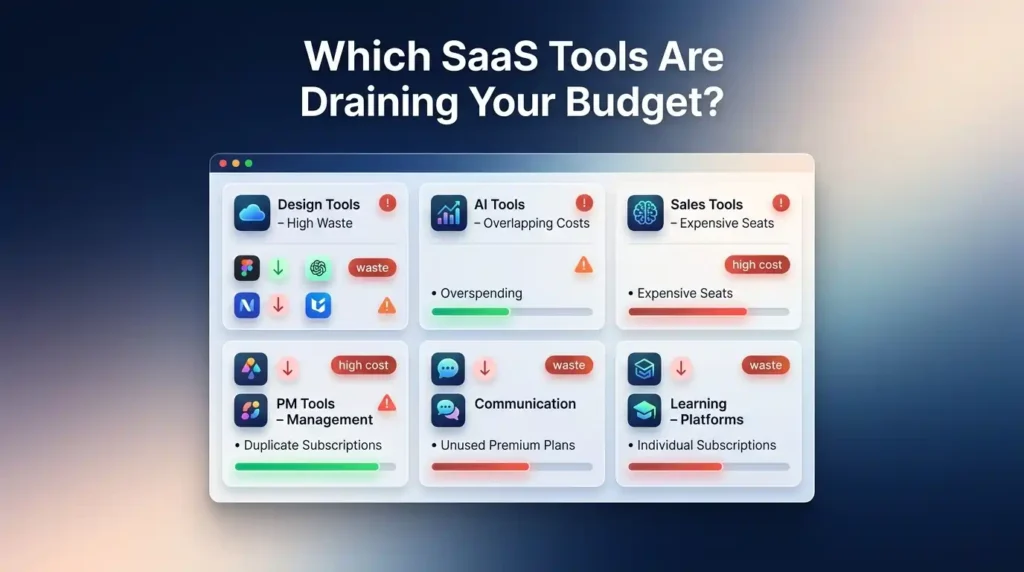
Here is how the main software categories typically break down for agencies:
| Software Category | Why Agencies Overpay Here | How Bad Is the Waste? | Priority to Fix |
| Design & Creative Tools (Adobe, Canva) | Full suite subscriptions bought for 2-3 apps out of 20+ available | Very High – most agency teams use only Photoshop and Illustrator from a full Creative Cloud plan | Act Immediately |
| AI & Productivity Tools (ChatGPT, Gemini, Notion) | Multiple overlapping AI tools doing the same job – writing, summarizing, generating | Very High – agencies commonly pay for 3-4 AI tools that all cover the same use case | Act Immediately |
| LinkedIn & Sales Tools | Per-seat pricing that multiplies across BD, outreach, and sales teams | High – LinkedIn Premium plans are expensive and rarely audited for actual usage | Review Every 90 Days |
| Project Management (Notion, Trello, Asana) | Teams migrate to a new tool but the old subscription keeps running | Medium to High – duplicate PM tools are one of the most invisible wastes | Check for Duplicates |
| Communication (Zoom, Slack, Teams) | Premium plans for features that the free tier covers completely | Medium – most small agencies need far fewer call minutes than premium plans provide | Downgrade Candidate |
| Learning Platforms (Coursera, Skillshare) | Each team member buying their own subscription individually | Medium – paying separately for every team member is always the most expensive option | Switch to Group Plan |
Is Your Agency Paying for the Same Tool Twice Without Knowing It?
This is the uncomfortable question that most agency owners avoid asking – but it is one of the most important ones.
Tool overlap happens slowly and silently. Your creative team migrated from Adobe to Canva six months ago, but nobody cancelled the Adobe subscription. Someone on your content team signed up for Jasper AI, while another person is already using ChatGPT Plus for the exact same tasks. You are paying for both Zoom and Google Meet because they came with different client accounts, but your team only actually uses one of them.
These overlaps are not anybody’s fault. They are the natural result of teams growing, tools evolving, and subscriptions being scattered across multiple credit cards and billing emails. But the financial damage is very real. Removing duplicate tools alone can reduce SaaS costs by 20% to 30% in many cases – with zero disruption to anyone’s workflow.
Also Read – Adobe Creative Cloud Pricing Guide: Plans, Costs, and Best Value in India
How to Audit Your Agency’s SaaS Stack in 4 Simple Steps
A SaaS audit sounds corporate and complicated. It is not. For most agencies, a thorough audit takes two to three focused hours – and the results are almost always eye-opening. This is also the single most effective first step you can take to genuinely reduce SaaS costs on your own, without needing any special tools or outside help. Here is exactly how to do it.
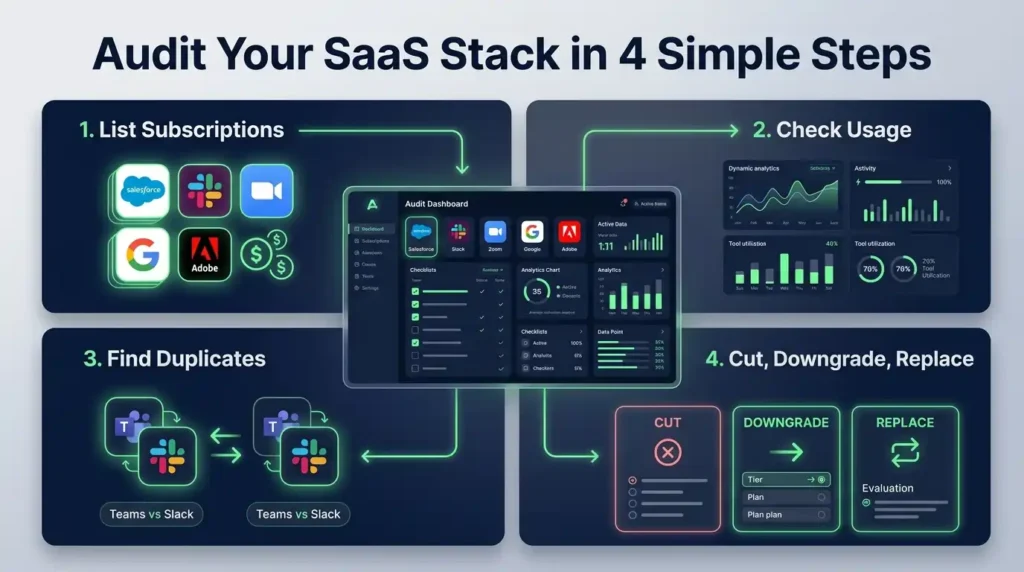
- Step 1: Pull up every single subscription you are currently paying for. Go through your bank statements, credit card statements, and any accounts your team uses for business payments. Go back at least three months. Write down every recurring charge you find. Do not filter at this stage – include everything, even things that look familiar. Many agencies are genuinely shocked by how many subscriptions appear that they had completely forgotten about. Free trials that converted. Annual renewals that auto-fired. Tools that were “temporary” two years ago. Write them all down. To properly manage saas subscriptions, you need to start from a complete picture – a messy, incomplete list leads to a messy, incomplete audit.
- Step 2: Check actual usage for each tool on your list. For every subscription you found, answer one simple question: has anyone on your team actually logged into and used this tool in the last 30 days? Most SaaS platforms show this data in their admin dashboard or billing settings. If you do not have admin access, a quick team survey works just as well. Ask each person which tools they use daily, which they use occasionally, and which they honestly cannot remember the last opening. Usage data is the foundation of any real plan to optimize saas spending – without it, you are guessing.
- Step 3: Identify every tool that is doing the same job as something else on your list. Look for overlap. Common duplicates that agencies discover include: paying for both Notion and Trello because they migrated but never cancelled the old one; subscribing to multiple AI writing tools doing the exact same job; holding onto two VPN subscriptions because someone found a better option months ago; having Zoom and Google Meet both on paid plans when the team only uses one. Every duplicate you remove is money coming directly back to your agency – with zero impact on the quality of work you deliver.
- Step 4: Sort every subscription into one of three buckets. Now that you have the full picture, make decisions. Cut immediately – tools that are unused, forgotten, or fully replaced by something else. Cancel with no hesitation. This is free money. Downgrade – tools you genuinely need but are on a plan far beyond your actual usage level. Downgrading is a clean way to save money on software subscriptions without disrupting anyone. Replace or renegotiate – tools your team truly depends on, but where the official pricing is far higher than what you should pay. This is where platforms like PremiumToolsHub become genuinely valuable.
When Should an Agency Cancel, Downgrade, or Replace a SaaS Tool?
Timing matters more than most people realize when it comes to saas savings strategies. Cancelling a tool right after your annual plan just renewed means you have already paid for the year and the cancellation saves nothing until the next cycle.
The smartest approach is to track renewal dates proactively – at least 30 days in advance. When you know a renewal is coming up, you have time to evaluate: is this tool worth keeping at this price? Could you negotiate a better rate? Is there a shared plan option? A particularly useful question for agencies is whether a given tool cost should be passed on to a client as a project budget expense, rather than absorbed as agency overhead.
| Did You Know? Most SaaS vendors are willing to negotiate pricing – but only if you ask, and only if you ask at the right time. The best window to negotiate is 30 to 60 days before your renewal date, when vendors still have an incentive to retain you. Agencies that negotiate proactively as part of their SaaS cost management routine consistently report 10% to 30% discounts on tools they were about to renew at full price. The ask costs nothing. The silence costs you money every single year. |
Also Read – LinkedIn Premium Plans – Complete Introduction & Foundation
🔥 LinkedIn Premium Business Plan 12 Months
Original Price ₹23,000 • Get it ₹8XXX
🤖 Gemini AI Advanced Pro Plan
Original Price ₹19,500 • Get it ₹8XXX
💼 LinkedIn Sales Navigator Core
Original Price ₹80,000 • Get it ₹2XXXX
🎨 Canva Pro Lifetime Access
Original Price ₹3,999 • Get it ₹4XX
📚 Coursera Plus Annual Plan
Original Price ₹33,000 • Get it ₹2XXX
✨ Adobe Creative Cloud All Apps
Original Price ₹59,000 • Get it ₹4XXX
5 Proven Strategies Agencies Use to Reduce SaaS Costs by 50%
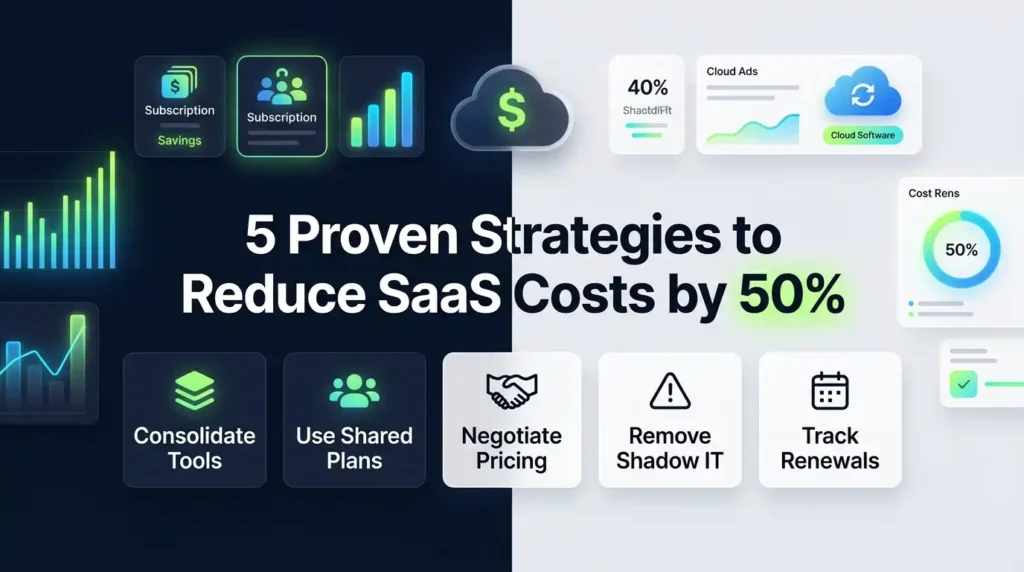
These are the five strategies that agencies actually use – not corporate theory, but real moves that save real money. Together, they are what allow agencies to reduce SaaS costs by 50% or more without touching the tools that matter. Every strategy below has been tested by real agencies managing real budgets – and every one of them is something you can start acting on today.
Strategy 1: Consolidate Overlapping Tools into One Multi-Purpose Platform
The simplest and fastest win in any software cost reduction effort is consolidation. Look at your tool list and find every case where two or three tools are serving functions that one well-chosen platform could handle. The most powerful example for agencies is moving to a single flexible workspace like Notion, which can replace a project management tool, an internal wiki, a client documentation hub, a meeting notes system, and a content calendar – all at once. Every tool Notion replaces is a subscription you cancel immediately. The key is asking honestly: is this second tool doing something genuinely irreplaceable, or is it just a habit?
Strategy 2: Switch from Per-Seat Pricing to Shared or Group Plans
This is the strategy with the biggest impact and the least discussion. Every time you add a new hire, per-seat pricing automatically increases your software bill without any deliberate decision on your part. The alternative is to look for shared or group licensing options where multiple users access the same premium tool through a single centralized subscription at a much lower per-person cost.
This is the model that platforms like PremiumToolsHub are built around. By accessing tools through legitimate team licensing and authorized shared plans, agencies can get full access to premium software – Adobe Creative Cloud, ChatGPT Plus, LinkedIn Premium, Notion Business, and many more – at costs that are 50% to 85% lower than paying per-seat retail. This is not a workaround. These models work because major software companies explicitly offer team, family, and corporate licensing structures designed for exactly this kind of shared access.
Strategy 3: Negotiate Annual Contracts Before Renewal Dates
Negotiation is not just for big enterprise deals. Agencies of any size can negotiate SaaS pricing – and most vendors will respond, especially when you approach them with data. The most effective approach is to contact your vendor 30 to 60 days before your renewal date. Let them know you are evaluating your software budget. Ask directly whether there are loyalty discounts, multi-year deal options, or plan adjustments available. This single habit, applied consistently as part of your optimize saas spending routine, can return meaningful savings each year across your full software stack.
Strategy 4: Find and Remove Shadow IT – Tools Your Team Buys Without Approval
Shadow IT is what happens when team members purchase their own tools without central visibility or approval. It is extremely common in agencies. Someone on your design team buys a Canva Pro subscription because they do not know the agency already has one. A developer purchases a tool to cut software costs for startups thinking it will help – without realizing it overlaps with something that already exists. The fix is simple: create a low-friction process for requesting new tools, and do a monthly check on expense reports to catch any new shadow subscriptions before they multiply.
Strategy 5: Build a SaaS Renewal Calendar to Stop Auto-Renewals Silently Draining Your Budget
A renewal calendar is a shared document – it can be a Google Sheet, a Notion page, or anything your team already uses – that lists every subscription your agency has, along with its renewal date, cost, and the owner. Every new subscription goes into the calendar. Every renewal landing in the next 30 days gets reviewed. This single habit does more for long-term saas cost management than any other tactic. It prevents you from being charged for a full year on something you meant to cancel. It gives you advance notice to negotiate. It makes sure the cost reduction work from your audit does not silently unravel when old subscriptions auto-renew.
Also Read – How to Use Notion for Content Planning
Where Do Smart Agencies Find Premium Tools at 50-85% Off the Official Price?
Once you know which tools you actually need, the next question is where to find them at a price that makes sense for an agency budget. Most people go directly to the official website and pay whatever is listed. That is the most convenient option – and almost always the most expensive one. Here is where smart agencies actually look:
- Official family and team plans – Many SaaS companies offer family or team plans that allow multiple users to share one subscription at a significantly lower per-person cost. These plans are listed on pricing pages but are easy to overlook when you are in a hurry to get access.
- Annual billing discounts – Almost every SaaS platform offers a 20% to 40% discount if you commit to annual billing instead of monthly. If you know you will use a tool for the full year, switching from monthly to annual is one of the easiest ways to save money on software subscriptions immediately, with no change to what you get.
- Student and nonprofit discounts – Tools like Adobe Creative Cloud, Notion, and Grammarly offer significantly discounted rates for students and registered nonprofits. If your team includes eligible members, this can mean 50% to 70% off standard pricing.
- Verified shared access platforms – This is the most powerful option for agencies. Platforms like PremiumToolsHub provide access to premium tools through legitimate team licensing, corporate plans, and authorized reseller programs – at prices dramatically lower than paying each vendor directly. Instead of managing 15 separate subscriptions with 15 different billing dates, you access everything through one trusted provider at a fraction of the combined cost.
Is Shared Plan Licensing Legal and Safe for Agency Use?
This is the first question most people ask – and it is absolutely the right question. The answer is yes, when it is done through the right channels. Legitimate shared licensing works through structures that the original software companies explicitly design and allow: family plans, team workspaces, corporate licensing tiers, and authorized reseller programs. These are not loopholes – they are built into the products intentionally, to make tools accessible to different types of users at different price points.
The key is working with a provider who is transparent about how their access model works, who backs every subscription with a real warranty, and who has genuine support available when something needs fixing. That is exactly what separates a platform like PremiumToolsHub – which operates on legitimate licensing, offers full WhatsApp support, and warranties every subscription – from a sketchy source with no accountability. For agencies serious about optimize software stack costs for the long term, shared licensing through a trustworthy platform is one of the most impactful and sustainable moves available.
| Did You Know? Individual freelancers and small agencies often end up paying the highest possible price for SaaS tools – more than large enterprises pay for the exact same software. This is because enterprise clients negotiate volume discounts and access corporate pricing tiers, while individuals pay the full consumer retail rate. Platforms that offer group or shared access to premium tools are specifically designed to close this gap – giving small agencies access to the same tools, at pricing that is closer to what large businesses actually pay. This is one of the most direct ways to reduce marketing software expenses without any compromise on quality. |
🔥 LinkedIn Premium Business Plan 12 Months
Original Price ₹23,000 • Get it ₹8XXX
🤖 Gemini AI Advanced Pro Plan
Original Price ₹19,500 • Get it ₹8XXX
💼 LinkedIn Sales Navigator Core
Original Price ₹80,000 • Get it ₹2XXXX
🎨 Canva Pro Lifetime Access
Original Price ₹3,999 • Get it ₹4XX
📚 Coursera Plus Annual Plan
Original Price ₹33,000 • Get it ₹2XXX
✨ Adobe Creative Cloud All Apps
Original Price ₹59,000 • Get it ₹4XXX
Who Benefits Most from Reducing SaaS Costs – Agencies, Startups, or Freelancers?
The honest answer is that almost anyone who pays for software regularly stands to benefit from thinking more carefully about what they pay and how they pay it. But three groups feel the impact most directly.
- Digital agencies are the biggest beneficiaries of smarter SaaS spending. Agencies have complex tool needs – design software, project management, AI tools, communication apps, client reporting platforms, and more. And because they work across multiple clients simultaneously, they often feel pressure to maintain full access to every tool, even when most sit mostly idle on certain accounts. Knowing how agencies reduce SaaS costs through consolidation and shared plans is the difference between healthy agency margins and a software bill that quietly eats your profitability alive.
- Startups face a different version of the same problem. They are tempted to build a “complete” tech stack from day one – because they see what established agencies use and want to operate the same way. But paying full retail for every tool from the start is one of the fastest ways to burn through runway on expenses that do not directly grow the business. Smart saas savings strategies for startups are about building a lean, high-performance stack with only the tools that directly support growth – and accessing them at the lowest possible legitimate cost.
- Freelancers and solo professionals are, statistically, the most overpaying group of all. They pay individual consumer pricing – almost always the highest available tier per user – for tools designed for teams. A freelancer paying full price for Adobe Creative Cloud, LinkedIn Premium, ChatGPT Plus, and Notion individually is paying significantly more per user than a company accessing those same tools through a team or shared plan. The opportunity to cut software costs for startups and individual professionals through group access models is substantial – and it does not require giving up any features or quality.
Also Read – Notion vs Obsidian – Best Knowledge Management Tool?
Real Agency SaaS Stack: Before vs After Optimization (With Actual Savings)
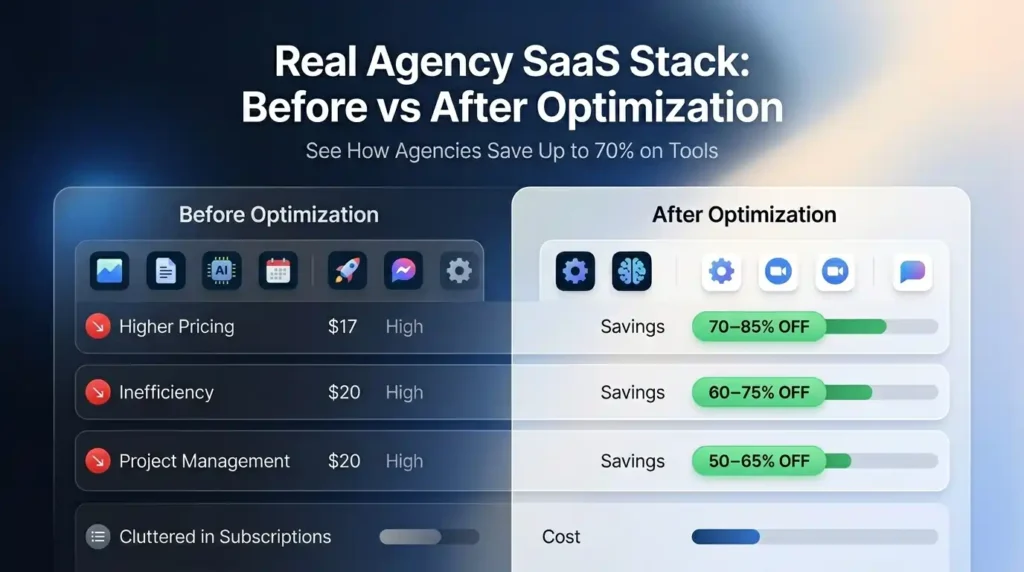
Let us make this concrete. Here is what a typical 8-tool agency software stack looks like before and after applying the strategies in this guide – with the kind of realistic percentage savings that agencies consistently report when they actually do the work.
| Tool | Before (Typical Agency Pays) | After (Optimized Access) | Savings |
| Adobe Creative Cloud (All Apps) | Full individual annual plan – expensive | Shared team plan via PremiumToolsHub | 70-85% off |
| LinkedIn Premium (Business or Sales Navigator) | Individual per-seat billing | Shared plan via PremiumToolsHub | 60-75% off |
| ChatGPT Plus | Individual subscription per team member | Shared plan via PremiumToolsHub | 65-80% off |
| Notion Business | Per-seat billing for full team | Shared workspace plan | 50-65% off |
| Canva Pro | Individual subscription | Shared pro plan | 60-75% off |
| Gemini Advanced | Individual per-user subscription | Shared plan via PremiumToolsHub | 55-70% off |
| Project Management Tool | Paying for duplicate (2 tools in use) | Consolidated to 1 – cancelled the duplicate | 100% on duplicate |
| VPN (NordVPN / Surfshark) | Individual subscription | Shared / group plan | 50-65% off |
When you apply shared plan access across the tools where it is available, consolidate the duplicates, and downgrade the tools where you are on a plan far beyond actual usage – the combined savings easily land between 50% and 70% of what you were previously spending. That is not a small number. For any agency spending meaningfully on software each month, this is real money that can go back into hiring, client work, or simply becoming more profitable. And not a single one of those savings required removing a tool your team actually uses. This is exactly what it looks like when agencies reduce SaaS costs the right way – not by cutting corners, but by cutting the waste.
Also Read – Zapier vs Make vs n8n: Which Workflow Automation Software Is Best in 2026?
| Ready to Reduce SaaS Costs for Your Agency? Here Is Where to Start. You have done the hard thinking. You understand what is draining your budget, you know the strategies that work, and you have seen what optimized spending looks like in practice. The only question left is – who do you trust to help you get there? At PremiumToolsHub, we have helped 650+ agencies, freelancers, and startups across 15+ countries access the exact same premium tools they were already using – just at prices that finally make sense. Here is what you get when you work with us: 1. Proper billing invoice with every purchase – every transaction is clean, documented, and professional. You get a proper invoice with each purchase so your agency books are always in order, with zero ambiguity about what you paid and what you received. 2. Real human support on WhatsApp, 9 AM to 12 AM IST – no bots, no ticket queues, no waiting three days for an email reply. A real person answers your WhatsApp message and resolves your issue – usually within a few hours, sometimes within minutes. 3. 100% legitimate access through proper licensing – all tool access is provisioned through official family plans, team workspaces, corporate licensing tiers, and authorized reseller programs. No cracked software. No stolen accounts. No risk to your agency’s reputation or security. 4. Way more than just automation tools – PremiumToolsHub is not a one-trick platform. You get access to a full range of premium tools across AI and productivity, design and creative, business and career, and learning and entertainment – all in one place, all backed by the same warranty and support. Visit premiumtoolshub.in or send a message on WhatsApp to see exactly how much your agency could be saving – starting from your very next billing cycle. |
Conclusion: Your Agency Does Not Have to Choose Between Great Tools and a Sensible Budget
If there is one thing this guide should leave you with, it is this: the tools your agency needs to do great work do not have to cost what they currently cost. The gap between what agencies pay and what they could pay – without losing access to anything – is enormous. And closing that gap is not about being cheap. It is about being smart.
Here is a quick recap of what we covered:
- The Agency Tax is real – agencies pay full consumer retail prices while enterprises pay negotiated rates. Shared plans and group licensing models exist specifically to close that gap for smaller teams.
- SaaS cost management starts with a proper audit – a complete list, real usage data, and a ruthless look at what is duplicated or unused.
- The five core saas savings strategies – consolidation, shared plans, negotiation, shadow IT removal, and renewal tracking – each tackle a different layer of the waste problem. Together, they consistently deliver 50% or more in total savings.
- Platforms like PremiumToolsHub offer legitimate shared access to premium tools – Adobe Creative Cloud, LinkedIn Premium, ChatGPT Plus, Gemini Advanced, Notion, Canva Pro, and more – at prices that make these tools genuinely affordable for agencies, startups, and freelancers.
- The best time to start is now – every month you wait is another month of overpaying for tools your team deserves to have at the right price.
If you want to see exactly how much your agency could be saving on the tools you are already using, the team at PremiumToolsHub is one WhatsApp message away. No complicated onboarding. No hidden fees. Just real access to the tools your agency runs on – at prices that finally make sense.