| The best AI tools for marketing agencies in 2026 fall into four categories: design (Canva), content and ideation (ChatGPT and Gemini), workflow and client management (Notion), and automation (n8n). Together, these four tools let a small agency run client reporting, content production, and project tracking with far fewer manual hours, without hiring extra staff for repetitive work. |
Every marketing agency owner has felt it: the week where client work piles up faster than the team can produce it. Reports are due, creatives need approval, and someone still has to write the caption for tomorrow’s post. This is exactly where an AI and automation stack earns its place.
An agency doesn’t need twenty tools. It needs four that talk to each other well – one for design, one for content thinking, one for organizing the work, and one for connecting everything so people stop copy-pasting data between apps. That’s the practical shape of the best AI tools for marketing agencies in 2026, and it’s what this guide breaks down.
This isn’t a theoretical list. It’s built around how agencies actually operate – juggling five to fifteen clients, tight budgets, and small teams where one person often wears three hats.
If you’re evaluating tools for digital marketing agency operations more broadly – not just AI tools – this same four-category thinking applies: design, content, workflow, and automation cover almost everything an agency needs day to day.
Key Takeaways
● A lean four-tool stack (Canva, ChatGPT/Gemini, Notion, n8n) covers design, content, workflow, and automation for most agencies.
● Canva Pro’s Team plan is built for shared brand kits across multiple client accounts, not just single-user design.
● ChatGPT and Gemini serve different jobs – one leans stronger for structured writing, the other for research-heavy, current responses.
● n8n removes manual reporting work by connecting ad platforms, spreadsheets, and messaging tools without a developer.
● Notion works best as the single source of truth for client status, content calendars, and SOPs.
● Buying tools individually gets expensive fast; agencies increasingly use bundled or reseller access to control per-seat costs.
Also Read – Best AI Tools for Digital Marketing Agencies in 2026 – The Ultimate Guide
🔥 LinkedIn Premium Business Plan 12 Months
Original Price ₹23,000 • Get it ₹8XXX
🤖 Gemini AI Advanced Pro Plan
Original Price ₹19,500 • Get it ₹8XXX
💼 LinkedIn Sales Navigator Core
Original Price ₹80,000 • Get it ₹2XXXX
🎨 Canva Pro Lifetime Access
Original Price ₹3,999 • Get it ₹4XX
📚 Coursera Plus Annual Plan
Original Price ₹33,000 • Get it ₹2XXX
✨ Adobe Creative Cloud All Apps
Original Price ₹59,000 • Get it ₹4XXX
What Is an AI + Automation Stack (and Why Agencies Need One)
An AI and automation stack is a connected set of tools that handles content creation, task organization, and repetitive reporting so agency teams spend more time on strategy and client relationships than on manual production. For a marketing agency, this typically means a design tool, a generative AI tool, a project management layer, and an automation connector.
The reason this matters now isn’t hype. Client expectations have shifted. Brands hiring an agency in 2026 expect faster turnaround on creatives, weekly instead of monthly reporting, and content volume that used to require a bigger team. Without some automation, agencies either burn out their staff or turn away clients they can’t service properly.
A good stack doesn’t try to automate everything. It automates the parts that are repetitive and low-judgment – pulling ad metrics into a report, resizing a creative for five platforms, drafting a first version of a caption – while keeping strategy, client calls, and final creative decisions with actual humans.
Best AI Tools for Marketing Agencies in 2026 – Overview
What AI tools should a marketing agency use in 2026?
A marketing agency in 2026 should use one tool per core function rather than several overlapping options – a design tool, a content/research AI, a workflow tracker, and an automation connector. Here’s how the main options stack up:
| Tool | Core Job | Best For | Agency Use Case |
| Canva | Design & creative production | Social posts, decks, ad creatives | Brand kits, bulk resizing, templated client creatives |
| ChatGPT | Content writing & ideation | Blog drafts, ad copy, brainstorming | First-draft content, campaign ideas, client emails |
| Gemini | Research-backed writing | Market research, competitor analysis | Fact-checked briefs, trend research, data summaries |
| Notion | Workflow & documentation | SOPs, content calendars, dashboards | Single view of every client’s status |
| n8n | Automation & integration | Connecting apps, reporting, alerts | Auto-pulling ad data into client reports weekly |
| Did You Know?Agencies using at least one automation tool for reporting typically cut their manual reporting time by more than half, simply by removing the copy-paste step between ad platforms and spreadsheets. |
No single tool on this list replaces a strategist. Each one removes a specific bottleneck – and the combination is what makes the difference, not any individual app in isolation.
Also Read – Best Automation Tools for Agencies in 2026: The Only Guide You Need to Scale Smarter
🔥 LinkedIn Premium Business Plan 12 Months
Original Price ₹23,000 • Get it ₹8XXX
🤖 Gemini AI Advanced Pro Plan
Original Price ₹19,500 • Get it ₹8XXX
💼 LinkedIn Sales Navigator Core
Original Price ₹80,000 • Get it ₹2XXXX
🎨 Canva Pro Lifetime Access
Original Price ₹3,999 • Get it ₹4XX
📚 Coursera Plus Annual Plan
Original Price ₹33,000 • Get it ₹2XXX
✨ Adobe Creative Cloud All Apps
Original Price ₹59,000 • Get it ₹4XXX
Canva Pro for Agency Teams
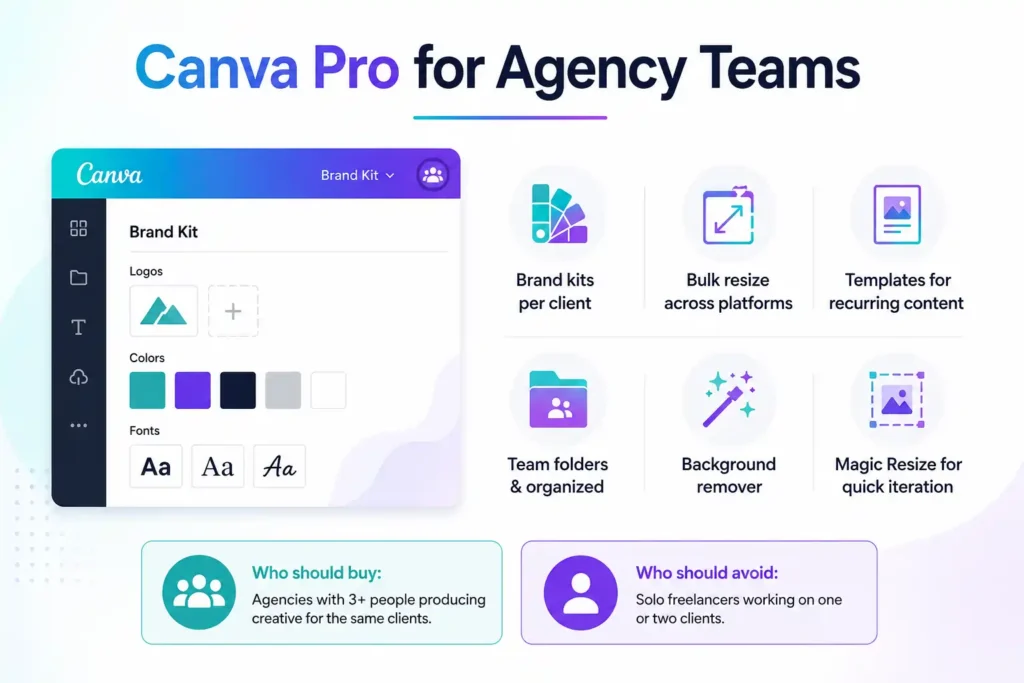
Canva Pro’s Team plan is worth it for a marketing agency because it centralizes brand kits, fonts, and templates across every team member working on a client, which prevents off-brand creative slipping through and cuts creative turnaround time significantly compared to individual accounts.
For an agency managing multiple client brands, the single biggest advantage isn’t the design tool itself – most designers already know a design tool. It’s the ability to set up a separate brand kit per client, lock fonts and colors, and let junior team members create on-brand content without constant senior review.
What agency teams actually use inside Canva
● Brand kits per client to keep colors, logos, and fonts consistent across every asset
● Bulk resize to adapt one creative across Instagram, LinkedIn, and Facebook specs instantly
● Templates for recurring content types (weekly promos, testimonials, carousel posts)
● Team folders so client work stays separated and organized
● Background remover and Magic Resize for quick creative iteration
Who should buy the team plan: Agencies with 3+ people producing creative for the same clients, where consistency and shared assets matter more than individual flexibility.
Who should avoid it: Solo freelancers working on one or two clients may not need team-level features and can manage with a single-seat plan.
ChatGPT vs Gemini for Marketing Agencies
ChatGPT is generally stronger for structured, long-form content like blog drafts, ad copy variations, and email sequences, while Gemini tends to perform better for research-heavy tasks that need current information, like competitor analysis or trend summaries. Most agencies end up using both rather than picking one exclusively.
The comparison matters because agencies often default to one tool out of habit, then wonder why certain outputs feel weak. The honest answer is that these tools have different strengths, and knowing which job to send where saves real editing time.
| Factor | ChatGPT | Gemini |
| Long-form content structure | Strong | Moderate |
| Research with current data | Moderate | Strong |
| Ad copy variations | Strong | Moderate |
| Integration with Google Workspace | Limited | Native |
| Brainstorming campaign angles | Strong | Strong |
| Fact-checking / citations | Moderate | Stronger |
| Did You Know?Neither tool should be used to publish a first draft as final client content. Every agency workflow that skips a human edit pass eventually ships an error or off-brand tone to a client – the fix is a mandatory review step, not avoiding AI drafting altogether. |
Practical split many agencies use
● ChatGPT for first drafts of blogs, ad copy, and email campaigns
● Gemini for research briefs, competitor scans, and anything needing recent data
● Both reviewed and edited by a human before anything goes to a client
🔥 LinkedIn Premium Business Plan 12 Months
Original Price ₹23,000 • Get it ₹8XXX
🤖 Gemini AI Advanced Pro Plan
Original Price ₹19,500 • Get it ₹8XXX
💼 LinkedIn Sales Navigator Core
Original Price ₹80,000 • Get it ₹2XXXX
🎨 Canva Pro Lifetime Access
Original Price ₹3,999 • Get it ₹4XX
📚 Coursera Plus Annual Plan
Original Price ₹33,000 • Get it ₹2XXX
✨ Adobe Creative Cloud All Apps
Original Price ₹59,000 • Get it ₹4XXX
Notion for Marketing Agency Workflow
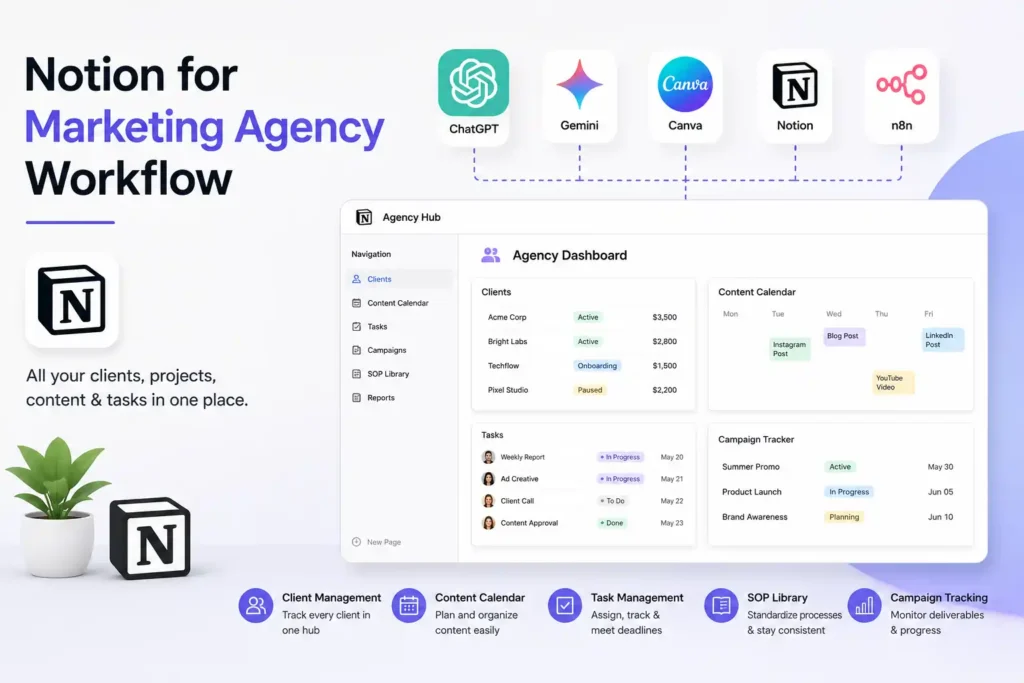
Notion works as an agency’s operating hub when it’s used to track client status, content calendars, and internal SOPs in one connected workspace, rather than scattering that information across spreadsheets, email threads, and chat messages. It’s a workflow layer, not a content-creation tool.
Agencies that get real value from Notion usually set it up around three connected views: a client database (status, contract details, contact info), a content calendar (linked to each client), and a task board (who’s doing what, by when). When these are properly linked, a single glance shows exactly where every client stands.
Best Notion templates for a digital marketing agency typically include
● Client CRM database with status, retainer value, and renewal dates
● Content calendar linked to each client’s brand and platform
● SOP library for repeatable processes (onboarding, reporting, content approval)
● Campaign tracker with deliverables and deadlines
● Team task board organized by client and priority
Who should use Notion: Agencies juggling 5+ clients where information currently lives in scattered spreadsheets or someone’s inbox.
Who should avoid over-relying on it: Notion isn’t built for real-time collaborative design or heavy automation on its own – it needs to stay the tracking layer, with Canva and n8n doing the actual production and automation work.
Automate Client Reporting with n8n
Agencies automate client reporting with n8n by connecting ad platforms, analytics tools, and spreadsheets through pre-built workflows that pull performance data on a schedule and format it into a report automatically, removing the need to manually export and compile numbers every week or month.
This is the piece most agencies skip the longest – not because it’s hard, but because it feels optional until the client list grows past four or five accounts. At that point, manual reporting starts eating hours that should go toward strategy.
A typical n8n reporting workflow for an agency
1. Trigger runs on a set schedule (weekly or monthly)
2. Pulls data from ad accounts, Google Analytics, or a CRM
3. Formats the data into a spreadsheet or document template
4. Sends the finished report to the client via email or a shared link
5. Optionally posts a summary to the internal team channel
How agencies use n8n for marketing agency automation beyond reporting
● Auto-tagging new leads from a form into a CRM
● Sending Slack or WhatsApp alerts when a campaign metric crosses a threshold
● Syncing new client onboarding data into Notion automatically
● Pulling social media engagement stats into a weekly summary
| Did You Know?n8n is self-hostable and workflow-based rather than pay-per-task, which is why many agencies prefer it over per-automation pricing tools once their workflow volume grows past a handful of processes. |
Also Read – Best Cheap SaaS Tools for Agencies in 2026 – Save Up to 85% Without Losing Performance
Step-by-Step: How to Build an AI Tool Stack for a Marketing Agency
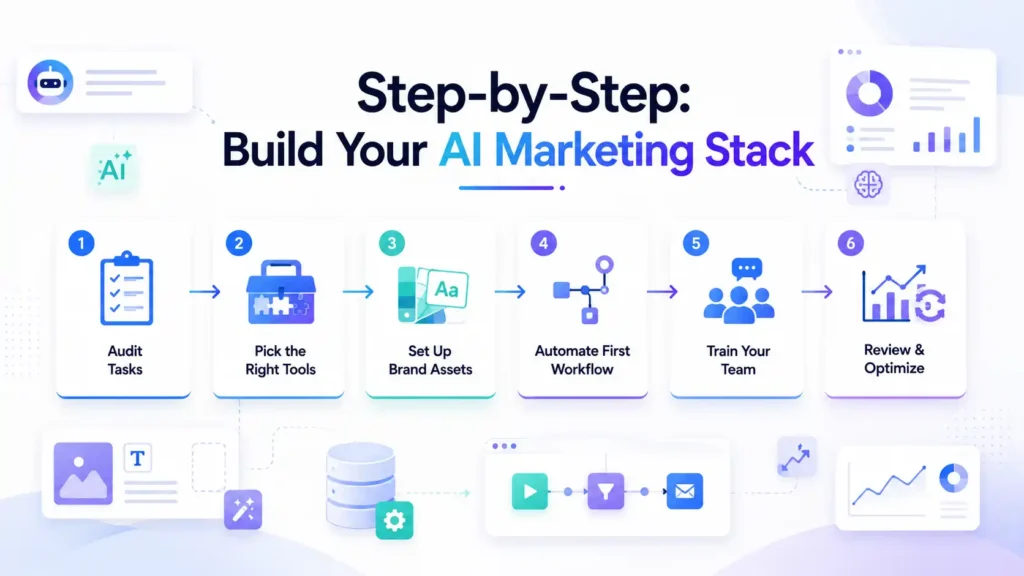
Building an AI tool stack for a marketing agency starts with mapping the repetitive tasks your team already does manually, then matching each task to one tool rather than adopting tools first and figuring out use cases later. The sequence matters more than the tool list.
Step 1: Audit your repetitive tasks. List everything your team does weekly that doesn’t require creative judgment – resizing images, compiling reports, updating status sheets.
Step 2: Pick one tool per function. Design (Canva), content drafting (ChatGPT/Gemini), tracking (Notion), automation (n8n). Resist adding a fifth tool unless a real gap remains after these four.
Step 3: Set up brand-specific assets first. Before automating anything, get Canva brand kits and Notion client databases populated correctly – automation on messy data just produces messy output faster.
Step 4: Automate the highest-friction task first. Usually this is reporting. Build one n8n workflow, test it on a single client, then expand.
Step 5: Train the team on the handoff points. The stack fails when tools don’t talk to each other through a person who knows the process. Document who checks AI drafts, who approves automated reports before sending.
Step 6: Review monthly. Drop what isn’t saving time. Expand what is.
Managing Multiple Clients Using Notion and Canva
Managing multiple clients with Notion and Canva works by pairing a Notion client database – which tracks status, deadlines, and deliverables – with matching Canva brand folders for each client, so any team member can find both the current task status and the correct on-brand assets without asking around.
The failure point for most agencies isn’t the tools – it’s that client information and creative assets live in different places with no clear link between them. A designer opens Canva and isn’t sure which brand kit is current. An account manager checks a spreadsheet that’s two weeks out of date.
A workable setup looks like this
● Each client gets one Notion page acting as their hub – contract details, contacts, content calendar, and a direct link to their Canva folder
● Canva brand kits are named identically to the Notion client entries, so there’s no guessing
● Task deadlines in Notion trigger reminders that match the content calendar
● A single “client status” view in Notion shows every account’s health at a glance – active, at-risk, or needs report
This isn’t complicated software. It’s discipline in how the two tools are linked, which matters more than either tool’s individual feature set.
Also Read – Claude AI vs ChatGPT Plus vs Gemini Advanced: Which AI Subscription Should You Buy in India in 2026?
Common Mistakes Agencies Make With AI Tools
Buying every tool at once instead of solving one bottleneck first. Agencies that adopt Canva, ChatGPT, Notion, and n8n simultaneously without a rollout plan usually end up with half the team using half the tools.
Publishing AI-generated content without a human edit pass. This is the fastest way to damage client trust – off-brand tone, factual errors, or generic phrasing that a competitor’s client will notice.
Automating a broken process. If client reporting is inconsistent because of how the team collects data, automating it with n8n just delivers the inconsistency faster.
Treating Notion as a dumping ground. Without a clear structure (client database, content calendar, SOPs), Notion becomes another place information goes to get lost.
Ignoring per-seat costs until the bill arrives. Agencies scaling up team accounts across Canva, ChatGPT, and other tools individually often don’t realize how quickly per-seat pricing adds up across a growing team.
Expert Tips
● Set a standing rule: no AI-drafted content goes to a client without a named human reviewer signing off.
● Keep one master Notion SOP page for “how we use AI tools here” – new hires ramp up faster and mistakes drop.
● Start automation with the task your team complains about most, not the one that looks most impressive to build.
● Revisit your tool stack every quarter. Agency needs shift as client mix changes; a stack that fit five clients may not fit fifteen.
Checklist Before You Adopt a New AI Tool
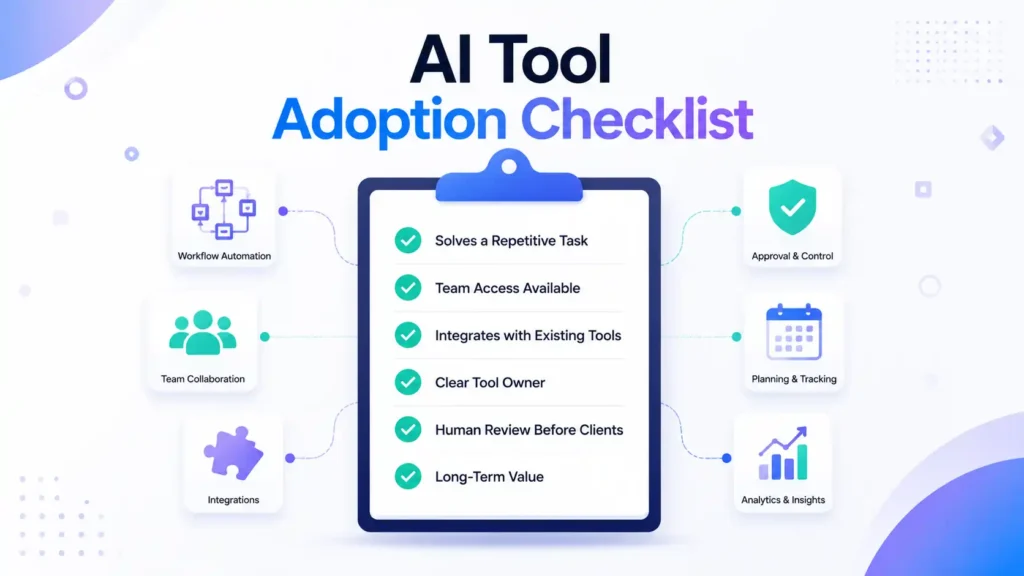
● Does this tool solve a task we already do manually and repeatedly?
● Can the whole team access it under one plan, or does it need per-seat licensing?
● Does it integrate with (or connect through n8n to) the tools we already use?
● Is there a clear owner on the team responsible for it?
● Have we set a review step for anything AI-generated before it reaches a client?
● Will we actually use this in three months, or is it solving a one-time problem?
Pros and Cons of Building an AI + Automation Stack
| Pros | Cons |
| Cuts manual reporting and resizing time significantly | Requires upfront setup time before benefits show |
| Frees senior team time for strategy and client calls | Per-seat licensing across multiple tools can get expensive |
| Keeps brand consistency across clients via shared kits | Automation on a broken process just breaks faster |
| Scales content output without proportional headcount growth | Needs a human review step to avoid off-brand AI output |
| Single source of truth reduces client status confusion | Team needs training and a documented handoff process |
Also Read – Notion vs ClickUp – Best Project Management Tool?
Conclusion
The best AI tools for marketing agencies in 2026 aren’t the flashiest ones – they’re the four that remove real bottlenecks: Canva for design consistency, ChatGPT and Gemini for content drafting and research, Notion for keeping every client’s status visible, and n8n for automating the reporting work nobody enjoys doing manually.
None of this replaces the actual work of strategy, client relationships, or creative judgment. It just clears out the repetitive tasks eating into the hours that should go toward those things. Start with one bottleneck, automate it properly, and build outward from there.
Get This Entire Stack Through One Trusted Source
Every tool in this guide – Canva, ChatGPT, Gemini, Notion, and n8n-connected apps – is available through PremiumToolsHub, along with a much wider range of AI, design, business, and productivity tools your agency will need as you scale.
| Why Agencies Switch to PremiumToolsHub● Proper billing invoice with every purchase – every transaction is clean, documented, and professional, so your agency’s books stay in order with zero ambiguity about what you paid and what you received.● Real human support on WhatsApp, 9 AM to 12 AM IST – no bots, no ticket queues, no waiting days for a reply. A real person answers your message and resolves it, usually within a few hours, sometimes minutes.● 100% legitimate access through proper licensing – every tool is provisioned through official family plans, team workspaces, corporate licensing tiers, and authorized reseller programs. No cracked software, no stolen accounts, no risk to your agency’s reputation.● Way more than just design tools – PremiumToolsHub covers AI and productivity, design and creative, business and career, and learning tools, all backed by the same support and warranty. Message PremiumToolsHub on WhatsApp to set up your agency’s tool stack |
Frequently Asked Questions
What AI tools do marketing agencies use?
Most agencies use a combination of a design tool like Canva, a generative AI tool like ChatGPT or Gemini for content and research, a workflow tool like Notion for tracking clients and tasks, and an automation tool like n8n to connect everything and handle repetitive reporting.
Is Canva Pro worth it for a marketing agency?
Yes, for agencies with more than one person producing creative work. The Team plan centralizes brand kits across clients, which keeps output consistent and speeds up production. Solo freelancers on one or two accounts may not need the full team features.
Can Notion be used for agency project management?
Yes. Notion works well as a client database, content calendar, and SOP library combined into one workspace. It isn’t built for heavy design or automation on its own, so it works best paired with tools like Canva and n8n.
How do agencies automate repetitive marketing tasks?
Agencies typically use n8n or similar automation tools to connect ad platforms, spreadsheets, and messaging apps, so tasks like pulling campaign data into a report or sending client updates happen on a schedule without manual work.
Which AI tool is best for content creation in 2026?
It depends on the task. ChatGPT tends to perform better for structured long-form writing like blog drafts and ad copy, while Gemini is often stronger for research-heavy content that needs current data. Many agencies use both.
Do I need all four tools, or can I start smaller?
You can start with two – usually a design tool and a content tool – and add workflow tracking and automation as your client count grows and manual work starts piling up.