If you run a creative team, a digital marketing agency, or an in-house design function, you’ve probably already seen a client-facing mockup or a competitor’s ad creative that looked suspiciously fast to produce and suspiciously clean in its typography. There’s a good chance it came out of Nano Banana Pro. This nano banana pro tutorial is built specifically for the people who need to move past the novelty demos and actually wire this model into a production creative workflow – with the technical detail, prompt frameworks, and cost math that a hobbyist post won’t give you.
Google shipped Nano Banana Pro – officially Gemini 3 Pro Image – as its most advanced image generation and editing model, built on the Gemini 3 Pro reasoning core. What makes it a genuinely different category from the last generation of AI image tools isn’t the aesthetics. It’s that the model reasons about your request before it renders, pulls real-world facts through Google Search grounding when accuracy matters, and holds a conversation about an image across multiple turns instead of forcing you to write one perfect mega-prompt. For agencies billing client hours against creative production, that combination changes the unit economics of a design department.
Key Takeaways
- Nano Banana Pro runs on a 65,536-token context window, outputs up to native 4K resolution, and blends up to 14 reference images per request.
- Its biggest B2B advantage isn’t image quality – it’s reliable, legible typography and multi-turn conversational editing, which cuts out manual Photoshop cleanup passes.
- It complements Adobe Firefly rather than replacing it: use Nano Banana Pro for concepting and grounded/text-heavy assets, Firefly for final layer-level production polish.
- Access cost varies by volume – pay-as-you-go API, individual subscription tiers, and consolidated multi-tool access all suit different team sizes.
- Agencies scaling AI-driven creative output tend to bleed margin on stacked per-seat licenses (Nano Banana Pro, Adobe, n8n, LinkedIn Sales Navigator) faster than they realize.
🔥 LinkedIn Premium Business Plan 12 Months
Original Price ₹23,000 • Get it ₹8XXX
🤖 Gemini AI Advanced Pro Plan
Original Price ₹19,500 • Get it ₹8XXX
💼 LinkedIn Sales Navigator Core
Original Price ₹80,000 • Get it ₹2XXXX
🎨 Canva Pro Lifetime Access
Original Price ₹3,999 • Get it ₹4XX
📚 Coursera Plus Annual Plan
Original Price ₹33,000 • Get it ₹2XXX
✨ Adobe Creative Cloud All Apps
Original Price ₹59,000 • Get it ₹4XXX
What Is Nano Banana Pro? Inside the Gemini 3 Pro Image Engine
Nano Banana Pro is the production name for the model – Google’s reasoning-driven image generation and editing engine, built directly on top of Gemini 3 Pro rather than bolted onto a separate diffusion pipeline. That distinction matters more than it sounds. Because the underlying reasoning model is the same one powering Gemini’s text and analysis capabilities, Nano Banana Pro doesn’t just pattern-match visual style – it interprets intent, checks internal consistency, and can incorporate live factual information into what it renders.
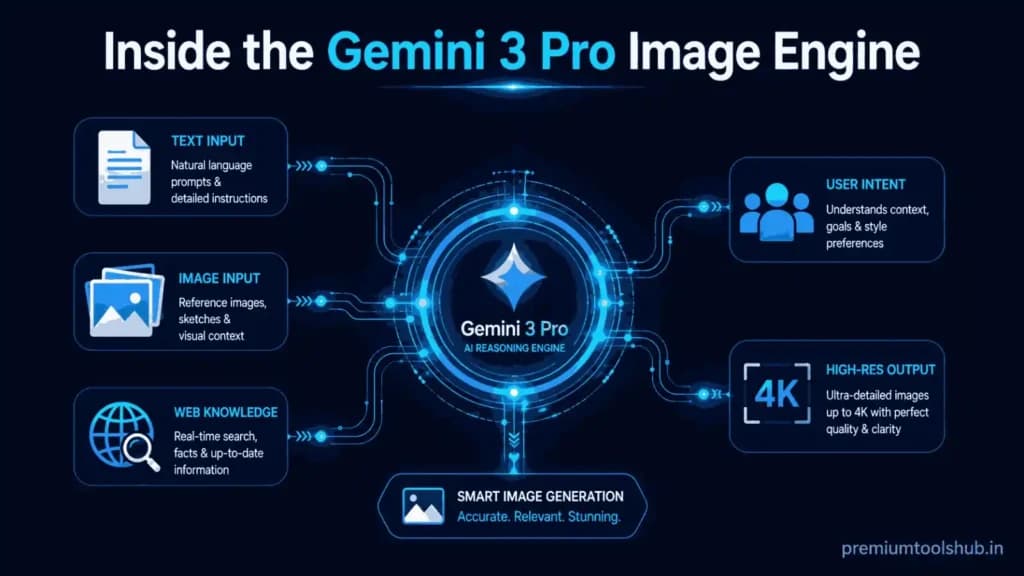
In practical terms, this is what separates Nano Banana Pro from the earlier “Nano Banana” (Gemini 2.5 Flash Image) and from most consumer-facing AI art generators: it’s built for professional-grade design, product visualization, storyboarding, and complex multi-element composition, not just single-shot novelty images. (If you’re newer to the Gemini ecosystem generally, our broader Gemini Advanced daily-use guide is a useful primer before diving into the image-specific workflow below.)
Did You Know? Nano Banana Pro runs on a 65,536-token input context window – more than four times the working memory of the original Nano Banana model. That’s what allows it to hold a long, detailed brand brief, several reference images, and a multi-turn editing conversation in mind simultaneously, instead of “forgetting” earlier instructions three prompts into a session.
The Core Technical Stack, In Plain Terms
A few specifics worth knowing before you build a workflow around this model:
● Input context window: 65,536 tokens – enough to hold a detailed creative brief plus multiple reference images without losing earlier instructions.
● Output capacity: up to 32,768 output tokens per generation request.
● Resolution support: native 1K, 2K, and full 4K image output, with flexible aspect ratios (including standard social and cinematic ratios).
● Reference image handling: up to 14 reference images can be blended into a single composition request – a genuinely unusual ceiling compared to most competing tools.
● Identity preservation: consistent rendering of up to 5 distinct individuals across a single image or across a multi-image series, which matters enormously for campaign work involving recurring brand characters or spokesmodels.
● Grounding: the model can pull real-time information via Google Search grounding, which is what allows it to generate factually accurate infographics, data visualizations, and context-rich diagrams rather than plausible-looking nonsense.
● Watermarking: outputs carry a SynthID watermark for AI-content transparency – worth knowing for any client-facing compliance conversation.
Nano Banana Pro AI Image Editing: The Deep-Dive B2B Benefits
The demo-reel capabilities are impressive. The commercially relevant capabilities are narrower and more specific, and they’re the ones worth actually understanding if you’re deciding whether to build production workflows around this model.
Pixel-Perfect Typography Generation
Every prior generation of AI image tools has had one consistent, embarrassing failure mode: text. Garbled letters, nonsense words, and unusable typography have been the single biggest reason agencies couldn’t ship AI-generated creative directly to clients without a manual redo in Photoshop. Nano Banana Pro’s text rendering is a genuine step-change – it handles short taglines, multi-line paragraph copy, and multilingual text with legible, correctly-spelled output, including specific font-style direction (“render this in a heavy blocky Impact-style font” actually produces that). For agencies producing posters, packaging mockups, and localized ad creative across multiple markets, this alone can eliminate a full manual production pass.
14-Image Spatial Reasoning and Composition Control
Being able to feed up to 14 reference images into a single composition request means Nano Banana Pro can be handed a full brand kit – logo files, product shots, approved color palettes, prior campaign assets – and asked to produce a new composite that respects spatial relationships between all of them. That’s a fundamentally different creative operation than “generate a new image from a text description.” It’s closer to art-directing a photoshoot than prompting a novelty generator, which is exactly the mental model your creative team needs to build around it.
Multi-Turn Conversational Editing
Because the model holds context across a conversation rather than requiring a single perfect prompt, you can direct changes the way you’d direct a human retoucher: “make the lighting warmer,” “move the product label slightly left,” “now try the same composition but in a night-time setting.” Each instruction builds on the last without you re-describing the entire scene from scratch. This is the practical meaning behind conversational AI photo editing – it turns image generation from a slot-machine (regenerate and hope) into an iterative art-direction session.
Did You Know? Nano Banana Pro’s real-time Search grounding means it can generate a factually accurate infographic about, say, current market share figures or a historical event – pulling live information rather than relying only on training data. For agencies producing data visualizations or educational explainer content, this cuts out an entire fact-checking-and-manual-correction step.
Consistent 5-Subject Character Preservation
Campaign work involving a recurring brand mascot, spokesmodel, or consistent cast of characters across multiple assets has historically been one of the hardest things to do with generative AI – models would subtly redraw a face or outfit between images. Nano Banana Pro maintains consistent identity across up to five people within a scene, and across a generated series, which is specifically what unlocks serial content: a multi-panel storyboard, a campaign with a recurring character across ten social posts, or a product line shot with the same model in ten configurations.
Did You Know? A full 4K image out of Nano Banana Pro isn’t a marketing rounding-up of “high-res” – real output has been measured at genuine print-ready dimensions (over 5,600 pixels wide), with every image carrying an embedded SynthID watermark for AI-content transparency. That combination of print-grade resolution and built-in provenance labeling is specifically why the model is being adopted for client-facing deliverables, not just internal concepting.
🔥 LinkedIn Premium Business Plan 12 Months
Original Price ₹23,000 • Get it ₹8XXX
🤖 Gemini AI Advanced Pro Plan
Original Price ₹19,500 • Get it ₹8XXX
💼 LinkedIn Sales Navigator Core
Original Price ₹80,000 • Get it ₹2XXXX
🎨 Canva Pro Lifetime Access
Original Price ₹3,999 • Get it ₹4XX
📚 Coursera Plus Annual Plan
Original Price ₹33,000 • Get it ₹2XXX
✨ Adobe Creative Cloud All Apps
Original Price ₹59,000 • Get it ₹4XXX
How to Use Nano Banana Pro: The Full Agency Workflow
This is the part most nano banana pro tutorial content skips entirely – a real, multi-stage production sequence rather than a single prompt-and-done example. Here’s how a creative team actually moves a client project from brief to finished asset.
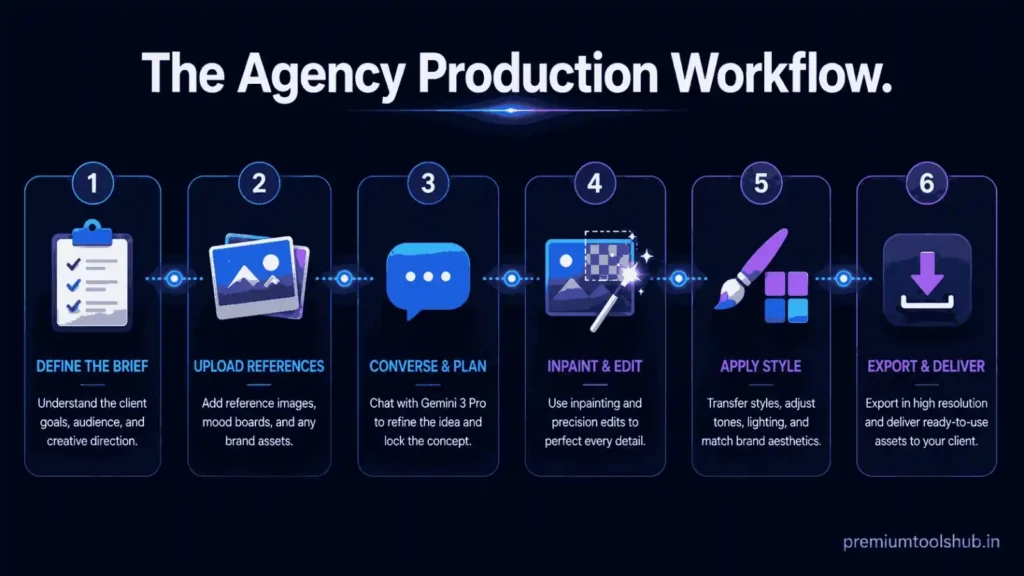
Stage 1: Structuring the Creative Brief as a Prompt Framework
Treat your first prompt like a creative brief you’d hand a photographer, not like a search query. A production-grade prompt framework generally includes, in order:
- Subject and composition – what’s in frame, camera angle, framing (close-up, wide shot, product-only)
- Lighting and mood – direction, hardness/softness, color temperature
- Style reference – photographic, illustrative, 3D-rendered, specific art movement
- Text requirements – exact copy, font style description, placement
- Brand constraints – color palette, logo placement, any elements that must not change
A working example for an agency producing e-commerce creative:
“A high-end, glossy commercial product shot of a matte black skincare bottle centered on a warm beige studio background, soft directional lighting from the upper left, shallow depth of field with the background gently blurred. Render the text ‘NEW: 24HR HYDRATION’ in a clean, minimalist sans-serif font along the bottom third of the frame, in white. Maintain the exact bottle shape and label design from the reference image provided.”
Stage 2: Feeding Reference Images for Brand Consistency
Attach your brand assets – logo file, prior approved product photography, brand color swatches – as reference images rather than describing them in text. This is where the 14-image input ceiling becomes a real production tool: a single request can carry the full visual context a human art director would have pinned to a mood board.
Stage 3: Multi-Turn Conversational Refinement
Once you have a first draft, work it the way you’d direct a shoot:
● “Keep this composition, but change the background to a soft gradient in our brand blue.”
● “Bring the product label into sharper focus and slightly dim the background.”
● “Generate three more variations of this same scene at different times of day.”
Each instruction refines the existing image rather than starting over, which is the entire point of treating this as a conversation instead of a prompt lottery.
Stage 4: Local, Context-Aware Inpainting
For targeted fixes – swapping a background element, adjusting a shadow, correcting a color mismatch against brand guidelines – direct the model to edit only the specific region rather than regenerating the whole composition: “Only change the sky in this image to an overcast gray, leave everything else exactly as it is.” This localized editing control is what makes the model usable for revision rounds, not just first drafts.
Stage 5: Style Transfer and Format Variants
Once a hero image is locked, generate campaign variants by holding the composition constant and shifting style: a flat vector version for social icons, a cinematic photographic version for a hero banner, a black-and-white line-art version for a print insert. Because the underlying composition and text are already validated, these variant passes are fast – typically a single follow-up instruction each.
Stage 6: Resolution and Export for Production
Generate your final approved composition at full 4K for print or hero placements, and at 1K or 2K for web and social contexts where file size and load speed matter more than maximum fidelity. Building this resolution step in last – rather than generating everything at 4K by default – keeps both cost and file-handling overhead down across a full campaign.
Nano Banana Pro vs Adobe Firefly Workflows: An Honest Comparison
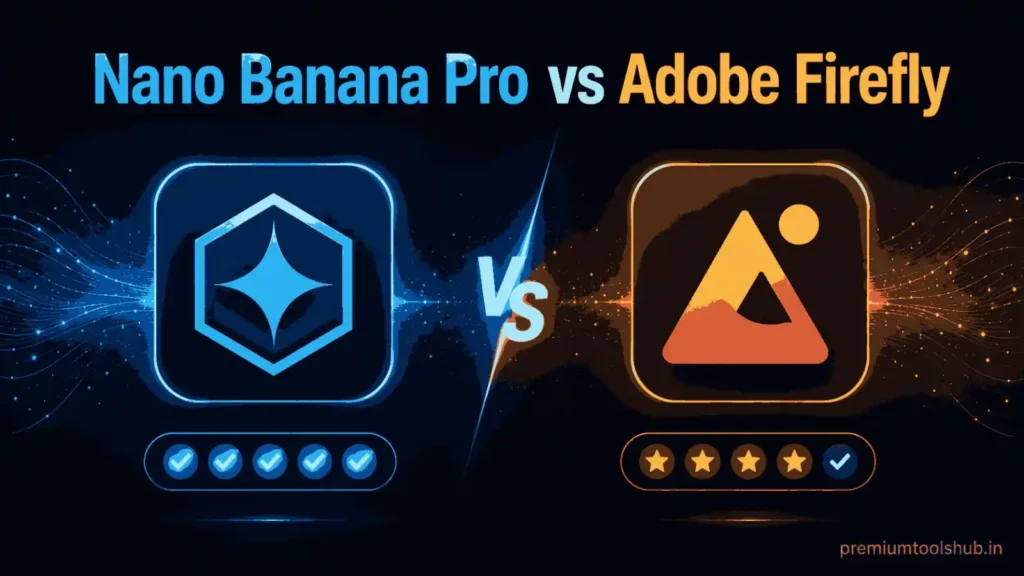
Neither tool wins outright – they solve different problems, and most serious creative operations end up using both.
| Factor | Nano Banana Pro | Adobe Firefly |
| Core strength | Reasoning-driven composition, text rendering, real-world grounding | Deep native integration with Photoshop/Illustrator layer workflows |
| Text-in-image accuracy | Industry-leading, multilingual | Improved, but generally weaker on complex typography |
| Reference image handling | Up to 14 images per request | Strong single/few-reference workflows within Adobe’s ecosystem |
| Editing style | Conversational, multi-turn | Layer-based, tightly bound to Creative Cloud tools |
| Best fit | Rapid concepting, data-grounded infographics, campaign variant generation | Final production polish inside an existing Adobe pipeline |
| Licensing/commercial terms | Google’s generative AI terms – always confirm current commercial-use terms before client delivery | Adobe’s enterprise terms, generally well-understood by agencies already on Creative Cloud |
The practical pattern most agencies land on: use Nano Banana Pro for concepting, variant generation, and any asset requiring accurate text or real-world facts, then finish inside Firefly/Photoshop when you need precise layer-level control for final production files.
Also read: Adobe Creative Cloud Pricing Guide: Plans, Costs, and Best Value in India
The SaaS Overhead Crisis: Why Individual Seat Licenses Are Eating Your Agency’s Margin
Here’s the part nobody puts in the demo video. Running a modern creative or growth agency at full capability now means paying full individual-seat price across a stack that typically includes a Gemini/Google AI subscription tier for Nano Banana Pro access, Adobe Creative Cloud for finishing work, n8n or a similar automation platform for client reporting and workflow, and LinkedIn Sales Navigator for the business-development side of the house. Multiply each of those by every team member who touches creative or client work, and you get a stack that quietly consumes a double-digit percentage of gross margin before a single billable hour gets delivered.
This is the actual constraint on agency scaling that doesn’t show up in a pitch deck: it’s not creative talent, and increasingly it’s not even AI capability – every agency now has access to roughly the same tools. It’s tool overhead per seat, compounding across every hire, that determines whether your margin survives a growth phase or gets quietly eaten by subscription renewals.
The instinctive response is to ration access – give the senior designer the AI tools and have juniors work off exported files, give one account manager Sales Navigator and have the rest work off shared exports. That works, until it doesn’t: bottlenecking your best tools around one or two seats slows down exactly the work you’re trying to accelerate by adopting AI in the first place.
Also read: n8n Pricing Guide 2026: Cloud Cost, Self-Hosted Cost, and Zapier Comparison
🔥 LinkedIn Premium Business Plan 12 Months
Original Price ₹23,000 • Get it ₹8XXX
🤖 Gemini AI Advanced Pro Plan
Original Price ₹19,500 • Get it ₹8XXX
💼 LinkedIn Sales Navigator Core
Original Price ₹80,000 • Get it ₹2XXXX
🎨 Canva Pro Lifetime Access
Original Price ₹3,999 • Get it ₹4XX
📚 Coursera Plus Annual Plan
Original Price ₹33,000 • Get it ₹2XXX
✨ Adobe Creative Cloud All Apps
Original Price ₹59,000 • Get it ₹4XXX
Buy Nano Banana Pro for Agencies: A Practical Access Comparison
There’s more than one path to production access, and the “cheapest way to access Nano Banana Pro” genuinely depends on your usage pattern, not a single universal answer:
● Pay-as-you-go API access: billed per image and per token, which suits low-volume or highly variable usage but scales unpredictably once a team is generating dozens of campaign variants daily.
● Individual Google AI subscription tiers: flat monthly access through the consumer/prosumer tiers, which works for a single freelancer or a very small team but multiplies linearly per seat as you hire.
● Consolidated multi-tool access through a platform like Premium Tools Hub: rather than provisioning Nano Banana Pro, Adobe Creative Cloud, n8n, and LinkedIn Sales Navigator as four separate line items across every team member, a bundled approach centralizes cost and removes the seat-by-seat rationing problem described above.
Whichever path you evaluate, the sizing question is the same one you’d apply to any SaaS decision: model your actual monthly generation volume and team size against each option’s real cost, rather than defaulting to whichever tier your largest competitor happens to be using.
Where to Buy Premium Digital Tools in Bulk (Without Killing Your Margin)
If your agency is past the point of a single creative lead using Nano Banana Pro solo, and into the phase where three, five, or ten team members all need concurrent access across your AI, design, automation, and sales-prospecting stack – pricing every tool individually per seat is the single most avoidable cost leak in an agency P&L. This is precisely the gap that consolidated, bulk-access platforms exist to close: instead of your finance team reconciling five separate SaaS invoices with five separate renewal dates and five separate seat-scaling headaches, you’re managing one relationship and one cost line for the tools your team actually uses daily.
Also read: Best Cheap SaaS Tools for Agencies in 2026 – Save Up to 85% Without Losing Performance
Compare Bundled Access Before Your Next Renewal
If your team is evaluating Nano Banana Pro, Adobe Creative Cloud, n8n, or LinkedIn Sales Navigator access at scale, compare current bundled options at Premium Tools Hub before renewing your next round of individual seat licenses. Model the math against your actual headcount before you commit either way – the right answer depends on your team size and usage pattern, not on which option has the flashier landing page.
The numbers back up why this math matters: recent 2026 industry data on agency software spend puts average per-employee SaaS cost at roughly $4,830 a year, with well over a third of paid licenses sitting unused at any given time – and agencies that consolidate their stack report cutting total software costs by 20–35%. That’s not a hypothetical margin leak; it’s the documented norm across the industry. (See Agiled’s 2026 agency technology and SaaS spend statistics for the full breakdown, sourced from Zylo, BetterCloud, and Gartner data.)
Every purchase comes with a proper billing invoice, and if you run into any questions setting things up, real human support is available on WhatsApp from 9 AM to 12 AM IST – no chatbot loop, no ticket queue.
Frequently Asked Questions
What is the actual model ID for Nano Banana Pro? gemini-3-pro-image – this is the identifier used in Google’s API and developer documentation, distinct from the earlier Nano Banana (Gemini 2.5 Flash Image) and the newer Nano Banana 2 (Gemini 3.1 Flash Image), which has a different context window and resolution profile.
Can Nano Banana Pro generate accurate infographics with real data? Yes – its Google Search grounding capability lets it pull real-time information into a generation request, which is specifically what makes it usable for factual data visualizations rather than plausible-looking but inaccurate charts. That said, Google’s own documentation is explicit that outputs should always be checked for accuracy, especially for data-driven or text-heavy results.
Is Nano Banana Pro better than Adobe Firefly for agency work? Neither replaces the other outright. Nano Banana Pro is generally stronger for rapid concepting, text-heavy creative, and grounded infographics; Firefly remains the stronger choice for final production work tightly integrated into an existing Photoshop/Illustrator pipeline.
How many reference images can I use in a single Nano Banana Pro request? Up to 14, with consistent identity preservation maintained for up to 5 distinct people within a composition – a meaningfully higher ceiling than most competing image models currently support.
Is buying tool access in bulk actually cheaper than individual subscriptions? It depends entirely on your team size and usage volume – for a single freelancer, an individual subscription tier is often simplest. For an agency provisioning the same handful of tools across five or more team members, consolidating access typically removes both cost duplication and the seat-rationing bottleneck described above. Model your specific numbers before deciding either way.
Conclusion
The agencies that get real production value out of Nano Banana Pro aren’t the ones running the flashiest single-prompt demo – they’re the ones who’ve built a genuine workflow around it: structured briefs, reference-image-driven brand consistency, conversational multi-turn refinement, and a clear-eyed sense of where it hands off to Firefly or Photoshop for final polish. The technical capability is genuinely there – a 65,536-token context window, 4K output, 14-image composition, and real-world grounding aren’t marketing fluff, they’re the specific reasons this model behaves like a collaborator instead of a slot machine.
But the tool itself is only half the equation. The agencies actually protecting margin while scaling their AI-driven creative output are the ones treating their whole software stack – Nano Banana Pro, Adobe, automation, and sales tooling – as one consolidated cost decision, not five separate renewals nobody has time to renegotiate individually.
Ready to Stop Bleeding Margin on Individual Seat Licenses?
See how Premium Tools Hub consolidates your team’s Nano Banana Pro, Adobe, n8n, and LinkedIn Sales Navigator access into one manageable line item – model it against your current spend before your next renewal cycle.