If you have ever watched your sales team spend more time searching for contact details than actually talking to real prospects, you already know the problem. Manual research is slow, messy, and frustrating. You find a company that looks perfect, but getting the right person’s email takes thirty minutes of digging across LinkedIn, company websites, and guesswork. By the time you have the email, the energy is gone. That is the exact problem Apollo.io was built to solve. And in this Apollo.io review, we are going to break everything down in plain language – what it does, how it works, who it helps the most, where it falls short, and whether it is actually worth your money in 2026.
This is not a sponsored write-up. This is an honest Apollo.io review based on real user feedback, platform research, and a hard look at things most other articles do not even mention – including a privacy issue almost nobody talks about.
Whether you are a solo freelancer, a startup founder trying to find your first ten customers, or a sales manager running a team, this guide is written for you.
What Is Apollo.io and Why Should Sales Teams Care in 2026?
Apollo.io is an AI-powered B2B lead generation tool and sales intelligence platform. In simple terms, it is a tool that helps you find the right business contacts, get their verified email addresses and phone numbers, and then reach out to them through automated email sequences – all from one place.
Before Apollo.io existed, getting access to a quality B2B contact database meant paying tens of thousands of dollars a year to enterprise platforms like ZoomInfo. Small teams, freelancers, and startups simply could not afford it. Apollo.io changed that. It made professional-grade sales data available at a fraction of the traditional cost, which is why over 500,000 companies use it today – including big names like Anthropic, Autodesk, and Docusign.
Founded in 2015 and based in San Francisco, Apollo.io has raised over $300 million in funding. It now has more than 1,600 employees and a global partner network of over 5,000 agencies and resellers.
How Does Apollo.io Work as a Sales Intelligence Platform?
The way Apollo.io works is quite straightforward once you understand the basic flow. You start by searching their database using filters – job title, company size, industry, location, tech stack, funding stage, and many more. Once you find the right people, you reveal their contact details using credits. Then you add them to an automated email sequence and track everything from opens to replies inside the platform.
The whole process looks like this:
- Step 1 – Search: You describe your ideal customer using 65+ filters available inside Apollo’s database of over 275 million contacts and 35 million companies worldwide.
- Step 2 – Find and verify: You pull up the right decision-maker and reveal their verified email or phone number using credits.
- Step 3 – Outreach: You add them to a multi-step email sequence that runs automatically, sending follow-ups at scheduled intervals without you lifting a finger.
- Step 4 – Track and optimize: Apollo shows you open rates, click rates, reply rates, and which messages are working so you can improve over time.
It sounds simple because the core idea is simple. The complexity comes in when you get into the credit system, Apollo.io pricing tiers, and data accuracy – which we will cover in full detail below.
Who Is Apollo.io Built For?
This is one question most Apollo.io reviews skip past, so let’s be specific. Apollo.io is primarily used by:
- Sales Development Representatives (SDRs) who need to build prospect lists and send cold email campaigns at scale every single week.
- Account Executives who want to research a company deeply before getting on a discovery call.
- Startup founders who are trying to find their first customers without a full sales team behind them.
- Marketing teams running account-based marketing (ABM) campaigns who need enriched contact data for their target accounts.
- Agencies and consultants who need to generate new business leads for their own practice or manage outreach for multiple clients.
- Revenue Operations teams who want to keep CRM data clean and complete by automatically filling in missing fields.
Also Read – LinkedIn Sales Navigator vs Apollo: Which Tool Works Better?
🔥 LinkedIn Premium Business Plan 12 Months
Original Price ₹23,000 • Get it ₹8XXX
🤖 Gemini AI Advanced Pro Plan
Original Price ₹19,500 • Get it ₹8XXX
💼 LinkedIn Sales Navigator Core
Original Price ₹80,000 • Get it ₹2XXXX
🎨 Canva Pro Lifetime Access
Original Price ₹3,999 • Get it ₹4XX
📚 Coursera Plus Annual Plan
Original Price ₹33,000 • Get it ₹2XXX
✨ Adobe Creative Cloud All Apps
Original Price ₹59,000 • Get it ₹4XXX
What’s New in Apollo.io in 2026? – AI Features, Agentic GTM and Major Updates
One reason this Apollo.io review is different from others written even six months ago is that Apollo made some significant changes heading into 2026 that most articles have not caught up to yet.
The biggest update is the launch of Apollo’s AI Assistant. This is a conversational AI tool built directly into the platform that lets you describe what you want in plain language. Instead of manually applying twenty filters, you can type something like “find me 50 marketing directors at SaaS companies in the US with 100 to 500 employees” – and Apollo does it for you. The AI Assistant also drafts personalized email copy, suggests which leads to prioritize, and recommends next steps based on how prospects are engaging.
Another major development is Apollo’s integration with Claude via MCP (Model Context Protocol). This is a genuinely new feature that lets you run Apollo’s core outbound actions – searching for contacts, enriching records, creating sequences – directly inside Claude without switching tabs. For power users who already use AI tools as part of their workflow, this is a real time-saver.
Other 2026 updates include expanded technographic data coverage using AI extraction from over 10 million job postings, improved company funding data with mergers and acquisitions visibility, a redesigned meetings editor, and new Portuguese language support for global teams.
Apollo is clearly moving from being a contact database with an outreach tool bolted on, toward being a fully agentic go-to-market platform where AI handles large parts of the prospecting workflow. Whether that is enough to justify the Apollo.io pricing is a question we will answer later in this review.
Apollo.io Key Features: What Do You Actually Get?
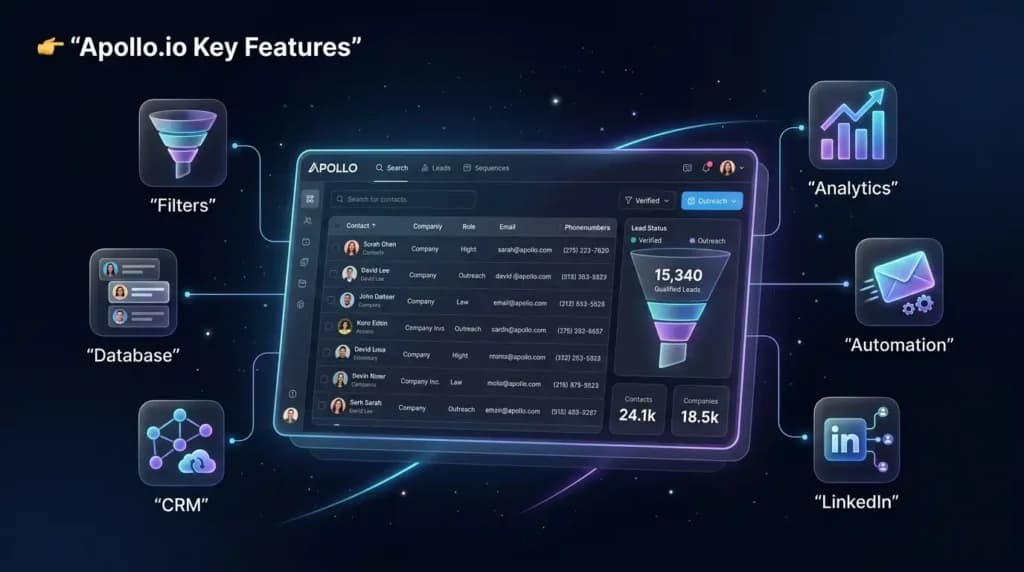
Let’s go through the Apollo.io features that actually matter in day-to-day sales work, without the marketing fluff.
How Does the Apollo.io Contact Database Work?
The database is the heart of Apollo.io and the main reason people sign up. With 275 million contacts and 35 million companies, it is one of the largest B2B databases available at this price point. But the real power is not the size – it is the filtering.
You can search and combine filters like these:
- Job title, seniority level, and department – so you reach the decision-maker directly, not a junior employee who has no buying power.
- Company size by headcount and by revenue – helpful when your product is only a fit for companies above or below a certain size threshold.
- Industry, sub-industry, and SIC codes – useful when you are targeting a very specific niche that broad industry filters do not capture accurately.
- Geographic location at country, state, or city level – essential for territory-based sales teams who only work within specific regions.
- Technology stack – meaning what software tools a company already uses, which opens up powerful targeting like finding everyone using a competitor’s product.
- Funding stage – Seed, Series A, Series B, and so on – ideal for selling to companies that have recently raised money and are actively spending on growth tools.
- Recent job changes – to catch people who just moved to a new role, which is often the best moment to pitch something new since they are looking to make an impact.
- Buyer intent signals – companies that are actively researching tools like yours right now, not six months from now.
The intent signals and technographic filters are particularly useful. For example, if you sell a HubSpot add-on, you can filter for companies that already use HubSpot and target them specifically. If you sell a competitor to Salesforce, you can find every company using Salesforce and reach out with a clear switch offer.
The limitation here – and this is important – is data accuracy. Apollo’s overall accuracy sits around 65 percent globally. In the United States, you can expect around 80 to 88 percent accuracy, which is reasonable. But outside the US, accuracy drops to 60 to 73 percent depending on the region. That means roughly one in three records outside the US has at least one piece of outdated or incorrect information. We will revisit this when we talk about whether Apollo.io works for Indian businesses.
What Is Apollo.io’s Email Sequencing and Automation Feature?
The sequencing feature is what turns Apollo from a data tool into a full outreach machine. You can build multi-step campaigns that run automatically across days or weeks. A typical sequence might look like this:
- Day 1 – Send an introductory email introducing yourself and the specific problem you solve for businesses like theirs.
- Day 3 – Send a follow-up that references the first email and adds a slightly different angle, a quick case study, or a relevant stat.
- Day 7 – Send a final short nudge – something like “just checking if this landed in the right place” – which often gets the highest reply rate of the three.
You can run A/B tests to compare subject lines and email bodies. Apollo tracks opens, clicks, and replies in real time and pauses a sequence automatically when someone replies so you do not send a follow-up to someone who already responded. You can also personalize emails at scale using merge tags that pull in the prospect’s name, company, job title, and other fields dynamically.
How Does the Apollo.io Chrome Extension Help with LinkedIn Prospecting?
The Chrome extension is one of Apollo’s most popular Apollo.io features, and for good reason. When you browse LinkedIn, the extension appears as a sidebar that shows you verified contact data for whoever’s profile you are looking at – without leaving LinkedIn.
You can reveal an email, add the person directly to a sequence, and log the activity to your CRM in about thirty seconds. For teams that do a lot of LinkedIn-based prospecting, this removes the back-and-forth of switching between tools constantly. It is especially useful when combined with LinkedIn Sales Navigator, where you can map out a target account inside LinkedIn and then pull verified contact details through Apollo in the same workflow without any copy-pasting.
Also Read – Notion vs ClickUp – Best Project Management Tool?
🔥 LinkedIn Premium Business Plan 12 Months
Original Price ₹23,000 • Get it ₹8XXX
🤖 Gemini AI Advanced Pro Plan
Original Price ₹19,500 • Get it ₹8XXX
💼 LinkedIn Sales Navigator Core
Original Price ₹80,000 • Get it ₹2XXXX
🎨 Canva Pro Lifetime Access
Original Price ₹3,999 • Get it ₹4XX
📚 Coursera Plus Annual Plan
Original Price ₹33,000 • Get it ₹2XXX
✨ Adobe Creative Cloud All Apps
Original Price ₹59,000 • Get it ₹4XXX
Apollo.io Pricing Plans: Which Plan Is Right for You in 2026?
Apollo.io pricing is structured across four tiers. Rather than listing specific dollar amounts that change frequently, here is what each plan is designed for and what you actually get at each level.
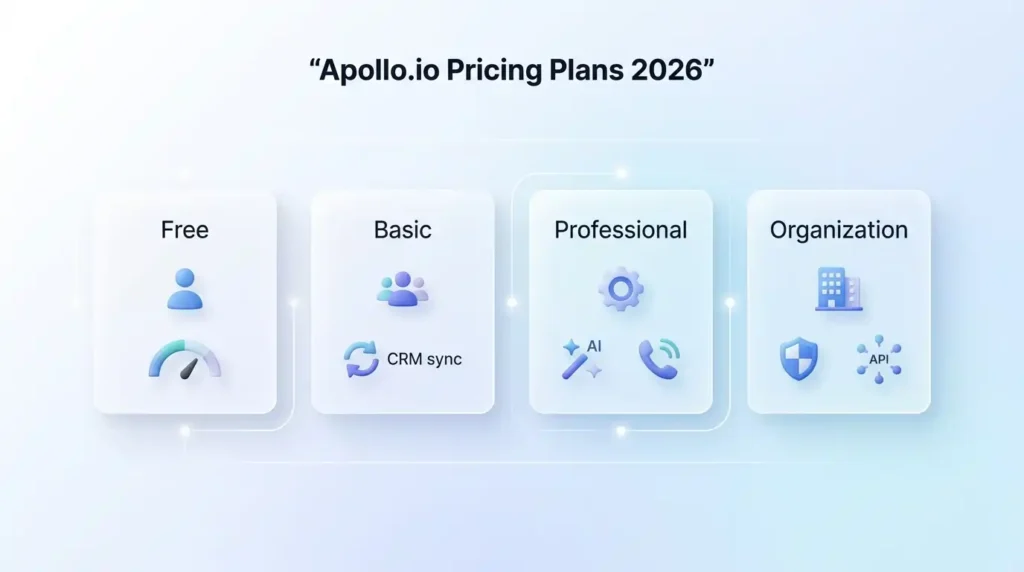
| Plan | Best For | Key Difference |
| Free | Solo users testing the platform | Very limited credits, Gmail only, max 2 active sequences – good for validating coverage |
| Basic | Small outbound teams starting out | More credits, CRM integrations with HubSpot and Salesforce, unlimited sequences unlocked |
| Professional | Growing teams needing automation and calls | Built-in dialer, call recording, AI email writing, advanced reporting added |
| Organization | Enterprise teams with compliance needs | Highest credit limits, SSO login, international dialing, full API access |
Annual billing gives you a meaningful discount over monthly billing across all paid plans. Monthly billing is available but costs noticeably more per seat, so annual makes more sense if you are committed to using the platform for the full year.
Is Apollo.io Free Plan Worth Using or Too Limited?
The free plan is genuinely useful for testing whether Apollo’s database covers your specific market. You can access the full search interface, use the Chrome extension on LinkedIn, and run up to two active outreach sequences. The credit limits are tight enough that you cannot run a real outbound campaign on the free plan alone, but you can absolutely validate whether Apollo has good coverage for your industry and region before spending any money.
One hidden limitation on the free plan that surprises new users: you can only connect a Gmail account. If your company uses Outlook or a custom email provider, you cannot send campaigns until you upgrade to a paid plan. Keep this in mind if Gmail is not your primary work email.
How Much Does Apollo.io Cost Per Month for a Small Team?
The sticker price on the Basic plan looks affordable. But the real monthly cost for most small teams is significantly higher once you factor in credit overages. Credits are consumed every time you reveal a contact’s email (1 credit), a phone number (8 credits), or export data to a CRM. The credit allocations on lower-tier plans run out faster than most buyers expect.
A small team doing active daily prospecting typically needs to purchase additional credits on top of their subscription, which adds a recurring cost that is not obvious from the Apollo.io pricing page. Plan your budget conservatively and assume you will need at least 30 to 50 percent more budget than the base subscription price alone.
Also Read – How to Use Superhuman for Faster Email
Apollo.io Real Cost Calculator – What Will You Actually Pay Each Month?
This is the section no other Apollo.io review gives you, and it is the one that matters most before you sign up.
Here is a realistic cost breakdown for different team sizes doing moderate outbound prospecting, assuming each person researches around 20 to 30 accounts per day:
| Team Size | Use Pattern | Monthly Base Cost | Estimated Credit Overages | Realistic Total/Month |
| Solo freelancer | Light testing and low-volume prospecting | Lowest tier or free | Minimal if you stay within limits | Low – free or entry-level paid plan |
| 3-person team | Moderate daily outbound | Entry-level paid tier | Moderate – credits often run mid-month | Noticeably higher than the advertised price |
| 10-person team | Active daily outreach plus calls | Mid-to-high tier | Significant – phone credits burn fast | Realistically 2x to 3x the advertised price |
| 25-person team | Heavy prospecting with full CRM sync | Organization tier | High – CRM exports counted on both sides | Contact Apollo sales for custom quote |
Important credit facts to know before you buy:
- Phone numbers cost 8 credits each – a team making 30 calls per day burns through monthly credit allocations very quickly on lower plans, sometimes within the first ten days of the month.
- Export credits are consumed every time you push data to your CRM – teams syncing with both Salesforce and HubSpot simultaneously burn exports from both directions, which doubles the consumption if not managed carefully.
- All credits expire at the end of the billing cycle – unused credits do not roll over to the next month, which means poor planning leads directly to money wasted every single billing period.
- Additional credits can be purchased on top of your plan but they come at a per-credit rate that adds up significantly for high-volume teams doing aggressive outbound week after week.
The honest takeaway: if you are comparing Apollo’s published price to what you actually see on your invoice after two or three months of real usage, expect the real number to be meaningfully higher. Build that into your decision before signing an annual contract.
🔥 LinkedIn Premium Business Plan 12 Months
Original Price ₹23,000 • Get it ₹8XXX
🤖 Gemini AI Advanced Pro Plan
Original Price ₹19,500 • Get it ₹8XXX
💼 LinkedIn Sales Navigator Core
Original Price ₹80,000 • Get it ₹2XXXX
🎨 Canva Pro Lifetime Access
Original Price ₹3,999 • Get it ₹4XX
📚 Coursera Plus Annual Plan
Original Price ₹33,000 • Get it ₹2XXX
✨ Adobe Creative Cloud All Apps
Original Price ₹59,000 • Get it ₹4XXX
Apollo.io Pros and Cons: What Real Users Are Saying in 2026
With over 9,000 reviews on G2 and a 4.7 out of 5 rating, Apollo.io clearly has a lot of happy users. But the honest picture is more nuanced than the star rating alone suggests.
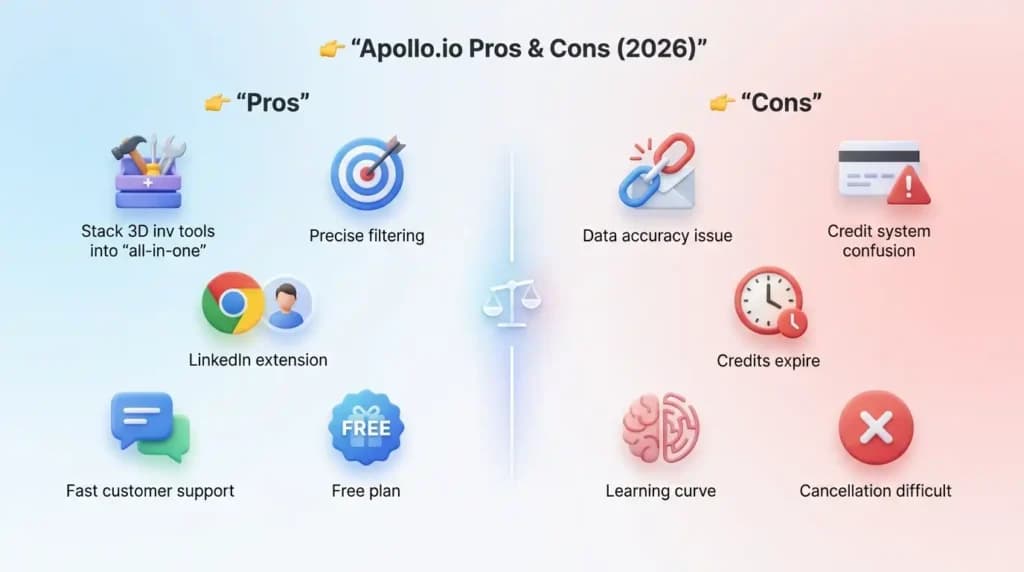
Why Do 500,000+ Businesses Use Apollo.io?
The reasons people love Apollo.io come up again and again across verified reviews on G2, Capterra, and Trustradius:
- All-in-one saves real money. Before Apollo, a sales team needed a separate data tool, a separate email sequencing tool, and a separate dialer. Apollo bundles all three, which can save a small team hundreds of dollars per month compared to paying for each tool individually. For budget-conscious teams, this consolidation alone is one of the strongest arguments for the platform.
- The free plan is genuinely generous. Apollo’s free tier is one of the best in the sales intelligence platform category. Getting access to a 275 million contact database at no cost – even with credit limits – is something no direct competitor matches at this level.
- Advanced filters make targeting precise. The ability to combine job title, company size, tech stack, funding stage, and intent signals in one search means you can build a highly targeted prospect list in minutes rather than hours of manual LinkedIn research.
- The Chrome extension is fast and practical. Users consistently praise how seamlessly the extension works on LinkedIn. Finding an email while browsing a prospect’s profile without leaving the page genuinely saves meaningful time every single working day.
- Customer support is responsive. Multiple reviewers across platforms mention getting help within an hour when they contact Apollo’s support team, which is better than many SaaS tools at this price point.
What Are the Biggest Limitations of Apollo.io You Should Know?
Being honest about limitations is what makes an Apollo.io review actually useful, so here is the full picture:
- Data accuracy is inconsistent, especially outside the US. An accuracy rate of around 65 percent globally means your campaigns will have bounced emails and wrong numbers. Email bounce rates of 15 to 25 percent are commonly reported by users, which is three to five times above the industry-accepted standard of under 5 percent. High bounce rates damage your sender domain reputation over time, which can affect all your email deliverability – not just campaigns running inside Apollo.
- The credit system is confusing and expensive at scale. The dual structure – where you pay a per-seat fee AND consume credits for data access – creates costs that are hard to predict month to month. Many users report frustration when credits run out mid-month and they face the choice of buying more immediately or pausing all outreach.
- Credits expire with no rollover. This is a significant complaint across review platforms. If you buy a block of credits and your team does not use all of them before the billing cycle resets, they simply disappear. There is no extension, no grace period, and no refund.
- Steep learning curve for advanced features. New users typically need two to four weeks to get fully comfortable with Apollo’s interface. The platform has many features, and some of the most important ones – like inbox rotation for deliverability protection – are not prominently placed or easy to discover on your own.
- Cancellation is difficult. Multiple user reviews mention that cancelling an Apollo.io subscription is not as simple as clicking a button. Annual subscribers must request cancellation 30 days before their term ends, and the process often goes through a chat bot rather than a direct option inside account settings.
Also Read – What Is Lovable AI? The AI Web Engineer That Builds Apps for You
Does Apollo.io Work in India? Honest Review for Indian Businesses in 2026
This is something almost no other Apollo.io review covers, even though India is Apollo’s second largest traffic source globally after the United States.
The short answer is: it depends entirely on what you are trying to do.
If you are an Indian business doing outreach to companies in the US, UK, or other Western markets, Apollo.io works reasonably well. The database coverage for US contacts is strong, and the outreach tools are solid for email campaigns targeting North American prospects.
However, if you are using Apollo.io to do outreach within India – finding Indian companies, Indian decision-makers, and Indian contact details – the results are noticeably weaker. Here is why:
- Apollo’s data accuracy outside the US sits between 60 and 73 percent. India falls in this lower-accuracy zone, which means a meaningful portion of the Indian contacts in the database have outdated emails, wrong phone numbers, or incorrect job titles.
- The Indian company database coverage is thinner compared to US company data. Many smaller and mid-sized Indian companies are either missing entirely or have incomplete profiles in Apollo’s system.
- Apollo’s pricing is in US dollars with no INR billing option, which means the effective cost for Indian buyers fluctuates with the exchange rate and can feel steep relative to the value delivered for India-specific outreach.
- LinkedIn penetration patterns in India are different from the US, which affects how useful the Chrome extension is for India-specific prospecting, where many decision-makers are more active on WhatsApp or direct email than on LinkedIn.
Verdict for Indian users: Apollo.io is a useful Apollo.io lead generation tool if you are selling to Western markets from India. It is a weaker choice if your target customers are primarily Indian businesses. If your entire sales motion is India-to-India, look at tools with better Indian market data coverage before committing to Apollo’s paid plans.
Who Should Use Apollo.io? – Verdict by Use Case
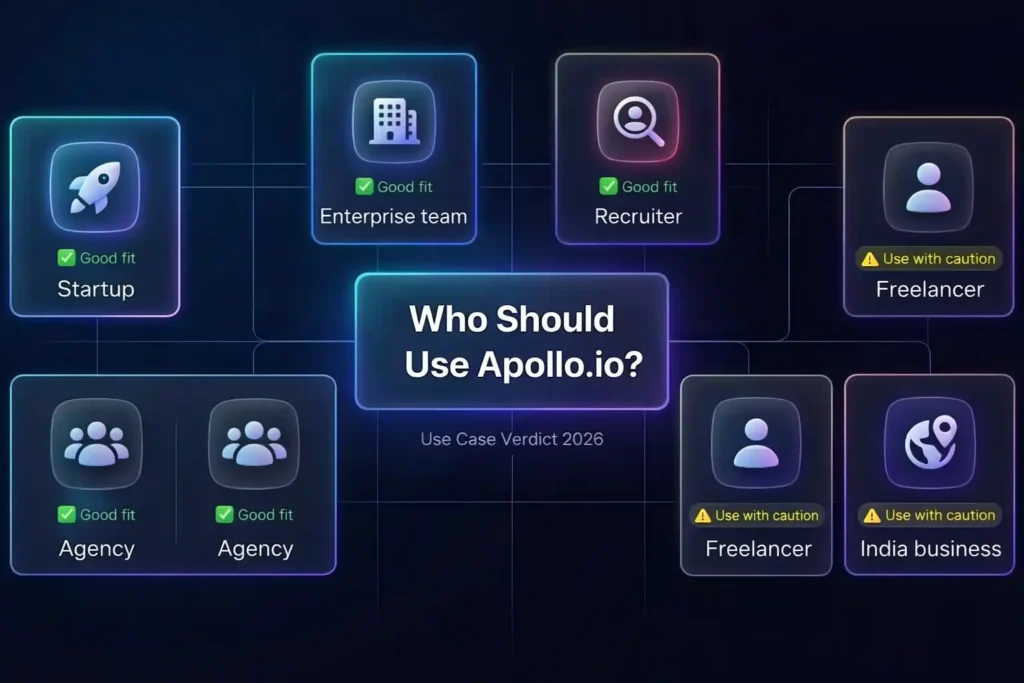
Most Apollo.io reviews give you one blanket verdict. That is not helpful because different types of users get very different results from the same platform. Here is an honest breakdown by use case:
| User Type | Is Apollo.io Right for You? | Why |
| Solo freelancer | Yes – start with the free plan | Free plan gives enough credits to test your market and find initial leads without spending anything upfront |
| Early-stage startup | Yes – Basic plan makes sense | Combines data and outreach in one affordable tool – eliminates three separate subscriptions |
| Agency managing multiple clients | Yes – Professional plan recommended | Multi-client sequences, higher credit limits, and CRM integrations make managing multiple campaigns manageable |
| India-focused B2B business | Proceed with caution | Data accuracy for Indian contacts is lower – validate carefully before running large paid campaigns |
| Enterprise sales team | Consider alternatives first | At scale, ZoomInfo’s higher data accuracy may deliver better ROI despite the higher upfront cost |
| Recruiter or HR team | Moderate fit | Apollo helps find candidates but lacks recruiter-specific features – LinkedIn Recruiter Lite remains stronger for talent acquisition |
How to Use Apollo.io for Lead Generation: Step-by-Step Beginner Guide
How to use Apollo.io is something most tutorials overcomplicate. Here is the cleanest way to get started without burning through credits on the wrong contacts.
How Does Apollo.io Help Sales Teams Find Verified Email Addresses?
Start by setting up your account and connecting your CRM before doing anything else. Then follow this process:
- Go to the People search section inside Apollo’s dashboard – this is where all contact searches happen.
- Apply your filters – start with job title and company size as your primary filters, then layer in location and industry to narrow results down to a manageable list.
- Review the results and pre-qualify – identify profiles that genuinely match your ideal customer before revealing any contact details, so you only spend credits on people worth reaching out to.
- Click “Reveal” on the contacts you want to reach – this consumes credits for email addresses and significantly more credits for phone numbers, so being selective here matters for your budget.
- Save selected contacts to a named list inside Apollo – organized lists make sequence management much easier as your outreach scales week to week.
- Add that list to an email sequence you have built in advance, with personalization tags pulling in name, company, job title, and any other relevant fields.
- Set your sequence schedule and launch – Apollo handles the follow-ups automatically from here, including pausing the sequence when someone replies so you are never chasing someone who already responded.
A practical tip that saves credits: use the Chrome extension to pre-qualify prospects on LinkedIn before revealing their contact info inside Apollo. This way you only spend credits on people who are genuinely a good fit, rather than revealing email addresses for everyone in a search result.
When Should You Start Using Apollo.io for Your Business?
Apollo.io as a B2B lead generation tool makes the most sense when you have a clear product or service to sell, when you are ready to do outbound sales actively, and when you understand who your ideal customer is well enough to use the filters effectively. If you are still figuring out your positioning and target audience, spending money on Apollo before that clarity exists will produce mediocre results regardless of how good the tool is.
Also Read – LinkedIn Premium vs Sales Navigator: Which LinkedIn Plan Is Best for You in 2026?
The Apollo.io Privacy Warning Nobody Talks About – What Happens When You Connect Your Inbox
This is the section of this Apollo.io review that almost no other article mentions, and it is something every user should understand before connecting their email account to the platform.
When you connect your Gmail or Outlook inbox to Apollo.io to send email campaigns, Apollo does more than just send emails on your behalf. It uses a system called a “contributor network” that scrapes the email signatures inside your connected inbox and adds that contact data to Apollo’s master database.
What this means in practice: the business contacts who email you – people who have not given Apollo any permission to store their data – may have their details added to Apollo’s database through your inbox connection. This happens because Apollo uses its entire user base as a crowdsourced data collection network to continuously grow and refresh the contacts in their system.
For most individual users, this does not create an immediate personal problem. But it raises a genuine question about data privacy, especially for users operating in jurisdictions with strict data protection laws like GDPR in Europe. If you connect your work inbox and Apollo scrapes your contacts, and those contacts are EU citizens, you could potentially be contributing to a compliance issue without realizing it.
Apollo is GDPR and CCPA compliant as a company, but responsibility for how you use their data sits with you as the user. Before connecting your inbox to Apollo, especially if you work with clients or contacts in Europe, it is worth carefully reading what data sharing you are agreeing to in their terms of service.
Apollo.io vs Competitors: Which Tool Wins in 2026?
Which Is Better – Apollo.io or ZoomInfo for B2B Prospecting?
This is one of the most searched comparisons in the B2B sales space, and the honest answer is “it depends on your budget and team size.”
ZoomInfo has better data accuracy, deeper company profiles, and stronger intent data. But it is significantly more expensive – typically priced for mid-market and enterprise teams with larger budgets. Apollo.io is more accessible, has a free plan, and includes email outreach built in, which ZoomInfo does not offer natively.
For most small to mid-sized teams, Apollo.io delivers strong enough data quality at a price that makes sense. For large enterprise teams where data accuracy directly impacts revenue at scale, ZoomInfo’s higher cost may be justified by fewer bounced emails and better conversion rates on outbound campaigns.
Is Apollo.io Better Than LinkedIn Sales Navigator for Cold Outreach?
LinkedIn Sales Navigator and Apollo.io solve different parts of the same problem. Sales Navigator is excellent for finding and mapping people inside LinkedIn’s network – it gives you deep search inside LinkedIn’s own data. But it does not provide email addresses or phone numbers, and you cannot automate outreach through it at scale.
Apollo.io as a B2B lead generation tool gives you the contact details and the outreach automation that Sales Navigator lacks entirely.
The strategy that works best for many sales teams is using both together: Sales Navigator to find and research the right people, Apollo.io to get their verified contact information and run the actual email campaigns. The two tools are genuinely complementary rather than competing when used this way.
What Are the Best Apollo.io Alternatives in 2026?
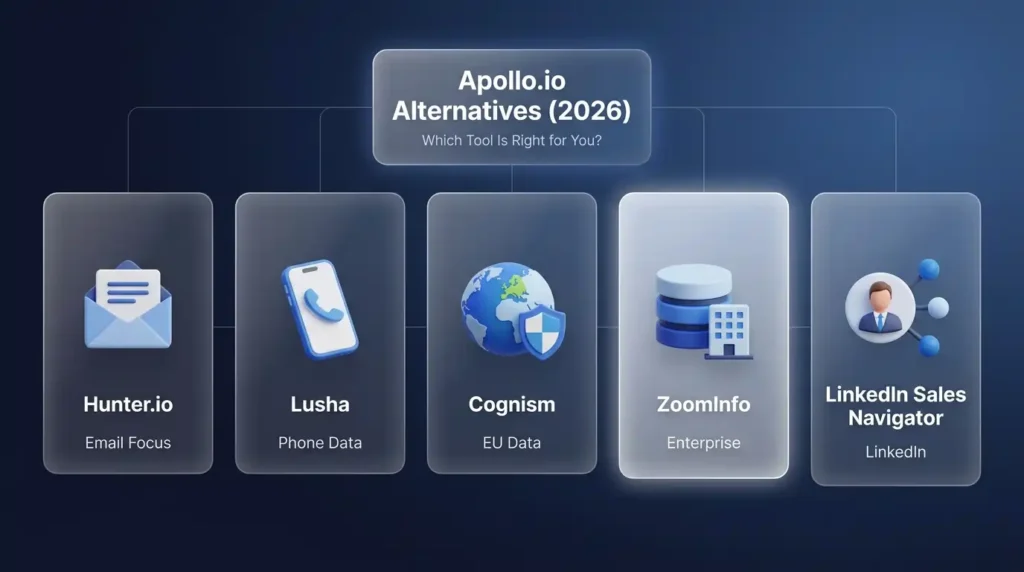
| Tool | Best For | Key Difference from Apollo |
| Hunter.io | Email-only teams with smaller budgets | Simpler, email-focused, strong verification, no phone data or dialer |
| Lusha | Teams needing high-quality phone numbers | Better phone accuracy, credit-based model similar to Apollo |
| Cognism | Teams selling into European markets | GDPR-compliant, phone-verified data, strong EU contact coverage |
| ZoomInfo | Enterprise teams needing maximum data depth | Much higher accuracy but significantly higher cost – not SMB-friendly |
| LinkedIn Sales Navigator | LinkedIn-first prospecting workflows | Best for mapping accounts within LinkedIn, no email or phone data provided |
Also Read – Notion Premium Subscription Service for Teams & Individuals
Is Apollo.io Right for You? – The Complete Yes/No Decision Table
| Use Apollo.io if you… | Skip Apollo.io if you… |
| Are doing outbound sales to US or Western markets | Are targeting primarily Indian or South Asian companies |
| Want one tool that handles data, outreach, and CRM sync | Need phone number accuracy above 90 percent consistently |
| Are a startup or small team watching your tool budget | Are running very high email volume and need enterprise-level deliverability |
| Want a generous free plan to test before committing | Find credit-based systems with expiry dates frustrating to manage |
| Need LinkedIn and email prospecting in one workflow | Have a large team where per-seat pricing gets expensive very quickly |
| Are comfortable with a two to four week learning curve | Need to cancel easily without going through a complicated process |
Frequently Asked Questions About Apollo.io
Is Apollo.io worth it for lead generation?
Yes, for most B2B sales teams doing outbound to US and Western markets, Apollo.io as a lead generation tool delivers genuine value. The combination of a large database, built-in email sequencing, and CRM integration in one platform saves both money and time compared to managing separate tools. The main caveat is data accuracy – if you are working in markets outside the US, validate the data quality for your specific region before committing to a paid plan.
Is Apollo.io free to use or do you need a paid plan?
Apollo.io has a free plan that gives you real access to the database, the Chrome extension, and two active email sequences. The credit limits on the free plan are tight, so you cannot run a full outbound campaign at scale without upgrading. That said, the free plan is one of the most generous in the sales intelligence platform space and is genuinely useful for testing and low-volume prospecting before making any financial commitment.
Which is better – Apollo.io or ZoomInfo?
Apollo.io is better for small and mid-sized teams that need an affordable all-in-one tool with outreach automation included. ZoomInfo is better for enterprise teams that prioritize maximum data accuracy and depth and have the budget to match. For most growing businesses, Apollo.io is the right starting point – you can always move to ZoomInfo as the team scales and ROI justifies the higher investment.
How does Apollo.io help sales teams find verified email addresses?
Apollo.io maintains a database of verified business contacts built from public web data, third-party data partnerships, and its contributor network. When you search for a prospect and click “Reveal,” Apollo runs its verification system and returns the email address with a confidence score. The verification is strongest for US contacts (80 to 88 percent accuracy) and weaker for non-US contacts (60 to 73 percent). The Chrome extension lets you do this directly on LinkedIn without leaving the page, which makes the prospecting workflow significantly faster for active SDRs.
How much does Apollo.io cost per month for a small team?
The published Apollo.io pricing for the entry-level paid plan is affordable per user, but the real monthly cost for a small team doing active prospecting is higher once credit overages are included. A three to five person team doing moderate daily outreach should budget for 30 to 50 percent above the base subscription price to account for additional credits and potential CRM sync costs each month.
Final Verdict: Should You Use Apollo.io for B2B Lead Generation in 2026?
After going through everything in this Apollo.io review, the honest verdict is this: Apollo.io is one of the best all-in-one B2B lead generation tools available at its price point, especially for small to mid-sized teams doing outbound to US and Western markets.
It is not perfect. The data accuracy outside the US needs improvement, the credit system takes time to understand and can create budget surprises, and the cancellation process is more complicated than it should be. But for what it does – combining a massive contact database with email automation, CRM integration, and a Chrome extension that works on LinkedIn – it delivers real value that would cost significantly more if you tried to piece it together from separate tools.
Still Figuring Out How to Get the Best Tools Without Overpaying?
If this Apollo.io review has helped you understand what the tool actually does and what it costs in reality, you are in a better position than most people who sign up without reading this far. But knowing a tool is worth using and figuring out how to access it without stretching your budget are two different problems.
That is where PremiumToolsHub comes in. It is a trusted platform where individuals, freelancers, agencies, and growing teams get access to premium tools – including sales tools, AI tools, creative tools, and more – at prices that actually make sense for their stage of business. You get a proper invoice for every purchase, access is delivered quickly, and if anything stops working, a real support team is there to fix it – not a help centre article that tells you to refresh your browser.
The idea is simple: the best tools should not be reserved only for the companies with the biggest budgets. Whether you need one subscription or several, PremiumToolsHub is built to make that accessible – for the solo founder, the freelancer, the small agency, and the growing team alike.